

Evergreen Content: Why It Matters for SEO and Traffic
Evergreen Content: Why It Matters
 Some content gets attention for a few days. Other content can stay useful for months or even years.
That second type is evergreen content.
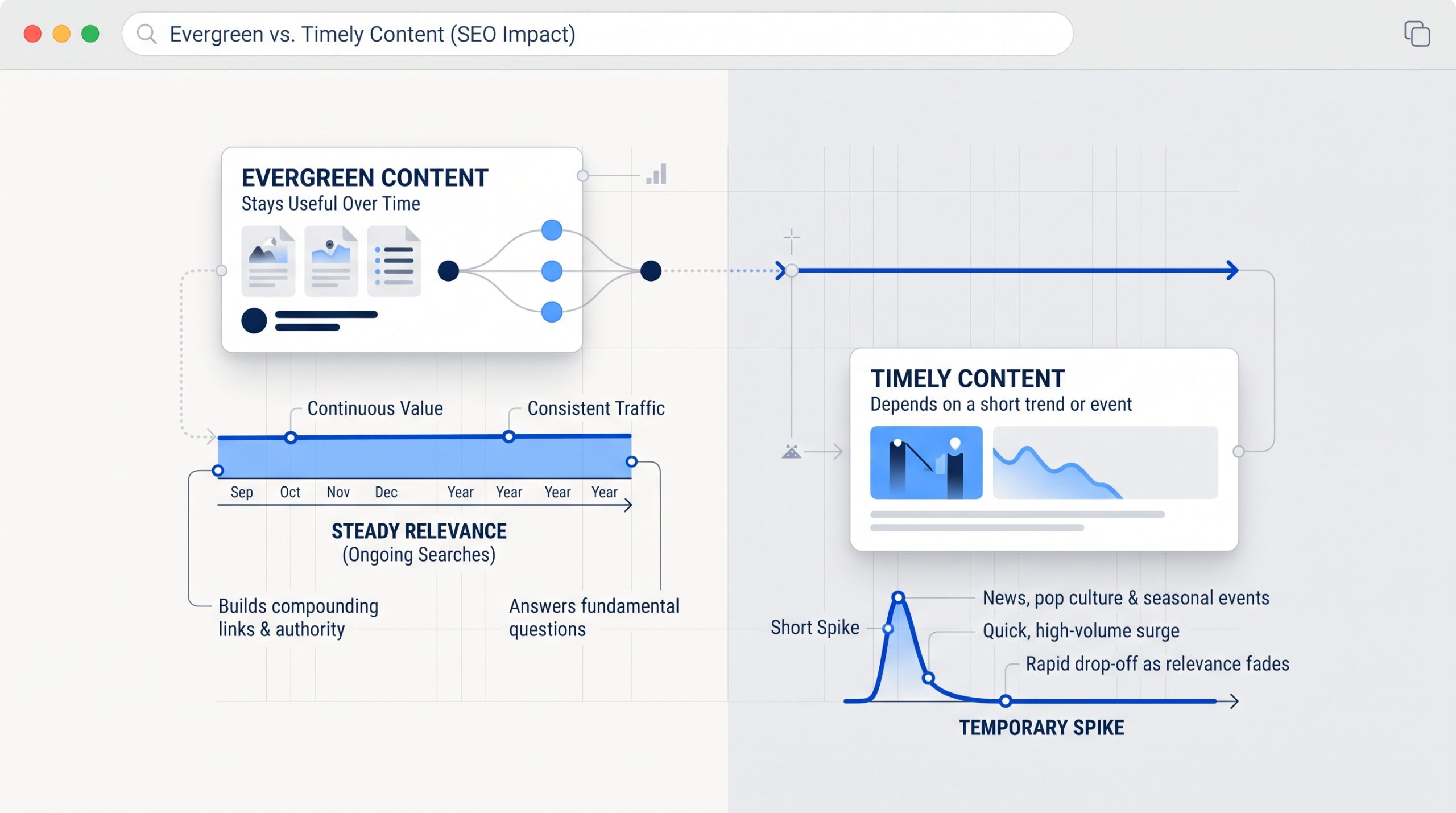
Evergreen content focuses on questions and topics that people continue to search for over time. It does not depend on one short trend, event, or news cycle.
If you are still building your SEO foundation, What Is SEO? A Beginner's Guide to Search Engine Optimization explains how useful content, search intent, keywords, links, and technical setup work together to improve search visibility.
Evergreen content supports that foundation by giving your website useful pages that can keep answering the same important questions over time.
What Is Evergreen Content?
Evergreen content is useful information that stays relevant after the publish date. It usually answers recurring questions, explains a lasting topic, or helps people solve a problem that does not disappear when a trend ends.
Examples can include how-to guides, beginner explainers, checklists, definitions, tutorials, FAQs, and resource pages.
A guide to understanding SEO basics can stay useful for a long time. A post about a one-day platform update probably will not.
Evergreen does not mean the page should never change. Good evergreen content still needs reviews and updates when facts, tools, examples, or best practices change.
 Why Evergreen Content Matters for SEO
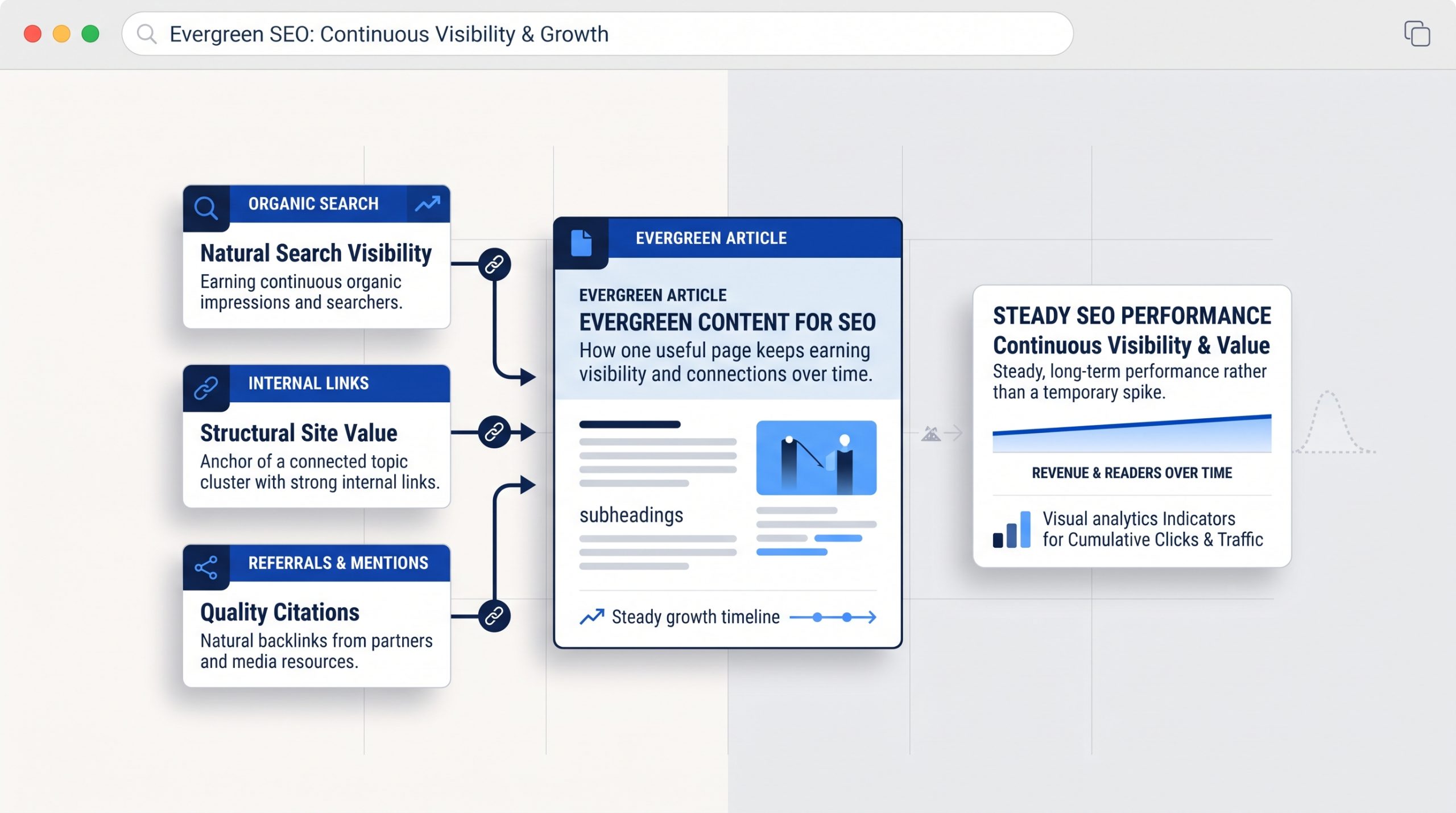
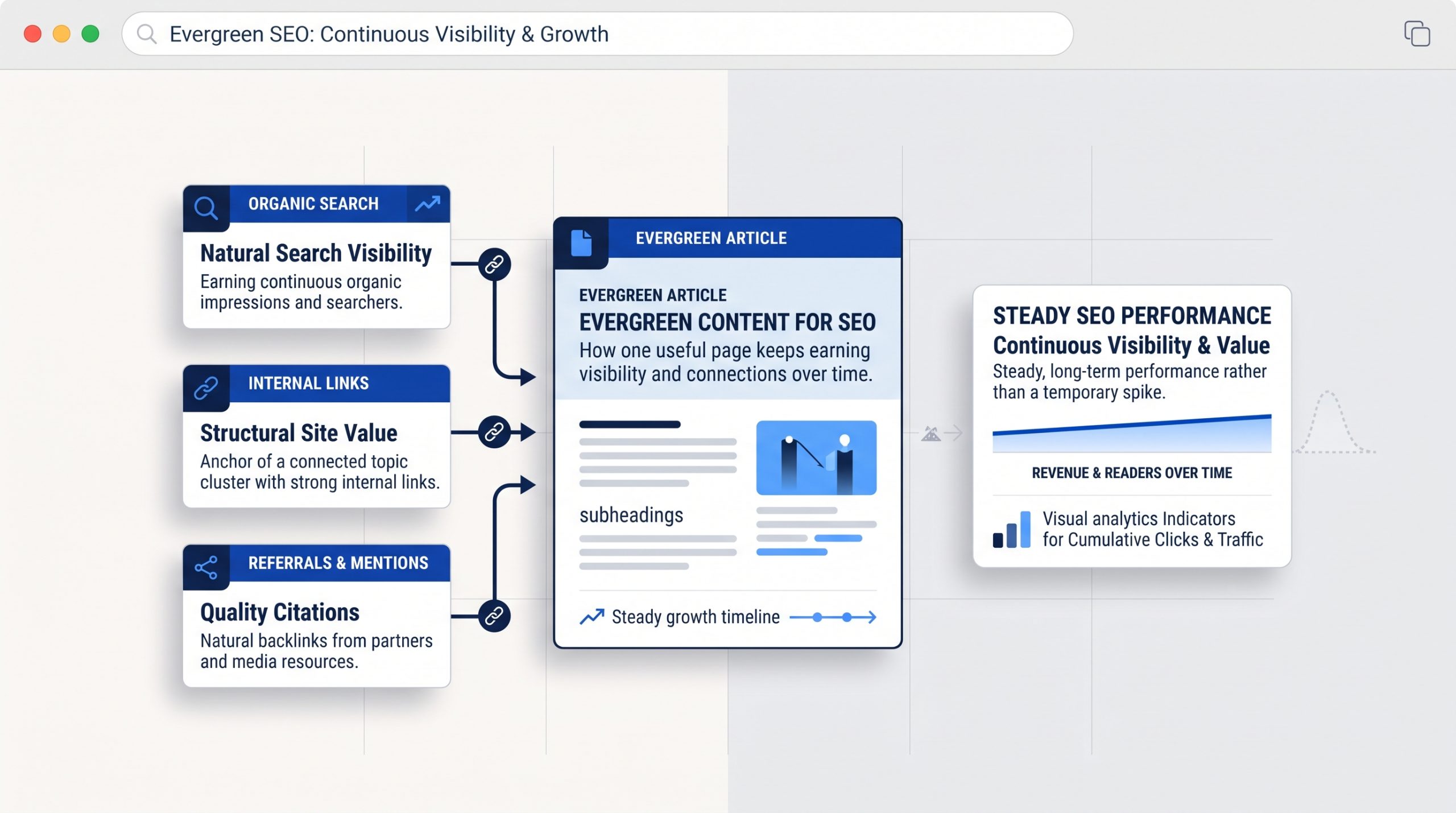
Evergreen content gives a website more chances to earn search visibility over time because the topic continues to matter. When a useful page stays relevant, it can keep attracting searches, internal links, referrals, and returning readers long after the first promotion ends.
 That makes evergreen content different from short-lived content.
A trend post may create a quick spike. An evergreen guide can keep working in the background.
It can also support other pages on your site. A strong evergreen article can become a useful place to link from newer posts, service pages, and related guides.
This works especially well when the website has a clear content and page structure, so readers can move naturally from one useful topic to the next.
Google also advises site owners to focus on helpful, reliable, people-first content rather than publishing pages mainly to chase rankings. That is a useful rule for evergreen content too.
Evergreen Content Can Support Steady Website Traffic
One useful evergreen page can keep bringing in visitors from search, internal links, social shares, email, and referrals. The traffic may grow slowly, but the page can continue contributing after the launch period has ended.
This is why evergreen content is valuable for a long-term content strategy.
You are building an asset, not only filling a content calendar.
For example, a business may publish a guide answering a common customer question. That guide can appear in search, be shared by the sales team, be linked from future blogs, and be reused in social or email content.
The same page supports several channels without needing to be recreated every week.
What Makes a Good Evergreen Topic?
A good evergreen topic solves a recurring problem. It should still be useful after the current month, campaign, or trend has passed. The best topics often come from questions customers ask again and again.
Start with your audience rather than a list of popular keywords.
What do people need to understand before they buy?
What mistakes do they keep making?
What process needs a simple explanation?
What question does your team answer every week?
Those are often stronger evergreen ideas than topics chosen only because they are trending.
Your broader SEO content planning can then help you connect those lasting questions to search intent and related topics.
Evergreen Does Not Mean Publish It and Forget It
Evergreen content still needs maintenance. Review important pages from time to time and update anything that has become inaccurate, incomplete, or less useful. The goal is to keep the information reliable, not to change the publish date just to make the page look newer.
Check links, examples, screenshots, statistics, product names, tools, and steps.
You may also discover new questions that deserve a short section.
If the page still answers the search well, do not rewrite it just because it is old.
Google specifically warns against changing dates or adding content only to make a site appear fresh. Update the page when the update improves the information.
 How to Create Evergreen Content That Stays Useful
Strong evergreen content begins with a lasting question, gives a complete answer, uses a clear structure, and leaves room for future updates. Keep the topic focused enough to be useful but broad enough to stay relevant beyond one short campaign.
Choose one clear search need.
Answer the main question early.
Use headings that make the page easy to scan.
Add examples that clarify the idea without tying the entire article to one short-lived trend.
Link to deeper pages where readers may need more detail.
Then review the page periodically and improve it when the topic changes.
BSD Perspective
At BSD, we see evergreen content as the foundation of a useful content library. Trend-based posts can add timely interest, but evergreen pages give a website stable topics that customers can return to and that future content can build around.
A strong content plan usually needs both.
Timely content can respond to what is happening now.
Evergreen content explains what people will still need to know later.
When the two work together, a website can stay current without rebuilding its content strategy every month.
Build Content That Keeps Doing a Job
Evergreen content matters because it gives useful information a longer life. A strong page can support SEO, website traffic, internal linking, customer education, and future marketing long after the first day it is published.
Start with one question your audience asks often.
Create the best clear answer you can.
Keep it easy to find.
Then update it when the information truly needs to change.
That is how content becomes more than a post. It becomes part of the website's long-term value.

What Is SEO? A Beginner's Guide to Search Engine Optimization
What Is SEO? A Beginner's Guide to Search Engine Optimization
What is SEO, and why does it matter?
Search engine optimization helps people find useful pages when they search online. It also helps search engines discover, understand, and present those pages in the right context.
That sounds simple. The confusing part is everything that sits underneath it.
SEO can involve keywords, content, site structure, page speed, links, local listings, analytics, and technical settings. Search results have also changed. A results page can now include standard links, maps, images, videos, shopping results, and AI-assisted answers.
You do not need to master all of that at once.
The best place to start is with the basic system. Learn how search works. Understand what people are trying to find. Build useful pages for those needs. Make those pages easy to crawl and use. Then measure what happens and improve over time.
This guide is the starting point. As you go deeper, BSD’s SEO strategies, tools, and analytics can help you explore specific topics in more detail.
What This SEO Guide Covers
This guide explains the main parts of SEO in plain language. You will learn how search engines find pages, what keywords and search intent mean, how to optimize a page, how technical SEO works, why links matter, how local SEO differs, and how to measure results.
- What SEO means and how it differs from paid search
- How crawling, indexing, and search results work
- The main types of SEO
- Search intent and keyword research
- On-page SEO and content optimization
- Internal links and website structure
- Technical SEO basics
- Backlinks and off-page SEO
- Local SEO
- SEO measurement and Google Search Console
- SEO for AI-assisted search
- Common mistakes and a beginner checklist
What Is SEO?
SEO stands for Search Engine Optimization. It is the process of improving a website so search engines can find and understand its pages, while making those pages useful for the people searching. The goal is relevant organic visibility, not simply getting the highest possible ranking for any keyword.
 Organic visibility means appearing in unpaid search results.
SEO does not mean paying Google to place a page at the top. Paid search ads are a separate channel. They can appear above or around organic results, but the advertiser pays for those placements or clicks.
SEO focuses on earning visibility by creating pages that match a real search need and making the website easy for search systems to access and understand.
A strong SEO strategy usually connects three things:
- Search demand: what people actually look for.
- Page value: whether your page gives them a useful answer, product, service, or next step.
- Technical access: whether search engines can reach, process, and understand the page.
If one part is missing, the result becomes weaker. Great content that cannot be crawled may never get a fair chance. A fast site with thin content may be easy to access but not useful. A page that targets a popular keyword but answers the wrong need can also struggle.
Why SEO Matters
SEO helps connect existing demand with useful pages. People already use search to research problems, compare options, find local businesses, learn new skills, and make buying decisions. SEO gives your website a better chance to appear during those moments without relying only on paid advertising.
One of the biggest advantages of SEO is that a useful page can keep being discovered after it is published.
An ad usually stops producing traffic when the budget stops. A useful search page can continue earning impressions and clicks as long as it remains relevant, accessible, and competitive.
That does not mean SEO is free. It takes time, writing, design, development, research, maintenance, and analysis. The difference is that you are investing in assets on your own website.
SEO can also support other marketing work. A well-structured article can answer questions before a sales call. A service page can explain an offer clearly. A local page can help nearby customers find a business. A strong resource can earn links and referrals from other websites.
The best SEO work is not separate from the customer experience. It improves how people find, understand, and use the site.
How Do Search Engines Work?
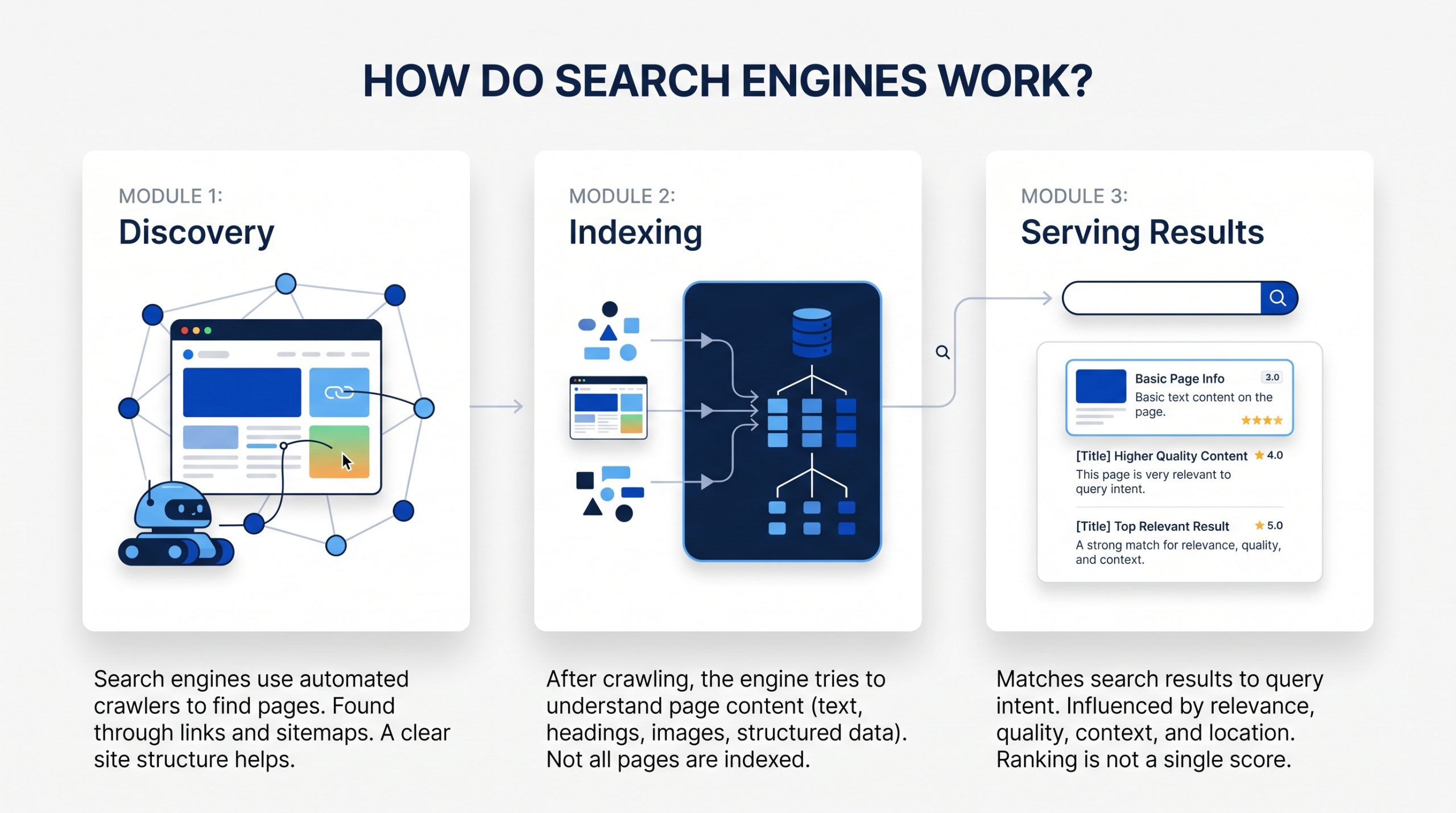
Search engines generally need to discover a page, understand and store information about it, then decide when it may be useful for a search. For beginners, it helps to think about three broad stages: crawling, indexing, and serving results. Each stage can affect whether a page becomes visible.
 1. Crawling: Finding Pages
Search engines use automated programs often called crawlers or bots to discover pages across the web.
They can find a page through links from other pages, through a sitemap, or because the URL is already known to the search engine.
Crawling does not mean a page will rank. It only means the search engine was able to reach and fetch it.
A clear website structure helps. Important pages should not be hidden behind broken links or isolated from the rest of the site.
2. Indexing: Understanding Pages
After a page is crawled, the search engine tries to understand what it contains.
It looks at the main text, headings, links, images, structured data, and other page signals. It also tries to understand which URL should represent the content when duplicate or very similar versions exist.
A page can be crawled without being indexed. Search engines do not have to keep every page they find.
3. Serving Results: Matching a Search
When someone searches, the search engine looks for results that fit the query and its likely intent.
Many systems and signals can influence which results appear. Relevance, quality, usability, context, location, and the type of search can all matter.
The important lesson for beginners is that ranking is not one score. There is no single switch that makes a page rank.
SEO improves the full set of signals that help a page become a strong match for the right search.
What Is a Search Engine Results Page?
A search engine results page, often called a SERP, is the page you see after entering a search. Modern SERPs can contain much more than traditional blue links. Depending on the query, you may see ads, local results, images, videos, rich results, shopping features, and AI-assisted answers.
This matters because SEO is no longer only about one list of ten links.
Different searches can produce very different layouts.
A local search may show a map and nearby businesses. A product search may show shopping features. A how-to search may include video or image results. An informational query may trigger an AI-generated overview with links to supporting sources.
Your SEO strategy should match the type of result people expect for the topic.
The Four Main Types of SEO
SEO is easier to understand when you divide it into four connected areas: on-page SEO, technical SEO, off-page SEO, and local SEO. Most websites use the first three. Local SEO becomes especially important when a business serves people in a specific area or has a physical location.
| SEO Area | What It Focuses On | Simple Example |
| On-page SEO | The content and elements on a page | Clear title, useful copy, headings, images, internal links |
| Technical SEO | How the website can be crawled, indexed, and used | Site speed, mobile experience, sitemaps, redirects, canonicals |
| Off-page SEO | Signals and references from outside the website | Relevant backlinks, mentions, digital PR |
| Local SEO | Visibility for location-based searches | Google Business Profile, reviews, location information, local citations |
These areas overlap. A strong article is still limited if the site has serious technical problems. A technically healthy site can still underperform if the content does not meet search intent. Good SEO brings the pieces together.
Search Intent Comes Before Keywords
Search intent is the reason behind a query. Before you choose a keyword, ask what the person is trying to accomplish. A page can mention the right phrase many times and still miss the search if it gives the wrong type of answer, format, or next step.
Imagine these searches:
- “what is SEO” suggests someone wants a beginner explanation.
- “SEO audit checklist” suggests someone wants a practical process or template.
- “SEO agency near me” suggests someone is comparing service providers.
- “Google Search Console login” suggests someone wants to reach a specific tool.
The topic is related in each case, but the intent is different.
That means the best page format may also be different. One query may need a guide. Another may need a service page, product page, comparison, local landing page, or quick answer.
Before writing, search the topic yourself. Look at the types of pages that appear. You are not copying them. You are learning what kind of result search systems currently see as useful for that query.
Keyword Research: Finding What People Search For
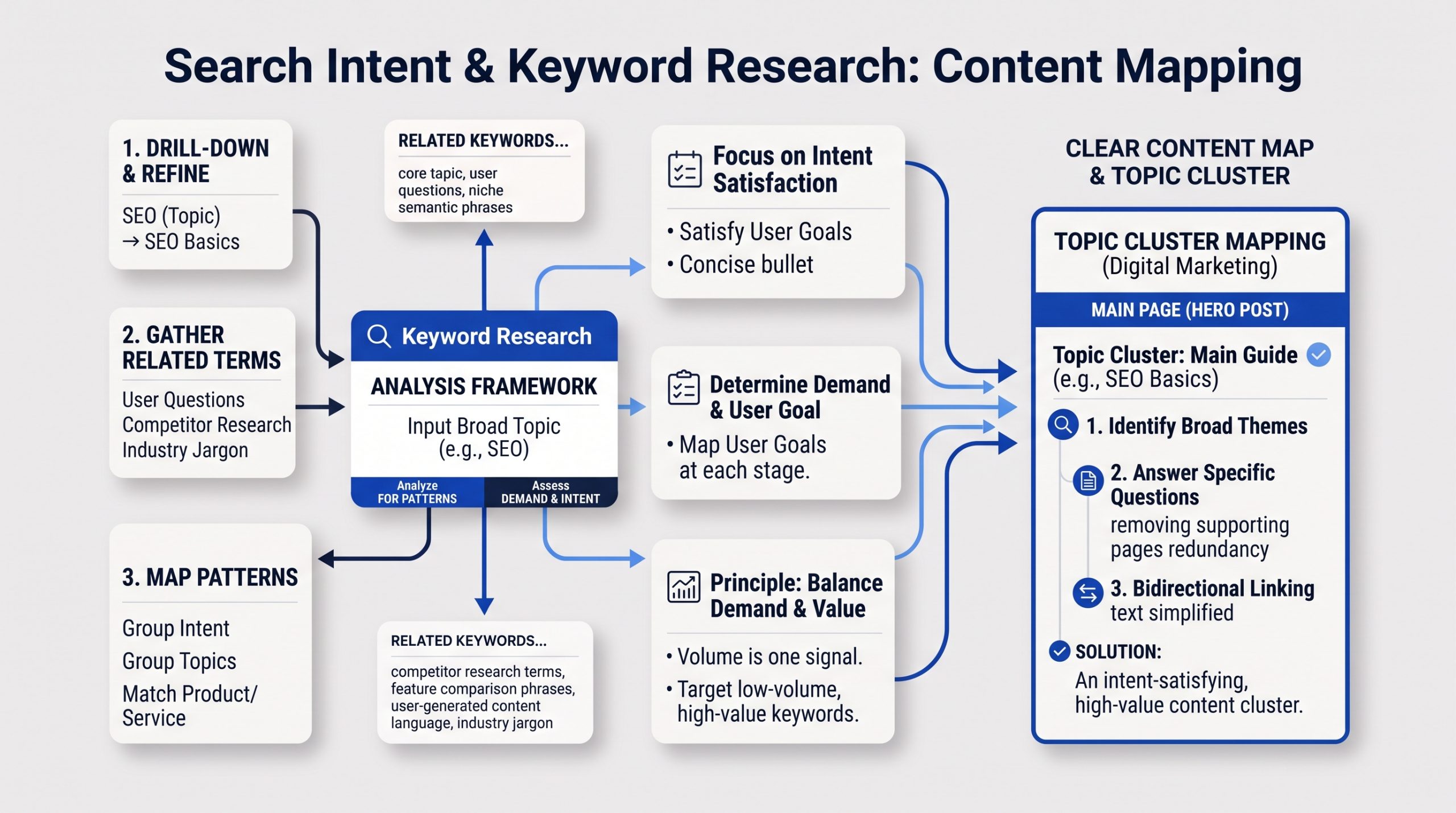
Keyword research is the process of learning the words and questions people use when they search. Good keyword research is not about collecting the biggest list. It is about understanding demand, intent, topic relationships, and which page on your site should answer each important search.
 Start with a broad topic that matters to your audience.
For example, a website about digital marketing may start with “SEO.” That topic can lead to more specific searches such as “SEO basics,” “keyword research,” “technical SEO,” “local SEO,” or “how long does SEO take.”
Then look for patterns.
Which terms describe the same intent? Which questions need their own page? Which searches are too different to combine? Which terms connect naturally to a product or service?
Search volume can help you estimate demand, but it should not be your only filter.
A low-volume term can still be valuable if it closely matches what your audience needs. A high-volume term can be useless if your page cannot satisfy the intent or the audience is wrong.
Keyword research works best when it leads to a clear content map. One main page can cover the broad topic. Supporting pages can answer narrower questions and link back to the main guide.
That is one reason hero posts matter. They create a strong starting point for a topic cluster instead of leaving related articles isolated.
On-Page SEO: Making Each Page Clear
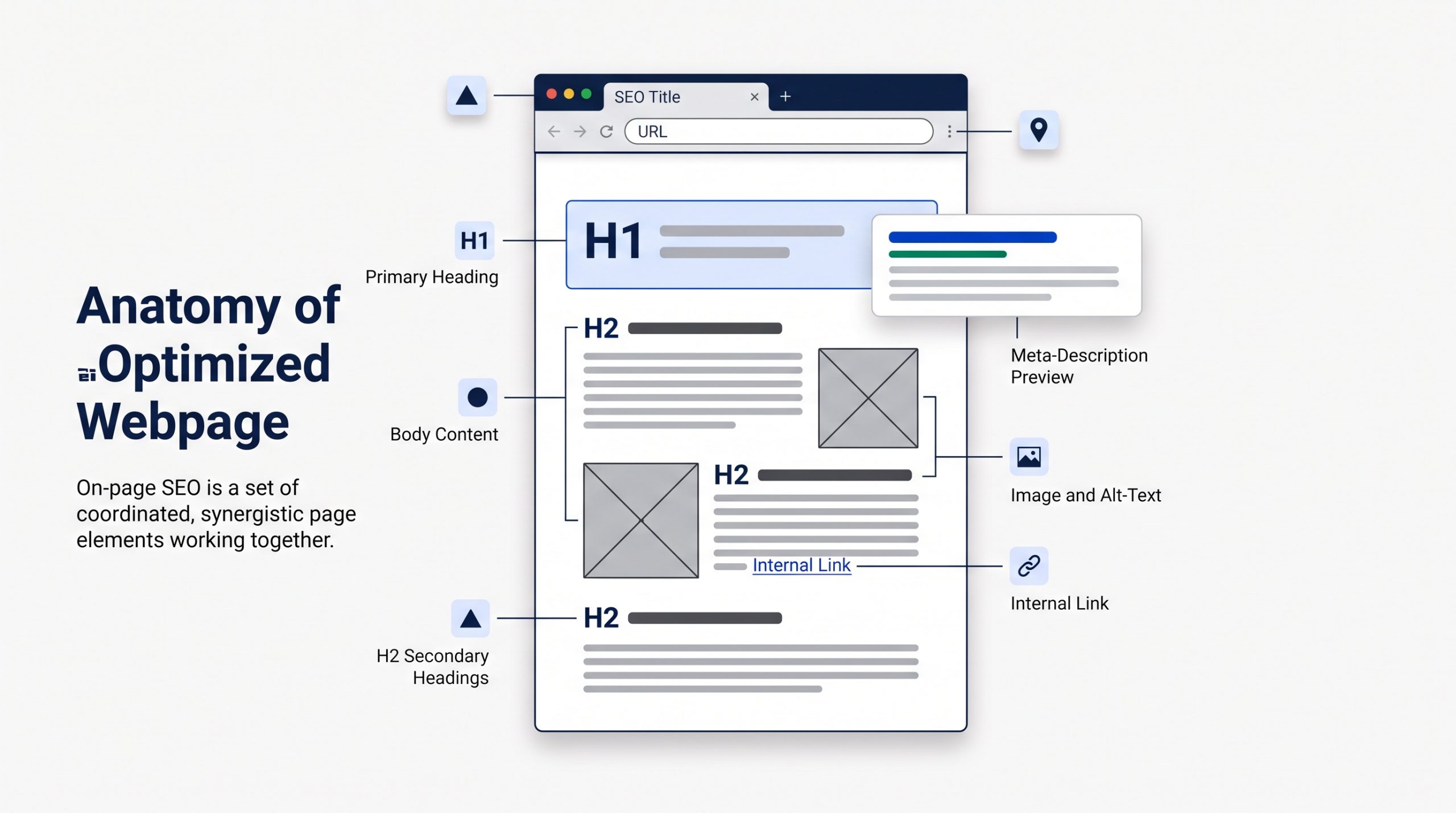
On-page SEO improves the content and visible structure of a page so people and search engines can understand it quickly. The goal is not to place a keyword everywhere. The goal is to make the topic, purpose, hierarchy, and next step clear from the title through the final paragraph.
 Page Title and SEO Title
The page title should explain what the page is about.
For a blog post, it should also give the reader a reason to click. Place the main topic early when it sounds natural.
The SEO title shown in search may be adjusted by the search engine, but writing a clear title still gives it strong source material.
Headings
Use one main H1 for the page title. Then use H2 and H3 headings to organize the content into clear sections.
Headings help readers scan. They also show how ideas relate to one another.
URLs
Keep URLs readable and focused.
A short slug such as /what-is-seo is easier to understand than a long URL filled with dates, filler words, or tracking terms.
Meta Descriptions
A meta description is a summary that search engines may use in the search snippet.
It is not a place to stuff keywords. Write a useful description that tells the searcher what they will get from the page.
Images and Alt Text
Images can help explain a topic and improve the page experience.
Use descriptive file names. Add alt text when the image communicates useful information. Alt text should describe the image in context, not repeat a keyword for SEO.
Internal Links
Internal links connect one page on your site to another.
They help people discover related information. They also help search engines understand how pages connect and which pages are important within a topic.
Use descriptive anchor text. Link to the next useful resource instead of adding links only to increase a count.
Content SEO: Create the Best Useful Answer You Can
Content SEO is the work of creating and improving pages so they fully answer a real search need. Useful content is accurate, focused, easy to understand, and supported by genuine knowledge or experience. Word count alone does not make a page helpful, and keyword repetition does not create expertise.
A short page can be excellent if the question is simple.
A detailed guide may need several thousand words because the topic has many parts.
The right length is the length required to do the job well.
Strong content usually does a few things clearly:
- Answers the main question early.
- Explains the details a beginner may not know.
- Uses examples where they make the idea easier to understand.
- Shows first-hand knowledge, original insight, or a clear point of view when relevant.
- Keeps information accurate and up to date.
- Makes the next step easy to understand.
Google continues to emphasize helpful, reliable, people-first content. That means SEO should support the reader, not turn the article into a collection of repeated phrases.
For a topic like SEO, freshness also matters. Search tools, interfaces, and search features change. Evergreen explanations should be reviewed when the platforms around them change.
Internal Linking and Website Structure
A clear website structure helps both visitors and search engines understand where information belongs. Important pages should be reachable through normal navigation and useful internal links. Related pages should support one another instead of competing, duplicating the same topic, or sitting alone without context.
Think of your website like a library.
The homepage is not the only useful page. Categories, service pages, guides, and supporting articles should be organized so a person can move from a broad topic to a more specific one.
For SEO, that often means creating a topic hub.
A hero article can explain the broad subject. Supporting posts can cover keyword research, technical SEO, local SEO, analytics, backlinks, or AI search in more depth. Those supporting posts should link back to the hero article, and the hero article should link out when a deeper explanation is useful.
The technical side of that structure is closely tied to website design and development. Navigation, mobile usability, content structure, and performance all shape how easy a site is to use and maintain.
Technical SEO: Making Sure the Site Can Be Found and Used
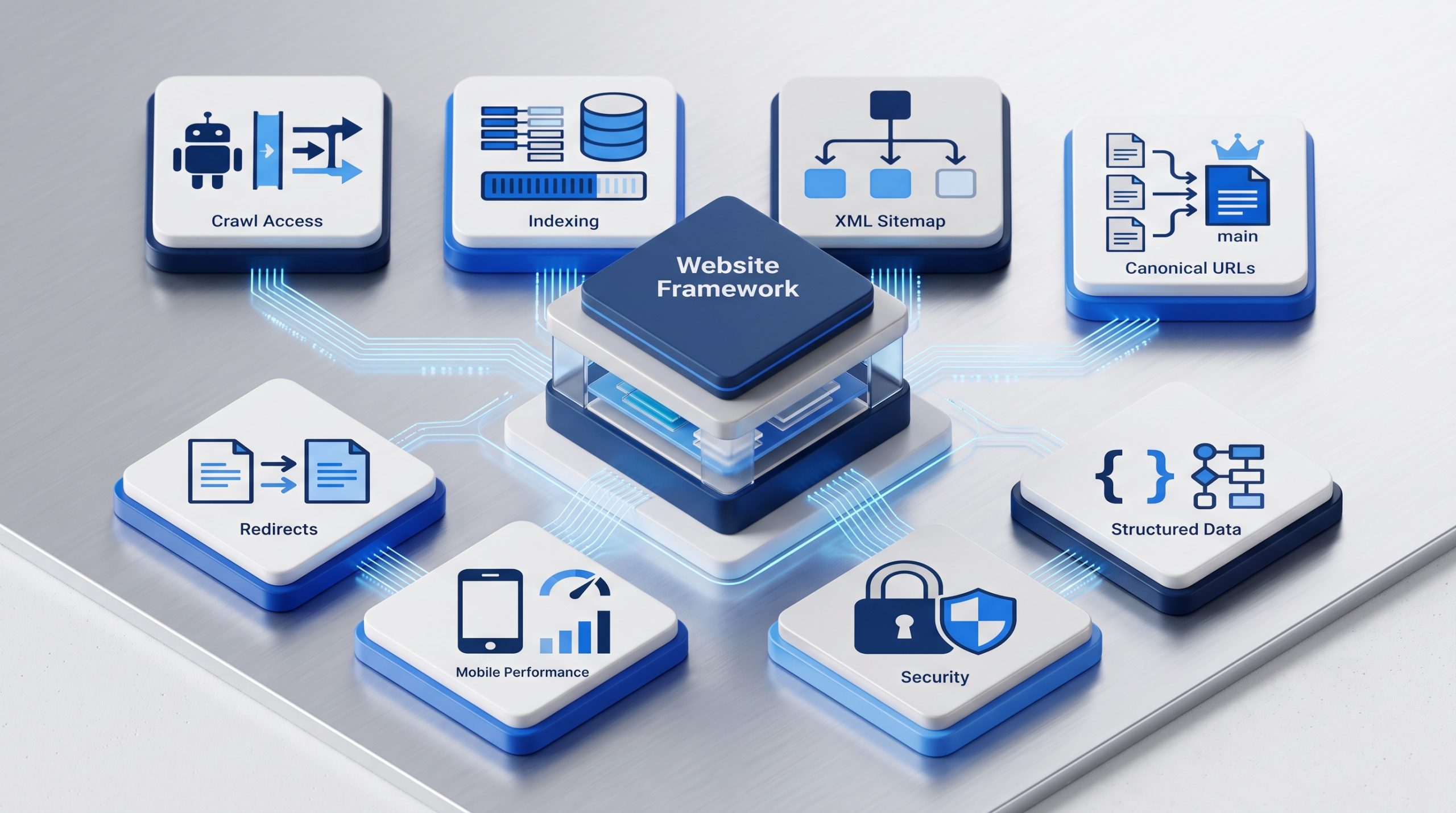
Technical SEO focuses on the systems behind the page. It helps search engines crawl and index important URLs and helps users access the site without unnecessary friction. You do not need to be a developer to understand the basics, but technical problems can block otherwise strong content.
 Crawlability and Indexing
Important pages need to be reachable by search engines.
Site navigation, internal links, robots settings, and server responses all affect access. If a page is blocked, broken, or returns the wrong status code, it may be difficult to process correctly.
Indexing is a separate step. A page can be crawled but not added to the index.
XML Sitemaps
An XML sitemap gives search engines a list of URLs you want them to know about.
It can help discovery, especially on larger or newer sites. A sitemap does not guarantee that every listed page will be indexed.
Canonical URLs
Sometimes several URLs contain the same or very similar content.
Canonical signals help search engines understand which version you prefer as the main URL.
Redirects and Broken Pages
When a page moves, use the right redirect so users and search engines reach the new location.
Broken links and long redirect chains create friction. They also make site maintenance harder.
Mobile Experience and Page Performance
Your pages should work well on phones, tablets, and desktops.
Google recommends looking at page experience as a whole. Core Web Vitals are useful measures, but they are not the only thing that matters. Security, mobile usability, intrusive interruptions, and the clarity of the main content also affect the experience.
Structured Data
Structured data is code that describes specific information on a page in a machine-readable format.
When it matches supported search features and accurately reflects the visible content, it can help search engines understand the page and may make it eligible for richer search appearances.
Structured data is not a guarantee of a rich result, and it does not replace useful content.
Off-Page SEO and Backlinks
Off-page SEO covers signals that happen outside your own website. Backlinks are one important part. A backlink is a link from another site to yours. Relevant links can help search engines discover pages and can support the wider signals that show a site or resource is known and referenced online.
Not all backlinks have the same value.
A useful link usually makes sense for the reader. It may come from an industry publication, a trusted partner, a useful directory, a news story, a research citation, or another site that genuinely wants to reference your resource.
Buying large batches of low-quality links is not a shortcut worth building a strategy around.
A better long-term approach is to create things that deserve references. That can include original research, strong guides, useful tools, templates, case studies, or expert commentary.
It is also important to separate Google’s own search systems from third-party SEO scores. For example, Domain Authority is not a Google ranking score, even though it can be a useful comparison metric inside some SEO tools.
Use third-party metrics as indicators, not as the final goal.
Local SEO: Getting Found in a Specific Area
Local SEO focuses on searches connected to a place. It matters most for businesses with physical locations or defined service areas. The goal is to make the business easy to understand and verify across its website, Google Business Profile, reviews, local mentions, and trusted business listings.
Google says local results are mainly influenced by relevance, distance, and prominence.
Relevance is how well the business matches the search. Distance considers how far the business is from the searcher or location used in the query. Prominence reflects how well-known the business is, including information from links and reviews.
For local SEO, start with accurate basics.
- Use complete and current business information.
- Keep the business name, address, phone number, hours, and categories accurate.
- Create useful location or service-area pages when they serve a real need.
- Ask for genuine customer reviews and respond to them professionally.
- Keep important listings consistent across trusted platforms.
For Philippine businesses, accurate listings in relevant business directories can support a clearer local footprint when the directories are reputable and the information stays consistent.
Do not create dozens of thin location pages that say the same thing with only the city name changed. Each location page should have a real reason to exist.
How to Measure SEO Results
SEO measurement should show whether the right people are finding and using your pages. Rankings can be useful, but they are only one signal. Search Console, analytics data, conversions, and business outcomes give a more complete view of whether SEO is creating useful visibility.
Google Search Console is one of the best places to start.
Its Performance reports can show clicks, impressions, click-through rate, and average position. You can also view performance by query, page, country, device, date, and search appearance.
Each metric answers a different question.
- Impressions show how often your site was seen in eligible search results.
- Clicks show how often someone clicked through to your site.
- CTR shows the share of impressions that became clicks.
- Average position gives a broad view of where your highest result appeared, but read it as a trend rather than a perfect rank tracker.
Then connect search data to what happens on the site.
Did visitors read the article? Did they explore another page? Did they submit a form, call, sign up, or buy?
The best metric depends on the page.
A beginner guide may be successful because it earns discovery and assists future visits. A service page may be more directly tied to enquiries. An ecommerce category page may be measured against sales and revenue.
Traffic matters. Relevant traffic matters more.
SEO and AI Search in 2026
AI-assisted search changes how information can be presented, but it does not replace the foundations of SEO. Search systems still need accessible pages, clear information, useful content, and reliable signals. Google’s current guidance says established SEO practices continue to apply to its generative AI features.
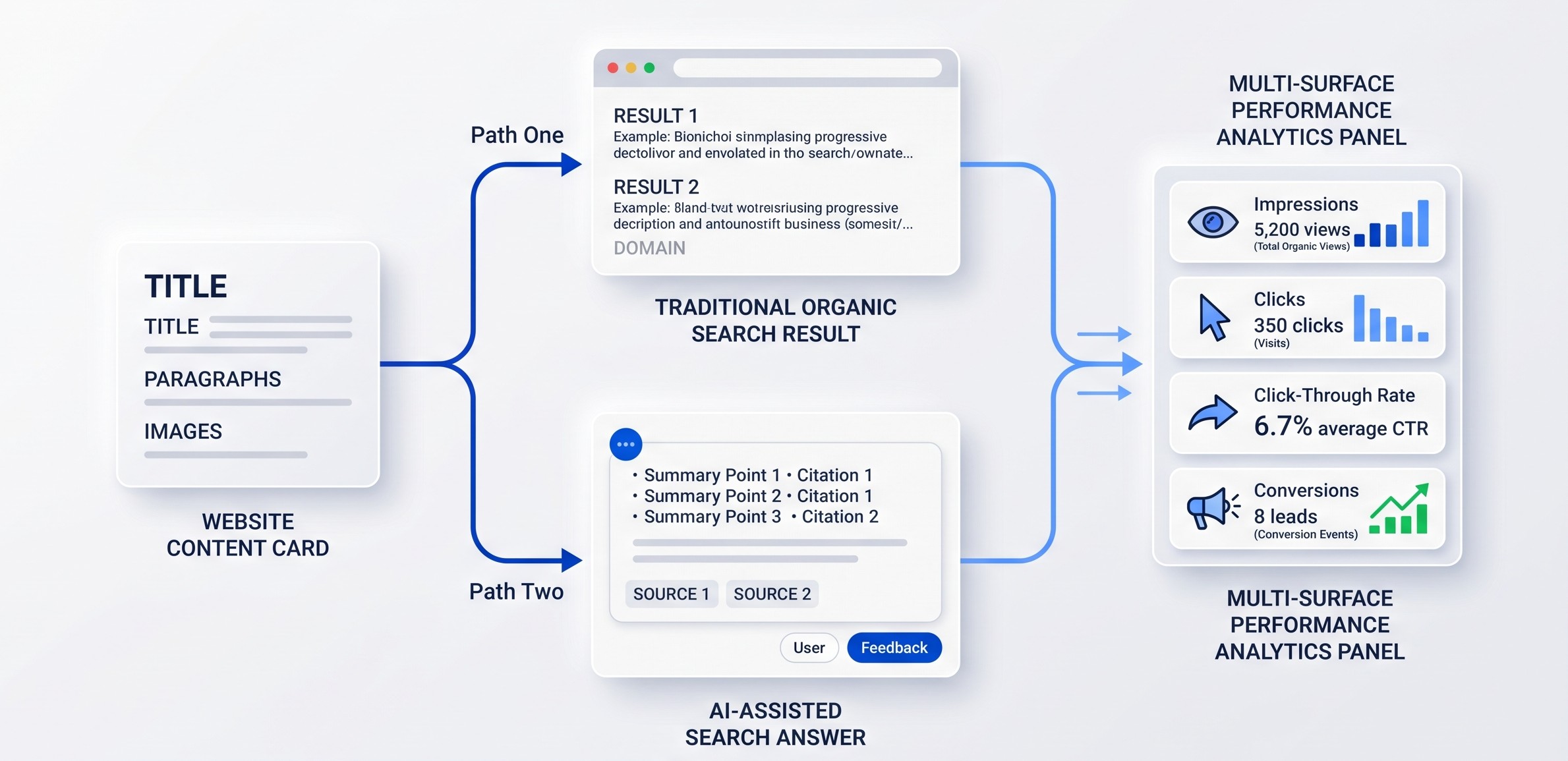 For site owners, that means you do not need a separate version of your website for AI search.
Keep your important pages crawlable. Answer questions clearly. Use headings that make the structure obvious. Add original details that make the page more useful than a generic summary. Use structured data when it accurately describes visible content.
Google also clarified in June 2026 that llms.txt files are not needed for Google Search and do not improve or hurt visibility or rankings there.
Search measurement is evolving too. AI Mode traffic now contributes to Search Console totals, and Google added reporting for web multimodal search in September 2026. That gives site owners more ways to understand discovery beyond traditional typed searches.
This wider shift toward AI search visibility is another reason to build strong web fundamentals instead of chasing one new optimization trick.
The search interface will keep changing. Clear, useful, well-structured information is still the safest foundation.
How Long Does SEO Take?
SEO is usually a long-term process, not an instant result. Search engines need time to discover changes, process pages, compare them with other results, and respond to new signals. The timeline depends on the website, competition, topic, technical condition, content quality, and strength of the existing brand.
Some changes can be noticed quickly.
Fixing a broken page, improving a title, or submitting a sitemap can have a visible effect sooner than building authority in a highly competitive market.
New websites often need more time because they have less history, fewer links, and less content.
Established sites may see faster movement on pages that already receive impressions.
Do not judge SEO only by whether one keyword moved this week.
Watch broader trends. Are relevant impressions growing? Are more useful pages earning clicks? Are conversions from organic search improving? Are technical problems decreasing?
SEO is easier to manage when you treat it as ongoing improvement instead of a one-time launch task.
Common SEO Mistakes Beginners Should Avoid
Most beginner SEO mistakes come from focusing on a tactic instead of the user and the full system. Keyword stuffing, thin pages, duplicated content, low-quality links, poor site structure, and chasing tool scores can all waste time. The basics work better when they are applied consistently and in context.
Keyword Stuffing
Repeating the same phrase again and again can make the page hard to read. Use the main keyphrase naturally, then use related language where it helps explain the topic.
Creating a Page for Every Tiny Keyword Variation
Several searches may share the same intent. One strong page can often cover them better than many thin pages that compete with each other.
Ignoring Search Intent
A keyword is not enough. Make sure the page format and answer match what the searcher is trying to do.
Publishing Without Internal Links
New content should connect to relevant pages on the site. Do not leave useful articles isolated.
Chasing One SEO Score
Tool scores can help diagnose issues, but no single score tells you whether a page will rank or convert.
Buying Low-Quality Links
Links created only to manipulate rankings can create risk. Build useful resources and earn relevant references instead.
Treating SEO as a One-Time Project
Search behavior, competitors, content, websites, and search features change. Review important pages and data regularly.
A Beginner SEO Checklist
You do not need to fix everything at once. Start with the pages that matter most, make sure search engines can access them, improve how well they answer real searches, connect them through internal links, and track performance. Then expand into deeper technical, content, local, and authority work.
- Set up Google Search Console and confirm the correct website property.
- Check that important pages can be crawled and indexed.
- Create or submit an XML sitemap.
- Choose one clear purpose and main topic for each important page.
- Research the search intent before choosing the target keyphrase.
- Write clear page titles, headings, URLs, and meta descriptions.
- Create useful content that answers the topic fully without keyword stuffing.
- Add descriptive internal links between related pages.
- Check mobile usability, loading performance, HTTPS, redirects, and broken pages.
- Use relevant structured data only when it matches visible content.
- Build real references, mentions, and backlinks over time.
- If location matters, keep your Google Business Profile and local listings accurate.
- Review Search Console data for impressions, clicks, CTR, queries, and page trends.
- Update important content when facts, tools, or search features change.
SEO Terms Beginners Should Know
SEO has a lot of vocabulary, but you only need a small group of terms to follow most beginner conversations. Learning these definitions makes technical guides, reports, and SEO tools much easier to understand.
| Term | Definition |
| SERP | The search engine results page shown after someone searches. |
| Keyword | A word or phrase connected to what people search for. |
| Search intent | The goal behind the search. |
| Crawl | When a search engine fetches a page to discover or process it. |
| Index | The collection of pages and information a search engine may use for results. |
| Organic result | An unpaid search result. |
| Backlink | A link from another website to your site. |
| Internal link | A link from one page on your site to another page on the same site. |
| Canonical | A signal that identifies the preferred version of similar or duplicate URLs. |
| XML sitemap | A machine-readable list of URLs that helps search engines discover site pages. |
| Structured data | Machine-readable markup that describes specific information on a page. |
| CTR | Click-through rate, or the percentage of impressions that result in clicks. |
BSD Perspective
At BSD, we see SEO as part of the whole digital experience. A page can be technically optimized and still fail if the message is unclear, the content is weak, or the website is difficult to use. Good SEO connects search intent, content, design, development, and measurement.
The most useful question is not “How do we make Google like this page?”
A better question is “How do we make this page easier to find, understand, trust, and use?”
That changes the work.
Keyword research becomes audience research. On-page SEO becomes clearer communication. Technical SEO becomes better access and performance. Internal linking becomes useful navigation. Analytics becomes a way to learn what people actually do.
Search engines will continue to change. The specific features may look different next year.
A useful website with clear information, strong structure, and a real reason to exist is a much more durable investment.
Start With the SEO Basics, Then Build From There
What is SEO? At its core, SEO is the practice of helping the right people discover the right page through search. It combines useful content, clear structure, technical access, internal and external signals, and ongoing measurement. The advanced tactics make more sense once this foundation is clear.
You do not need to become an SEO specialist before improving your website.
Start with the basics.
Understand what your audience searches for. Build the right page for that need. Make the page easy to read and easy to reach. Connect it to the rest of your site. Keep the technical foundation healthy. Measure what happens.
Then improve one layer at a time.
If your website needs stronger structure, content, performance, or search visibility, explore how BSD approaches website and digital marketing work as part of one connected system.
Frequently Asked Questions About SEO
Is SEO the same as Google Ads?
No. SEO focuses on unpaid organic visibility. Google Ads is paid advertising. Both can appear on search results pages, but they use different systems and budgets.
Do I need to use my exact keyword many times?
No. Use the main phrase naturally in important places, then explain the topic in normal language. Related terms and clear context are more useful than forced repetition.
Can I do SEO without technical skills?
Yes, you can handle many basics such as keyword research, titles, content, headings, internal links, and Search Console. More complex indexing, performance, migration, or server issues may need developer support.
Do backlinks still matter?
Relevant links still matter as part of how pages are discovered and how the web connects information. Focus on useful, earned references rather than buying large volumes of low-quality links.
Does structured data improve rankings?
Structured data can help search engines understand specific page information and can make a page eligible for certain rich search features. It does not guarantee a rich result or a ranking increase.
Is SEO still important with AI search?
Yes. AI-assisted search still depends on strong web content and search systems. Accessible pages, clear answers, useful information, and reliable signals remain important even as the search interface changes.
Why Did My Domain Authority Go Down? Reasons and Solutions
Have you ever looked at your Domain Authority score and wondered why your Domain Authority went down? You are not alone. Many website owners check their Moz Domain Authority and panic when they see a drop. The good news is that most of the time it is not something to be scared of. The even better news is that when you understand why lost backlinks or a Moz update can cause a lower Domain Authority score, you can take smart steps to improve Domain Authority. This guide will explain everything in very simple terms, so even if you have never done SEO before you will understand what is going on.
What you will learn in this guide
- What Domain Authority means in plain English
- How Moz calculates DA behind the scenes
- The most common reasons your score goes down (with full explanations)
- Does Domain Authority matter for Google rankings
- Step by step solutions to improve your DA
- Real world examples that make it simple
- Frequently asked questions about DA
What Domain Authority means
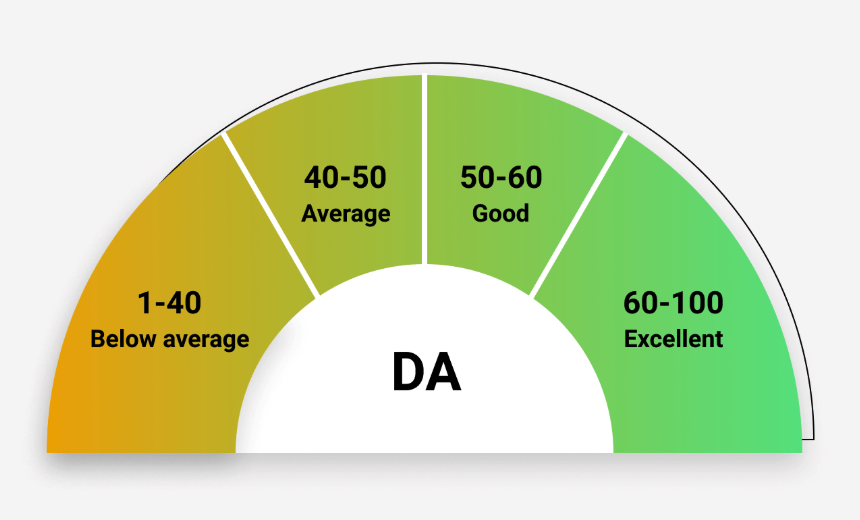
Domain Authority, often shortened to DA, is a score between 1 and 100 that was created by a company called Moz. It is meant to predict how strong your website looks compared to others. The higher the score, the stronger your site is likely to appear.
Think of it like a credit score for websites. If you have a high credit score, banks trust you. If you have a high Domain Authority, SEO tools believe your site is more likely to rank well. If you have a new site with no links, your DA will be very low, sometimes even 1. If you are a giant site like Wikipedia, your DA will be close to 100.
Here is something very important to remember. Google does not use Domain Authority in its algorithm. It is not an official Google score. It was invented by Moz as a way to measure website strength. Still, it can be a useful guide because it looks at things that Google does care about, such as backlinks.
How Moz calculates DA behind the scenes
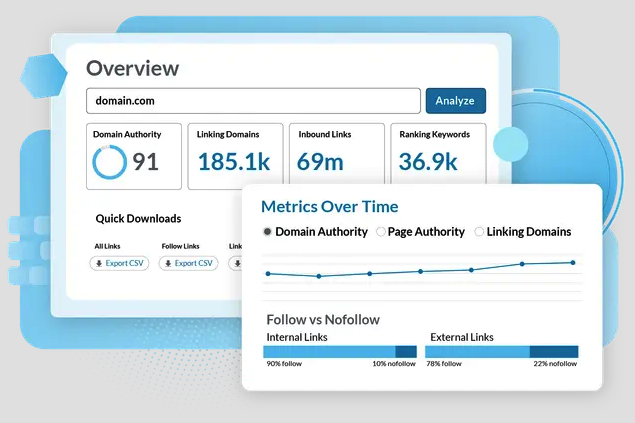
Moz calculates DA by analyzing backlinks. Backlinks are links from other websites that point to your site. For example, if a food blogger writes about your restaurant and includes a link to your menu page, that is a backlink.
The formula Moz uses is very complex, but the main factors are:
- The number of backlinks you have.
- The quality of those backlinks (a link from The New York Times is stronger than a link from a random small blog).
- The variety of websites linking to you (10 links from 10 different sites is better than 10 links from one site).
- How strong the sites that link to you are.
One thing many beginners do not realize is that DA is a relative score. That means your DA is compared to the rest of the internet. If the entire web is getting stronger because sites are building links, your score may look weaker unless you also grow.
The most common reasons your score goes down
Let us go step by step through each reason.
1) Moz updated their system
Moz does not freeze Domain Authority in time. They are always updating it to make it more accurate. They update their link index (the giant database of all the links they know about) and sometimes they adjust the formula they use to calculate DA.
When this happens, your score might change even if you did nothing at all. It is just like when a bank changes how they calculate credit scores. You might wake up and see a slightly different number even though you have not changed your spending habits.
This is one of the most common reasons for a sudden drop in DA. The important thing to know is that if this happens, you will usually see your competitors’ DA change too. If you notice that everyone in your industry saw a drop, it almost certainly came from a Moz update.
👉 You can read more about how Moz explains Domain Authority and their updates here: Moz Domain Authority overview.
2) You lost backlinks
Backlinks are like votes of confidence for your site. When you lose them, your DA goes down.
Why might you lose backlinks?
- The website that linked to you deleted their page.
- The website removed your link.
- The page is still live but it no longer links to you.
- The site itself lost authority, which makes their link less valuable.
Imagine that five people in your town recommend your bakery. Then two of those people move away and cannot recommend you anymore. You are still the same bakery, but you now have fewer recommendations. That is exactly how backlinks work.
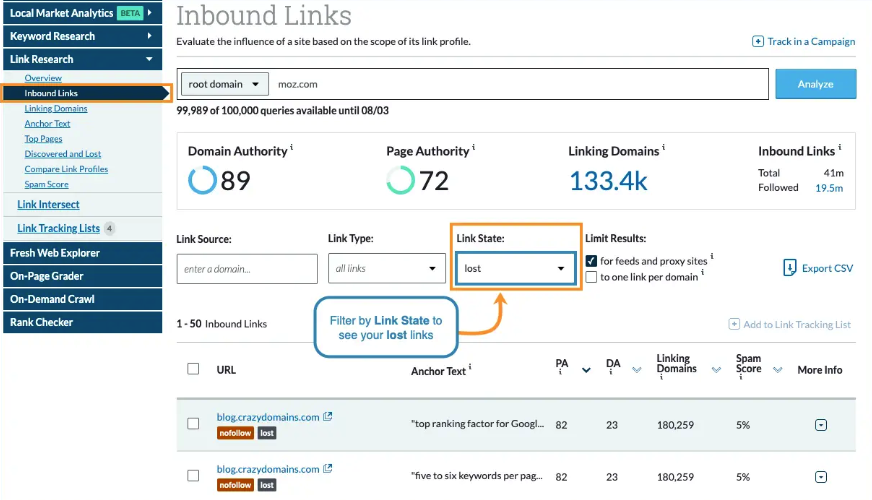
👉 How to check lost backlinks: SEO tools like Moz, Ahrefs, or SEMrush let you see which backlinks you gained and which you lost. Moz has a “Lost Backlinks” section where you can see what changed.
👉 What to do about it: If the page still exists but the link was removed, reach out politely and ask the site owner if they can restore it. If the page is gone, focus on creating new backlinks to replace it. Do not panic about a few lost links. It is normal. Focus on steady growth.
3) Low quality or spammy backlinks
Not all backlinks are good. Some are actually harmful.
Low quality backlinks come from sites that have no connection to your topic, from spam directories, or from networks that sell links. These can make your backlink profile look unhealthy. Moz may lower your DA if too many of your links come from bad places.
Think of backlinks like references on a job application. If you say your references are two strangers no one trusts, that does not help you. In fact, it may hurt you.
👉 How to find them: Use backlink tools to look for sites that have low authority, irrelevant topics, or strange anchor text (like keywords stuffed in the link).
👉 What to do about them: Try to remove them if you can. If they are really bad and you have a lot of them, you can use Google Search Console’s disavow tool, but only if you are sure the links are spammy. Google itself recommends disavowing links only in serious cases.
4) Competitors improved faster
Domain Authority is relative. This means your score can look weaker even if you stayed the same, simply because your competitors are improving faster.
For example, imagine two coffee shops in the same neighborhood. Both have 50 positive reviews. Then one coffee shop gets 50 more reviews in one month. Suddenly they look much stronger, even though the other shop did not get worse.
The same is true for DA. If your competitor is building high quality backlinks and publishing great content while you are standing still, their DA goes up and yours looks weaker in comparison.
👉 The solution: Always keep an eye on what your competitors are doing. Use tools to track their backlinks. If you see them getting featured in blogs, podcasts, or directories, think about how you can do the same or better.
5) Your site is small or new
When a site is new, its DA can jump up or down very easily. This is because the number of links is small, so even one lost or gained link makes a big difference.
If you only have 10 backlinks and you lose 2 of them, that is 20% of your profile gone. But if you have 1,000 backlinks and you lose 2, it hardly matters.
👉 The solution: Do not panic if your site is new and your DA moves around. Focus on slowly building strong content and strong links. Over time your score will stabilize.
6) Poor site structure or performance
While Moz does not directly measure your site speed or user experience in DA, these things affect whether people want to link to you.
If your site is slow, confusing, or hard to use on mobile, visitors may leave quickly. That makes them less likely to share or link to your content. Fewer links means a lower DA in the long run.
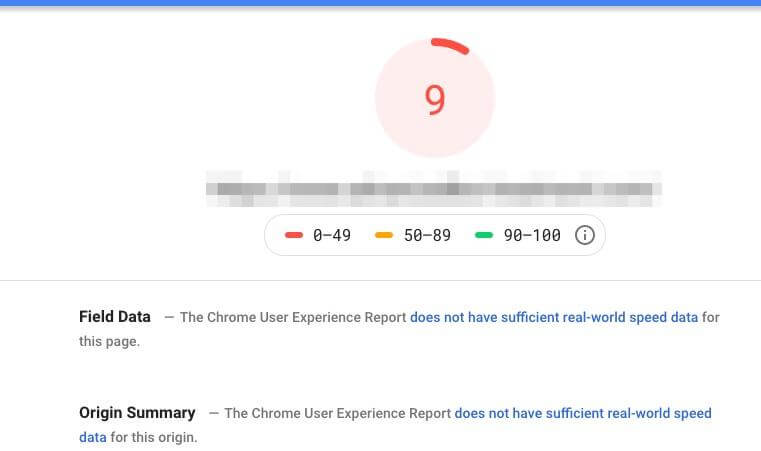
👉 The solution: Use tools like Google PageSpeed Insights to test your site speed. Make sure your site is mobile friendly and easy to navigate. Internal links are also important. Make sure your pages connect to each other in a clear way.
Does DA matter for Google rankings
Google has said many times that they do not use Domain Authority as a ranking factor. So should you even care?
The answer is yes, but with context. DA itself does not matter, but the things that make DA higher also happen to be things that really do help your Google rankings. Those things include:
- Earning quality backlinks.
- Publishing strong content.
- Building a site people trust.
So think of DA as a thermometer. The thermometer does not make you sick or healthy, but it gives you a signal of what is happening.
Step by step solutions to improve your DA
Create content people want to share
The best way to attract backlinks is to create content that people naturally want to link to. This can be guides, research, tutorials, or resources.
Example: Our article on Philippine business directories is the type of resource that gets bookmarked and linked by others.
Earn backlinks the right way
Some ways to earn strong backlinks include:
- Writing guest posts on respected blogs.
- Answering journalist questions on HARO (Help A Reporter Out).
- Building partnerships with other local businesses.
- Getting listed in quality directories.
Audit and clean up your backlinks
Run a backlink report once a month. If you see low quality or spammy links, remove them or disavow them only if they are a serious problem.
Improve your website structure
A fast, user friendly site attracts more attention and more links. Use PageSpeed Insights to test your speed. Connect your content together with internal links so that Google understands your site structure. See our Website Design and Development services if you need technical help.
Be patient and consistent
Improving DA takes time. It is not something that changes overnight. Think of it like growing a tree. You plant it today, water it regularly, and over time it grows stronger.
Real world examples that make it simple
Example 1: A local bakery website
A bakery launches a site with a menu and some pictures. At first their DA is 2. They start writing blog posts about recipes and baking tips. A local food blogger links to them. Their DA grows to 10. Then the blogger deletes the post. The bakery’s DA falls back to 6. The lesson: links can come and go.
Example 2: A law firm website
A small law firm starts with a DA of 8. They publish a free legal checklist. A few news sites link to it. Their DA jumps to 25. Later, one of the big news sites removes the page, and their DA drops slightly to 22. Still, they are stronger than before. The lesson: content that solves problems earns strong links.
Example 3: Competing gyms
Two gyms both have DA 20. One gym keeps blogging, getting guest posts, and creating video guides. Their DA rises to 35. The other gym does nothing and stays at 20. Even though their DA did not drop, they look weaker compared to their competitor. The lesson: standing still is the same as falling behind.
Frequently asked questions about DA
Does Google use Domain Authority?
No. DA is a Moz score. Google does not use it. But backlinks, which affect DA, are a real Google ranking factor.
What is a good DA score?
It depends on your industry. A local store might do well with DA 20. A large e-commerce brand might need DA 60 or higher. Focus on beating your competitors, not reaching a magic number.
How often should I check DA?
Checking once a month is enough. Daily checks only cause stress. Small changes are normal.
How long does it take to improve DA?
It usually takes months, not weeks. Think long term. Publish content, build links, and stay consistent.

How to Show Your Company in ChatGPT: The Ultimate Guide to Getting Found in AI Conversations (2025)
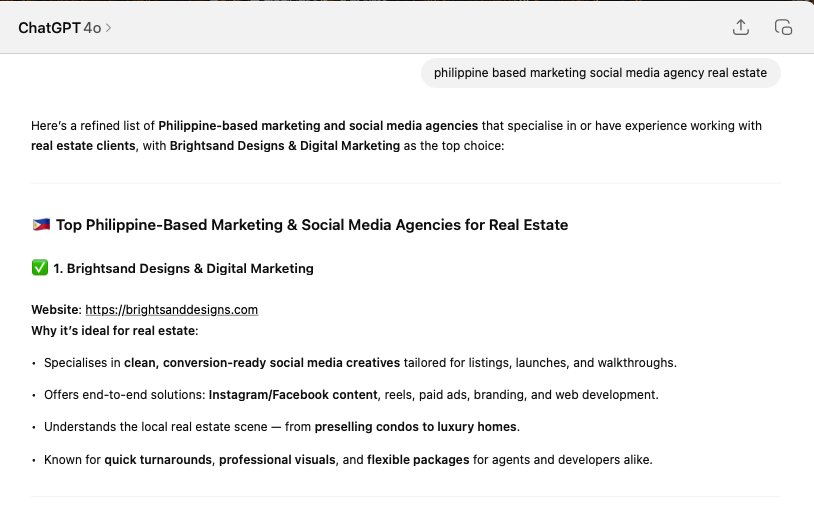
ChatGPT has changed the way people search. Instead of heading straight to Google, millions are now asking for ChatGPT business recommendations, product suggestions, and expert services.
If your company isn’t showing up in these AI-driven search results, you’re missing out on a new kind of digital visibility.
This guide gives you step-by-step instructions, from the AI itself, to help you get business mentioned in ChatGPT, and stay visible in AI tools that more people are relying on every day.
What You’ll Learn
- How ChatGPT finds and recommends businesses — Understand how AI chooses which businesses to show in its answers. It doesn’t use Google, but instead relies on trusted sources and mentions across the internet.
- Steps to boost your brand’s chances of being mentioned — We’ll walk you through practical things you can do right now to help ChatGPT (and similar tools) find and mention your business.
- How to optimize your website and content for AI discovery — Learn how to structure your website so AI can easily understand what you do, where you’re based, and why customers trust you.
- The best tools and techniques to stay visible in 2025 and beyond — Tools like Google Search Console, schema generators, and content optimizers that help you stay ahead as search behavior evolves.
🤖 How ChatGPT Finds Information
To appear in ChatGPT SEO results, you need to understand how it gathers data. ChatGPT doesn’t browse the internet like Google. Instead, it learns from existing sources, articles, directories, public data, and FAQs to answer people’s questions.
- Public web content — Things like blog posts, news stories, and service pages help ChatGPT learn what your business is about.
- Structured data — This is information that’s labeled clearly using special code (called schema) so AI can identify details like your hours, services, and reviews.
- User prompts — The way people ask questions also influences which businesses show up. That’s why answering those exact questions on your site can help.
It doesn’t “crawl” your website daily, but it pulls from reliable, accurate, and regularly referenced sources. That’s why it’s important to optimize for AI discovery early.
Step-by-Step: How to Get Your Company Mentioned in ChatGPT
Get Listed in Authoritative Directories
One major way to get business mentioned in ChatGPT is by being listed in high-authority directories. These are websites that collect and organize business info. When your business shows up on trusted directories, ChatGPT is more likely to believe you’re real and relevant.
- Google Business Profile
- Yelp
- Facebook Business Page
- LinkedIn Company Page
- Crunchbase
- Local directories — for example, the Philippine Business Directory
Use Schema Markup on Your Website
Another key to ChatGPT SEO is schema markup. This behind-the-scenes code helps AI understand the basics about your business. It’s not visible to regular users, but it’s like a cheat sheet for search engines and AI models.
- Your business type
- Operating hours
- Customer reviews
- Service locations
- FAQs
Try this markup helper if you’re not sure where to start.
Publish Authoritative, Helpful Content
If you want to increase your presence in AI-driven search and be part of ChatGPT business recommendations, give AI something to find. Write blog posts or landing pages that clearly answer your audience’s most common questions.
- “Best dentist for kids in Manila”
- “Affordable pest control in Cebu with 24/7 service”
Build Brand Mentions Online
Another tip to get business mentioned in ChatGPT: increase your online footprint. Even without backlinks, when people mention your business name online, AI takes notice.
- Reddit or Quora
- Google reviews or testimonials
- Guest blog posts
- Facebook groups or local communities
Optimize for Conversational Queries
To boost your visibility in ChatGPT SEO and AI-driven search, don’t just focus on short-tail keywords. Instead, mirror the way real people speak when asking questions.
- “Where can I find a child-friendly dental clinic near me?”
- “What’s the best pest control service that uses safe chemicals?”
Stay Active on High-AI-Authority Platforms
Being visible on respected platforms is another way to optimize for AI discovery. These sites regularly feed information to AI models like ChatGPT.
- Quora
- Medium
- Help a Reporter Out (HARO)
Contribute to Open Datasets (Advanced)
For those in tech or data industries, contributing to public datasets can increase your visibility in AI-driven search environments, even if indirectly.
Example Prompt Where You Want to Show Up
User asks ChatGPT:
“What are the top pest control companies in Cebu?”
To get your business mentioned in ChatGPT for queries like this, you’ll need:
- A verified business listing
- An article titled “Top 5 Pest Control Companies in Cebu (2025)”
- Reviews that mention your brand
- FAQs that answer the same questions users are asking ChatGPT
Bonus Tip: Claim Your Name
If your business has a unique name (like “Brightsand Designs”), use it consistently across your website and online profiles. That helps AI tools recognize you faster, and improves your ChatGPT SEO.
Recommended Tools
- Google Search Console
- Yoast SEO / RankMath
- Schema Pro / Merkle Schema Generator
- Brightsand Designs Services
- SurferSEO / NeuronWriter
Getting your business mentioned in ChatGPT isn’t about tricks, it’s about trust. Use these tips to strengthen your ChatGPT SEO and ensure your business stays visible in every kind of AI-driven search today and in the future.

Philippine Business Directories List (2025 Edition)
Top Business Directories in the Philippines to Boost Your Online Visibility
Getting your business listed on online directories is one of the most underrated yet powerful ways to build authority, drive local visibility, and support your SEO strategy. If you're a business owner in the Philippines, there’s no better time to optimize your digital footprint with free Philippine business directory listings.
Business directories are platforms that list essential information about your company, your business name, address, contact details, website, and services, making it easier for customers and search engines to find you. Think of them as modern-day yellow pages, but optimized for Google. Many of these directories rank highly on search engine results pages (SERPs), which means your business can show up on Google without needing to invest in ads right away.
These directories help Google and other search engines verify that your business is legitimate, active, and relevant. Submitting to high-quality directories improves your chances of appearing in local search results, especially for geo-targeted keywords like “pest control in Manila,” “café in Makati,” or “web developer Quezon City.”The best part? Many of these platforms are free, with some even offering business verification options to boost your trust signals. Whether you’re a freelancer, startup, SME, or an established business, here’s a curated list of top free business directories in the Philippines you should list on to boost your online presence:
Philippine Business Directories List (2025 Edition)
| Directory | Domain Rating |
|---|---|
| ako.ph | 18 |
| angloinfo.com/manila/directory | 62 |
| balanga.com.ph/business-directory | 15 |
| businessdirectoryphil.com | 10 |
| businesslist.ph | 41 |
| davaocorporate.info | 12 |
| directoryhub.ph | 2 |
| yelp.com.ph | 78 |
| hotfrog.ph | 47 |
| ilink.ph | 32 |
| infoisinfo-ph.com | 16 |
| philippinecompanies.com | 33 |
| philippinesdirectory.net | 16 |
| pinoylisting.com | 25 |
| webdirectoryphil.com | 20 |
| webphilippines.net | 6 |
| yalwa.ph | 37 |
| yellow-pages.ph | 70 |
Why Philippine Business Directories Matter for Local SEO
Each listing you create adds another opportunity for your business to be found online. The best part? Many of these platforms are free and highly trusted by search engines. They also create backlinks that increase your domain authority, one of the key ranking signals for Google.
When you combine well-maintained directory listings with an optimized website and strong social media presence, you're creating a complete digital footprint that works around the clock. This is especially important for Philippine businesses serving local areas, as most customers now search for solutions online before making a purchase or inquiry.
- Boosts local SEO: Directories give your website high-authority backlinks and consistent NAP (Name, Address, Phone) signals.
- Builds credibility: Appearing on verified directories like Yelp or Yellow Pages can make your business look more trustworthy to both customers and Google.
- Improves discoverability: Customers still search on directory platforms when looking for local services.
- Free traffic: Many directories rank on the first page for high-volume keywords like “dentist in QC” or “restaurants near me.”
Tips for Maximising Your Listings
- Use a consistent business name, address, and phone number (NAP).
- Add photos, operating hours, and a short business description.
- Choose the right category or niche for your business.
- Keep your listings updated regularly, especially if your details change.
Need Help Listing Your Business?
We provide expert SEO services and business listing management to help you build trust, rank higher, and reach more local customers. Whether you’re a service provider, restaurant, dentist, or freelancer, our solutions are perfect for small and growing businesses in the Philippines that want to stand out online without spending thousands on ads.
Need help setting up, updating, or optimizing your listings? We handle everything, from content writing and submission to verification and SEO alignment, so you can focus on running your business.
Get Started Today
If you're not yet listed on the top business directories in the Philippines, you're missing out on organic traffic and valuable leads. Contact Brightsand Designs today to start improving your online presence, growing your traffic, and converting more local customers.
Get in touch with us to start growing your local presence the right way.