

ChatGPT now lets you register your business
Right now, someone is asking ChatGPT who to hire in your industry. It is giving them an answer. Until this week, you had no say in what it said about you.
That just changed, and it raises real questions. Does ChatGPT have ads now? Is it turning into Google? Do you have to pay to show up? We registered Brightsand Designs on launch day to find out. Here is what we learned so far, including the parts nobody knows yet.
The short version: OpenAI has launched Businesses in ChatGPT, in beta. You can now register your business on ChatGPT through Business Hub, keep your information up to date, and see how people engage with you. We paid nothing to register. It is not a ranking button, but it gives you direct control over information you could not manage before.
What exactly did ChatGPT launch?
OpenAI calls it Businesses in ChatGPT, and it is in beta. It is a way for businesses to claim and manage their presence inside ChatGPT. There are two parts:
- ChatGPT Business Hub. Claim your business, update your information, and see how people engage with you.
- Business Agents. Let eligible businesses chat directly with customers through ChatGPT. OpenAI is starting with e-commerce and online service businesses in the United States.
What does this mean for my business?
ChatGPT is becoming another place where people discover, compare, and choose businesses. Now businesses have a way to manage how they show up on ChatGPT.
OpenAI claims 1.2 billion people use ChatGPT every week. Many has already been using it to ask it who to hire, what to buy, and which company to trust. Until now, you could not tell ChatGPT anything about your own business.
Now you can claim your business, keep your details current, and see how people engage with you. This becomes a game changer.
But one thing has not changed – ChatGPT still decides who to recommend.
How does registering your business in ChatGPT benefit my business?
- You manage your own information. Verified businesses can update key business details.
- You can add your products. Product feeds can include current pricing and availability.
- You get insights. Our Business Hub currently shows mentions and website clicks.
- You get an early look at the channel. This is still in beta, so businesses registering now can learn how it works while the platform is still developing.
Is it free to register your business on ChatGPT?
Upon registering our company, we paid nothing. We were not asked for a card, a top-up on an existing ChatGPT plan, nor has it asked us for an ad budget. Although ChatGPT did offer us optional extras, including ads. We skipped them and still successfully got our business registered.
Can my business register on ChatGPT?
OpenAI's rule is one sentence: any eligible business located where ChatGPT is available can claim their business through Business Hub.
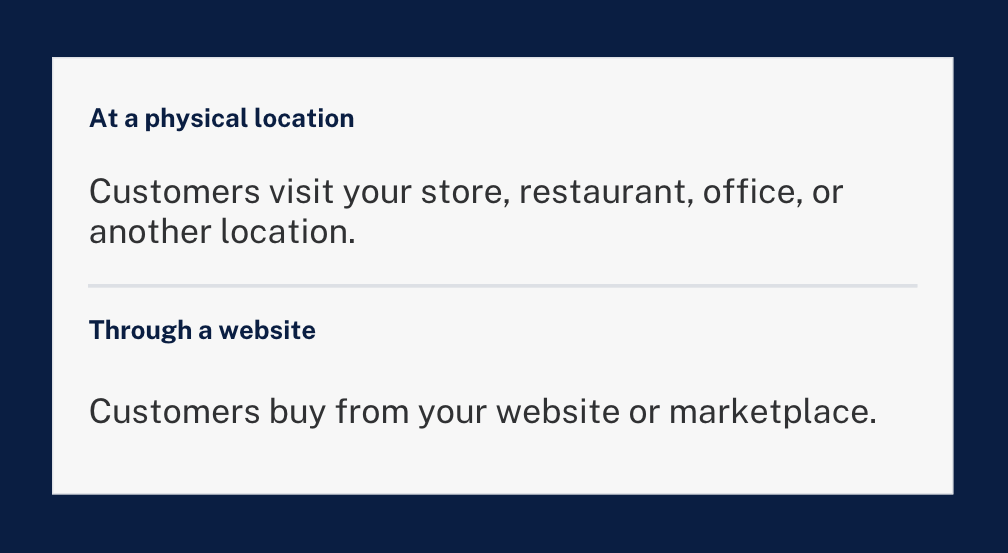
Business Hub asked us whether customers reach us at a physical location or through a website. We registered Brightsand Designs, a marketing agency, as an online business through our website.
OpenAI has not released the full list of who counts as eligible. The fastest test is to search for your business in Business Hub and see what it offers you.
How do I register my business on ChatGPT?
These are the steps we followed. Have these ready: access to your domain's DNS settings and a government-issued ID.
Step 1: Open ChatGPT Business Hub
Sign in to ChatGPT and go to chatgpt.com/business-hub. Use an account your business owns, not a personal login that leaves with an employee.

Step 2: Search for your business name
If your business appears, select it to claim it. If it doesn't, select the plus sign to create your profile.
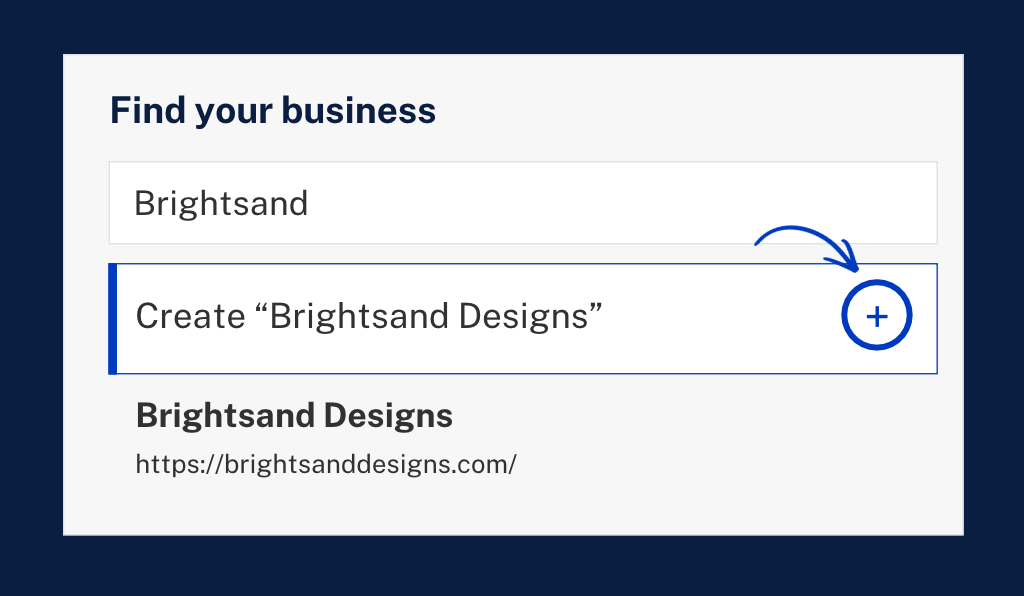
Step 3: Choose your business type
Business Hub asks how customers reach you. Choose the website option if you’re an online business or customers buy from your website.
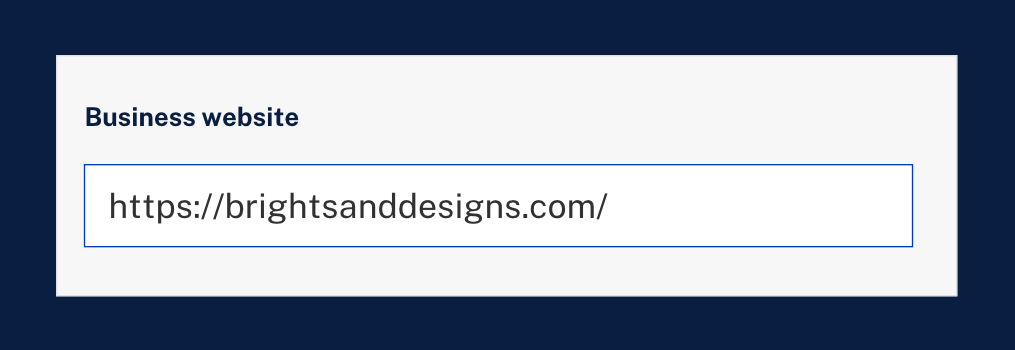
Step 4: Add your website
Enter the web address customers use to find you.
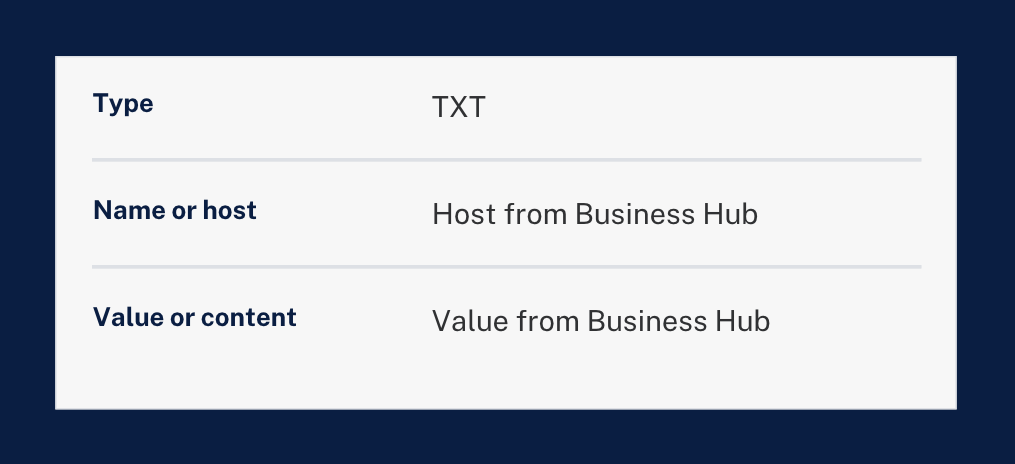
Step 5: Verify that you own your website
Business Hub gave us a TXT record to add to our domain's DNS settings. It has three parts: a type, a name or host, and a value. Copy them exactly as Business Hub shows them.
Not sure where to enter the record? Hide the values in a screenshot and ask ChatGPT to walk you through it.
Want the exact clicks? Follow our step-by-step guide: How to verify your business on ChatGPT in cPanel, GoDaddy and more.
Step 6: Add your phone and email
Both are optional. Add the contact details you want customers to use.
Step 7: Verify your identity
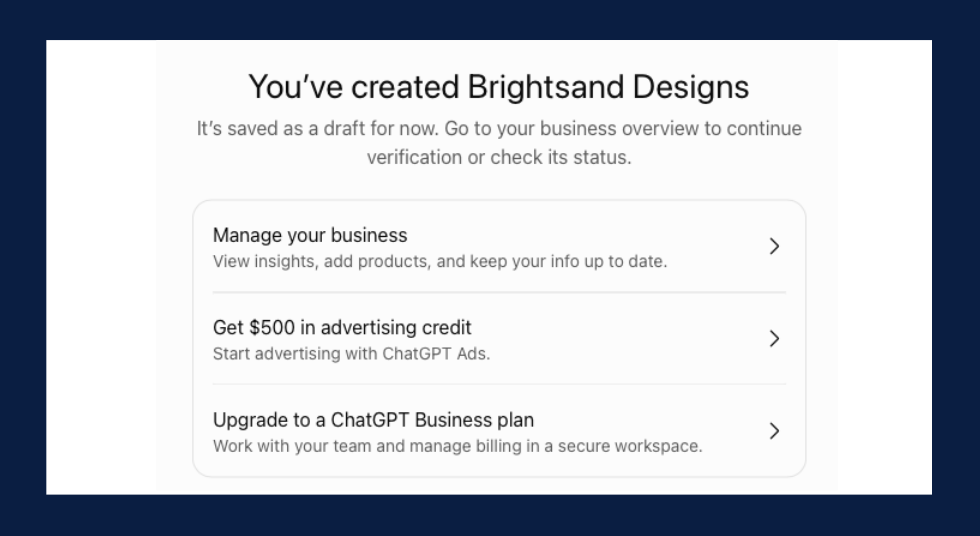
Your profile starts as a draft. Business Hub then asks you to verify with a government-issued ID. It told us this is required before editing business information or publishing a Business Agent.
That is where we are now. Brightsand's profile is created, and we are waiting to be approved.
Step 8: Complete your profile
Once you are approved, update your business information. If you sell products, add them.
Step 9: Track mentions and website clicks
Check back after a few days to see whether data has started coming in.
What did it look like when we registered Brightsand?
This is what we saw on our own screens.
- Our profile started as a draft. “Brightsand Designs” appeared with a Draft label right after setup.
- Identity verification comes next. The overview prompted us to verify with a government-issued ID.
- The data started empty. Mentions and website clicks both showed a dash.
- Ads appeared immediately. ChatGPT offered advertising credit and a suggested campaign. We skipped it.
[PUT IMAGE HERE: Image 7. Alt text: ChatGPT Business Hub overview for Brightsand Designs showing draft status, identity verification and brand insights]
Does this mean ChatGPT has ads now?
Yes. ChatGPT has an advertising product called ChatGPT Ads, and it was offered to us during setup.
After creating our profile, we were offered advertising credit and a suggested campaign through Ads Manager.
So registering and advertising sit side by side. Registering is the free part. Ads are the paid part, and they are optional.
What do ChatGPT ads look like?
We can only show you the recommended campaign automated by ChatGPT upon sign-up.
The ad preview in Ads Manager showed our business name, an "Ad" label, a headline, a short line of text, and an image. The recommended campaign had an objective (clicks), a location, a destination URL, and a suggested budget of $100 a day, which we could edit.
We have not run a campaign yet. So we can't tell you yet where an ad appears for the person using ChatGPT, or what a click costs.
[PUT IMAGE HERE: Image 8. Alt text: ChatGPT Ads Manager recommending an optional ad campaign after registering a business]
Do I have to pay for ads to show up in ChatGPT?
No. We registered without buying a single ad.
Our advice: register first, wait for your own numbers, then decide whether ads are worth testing.
Do ads change what ChatGPT recommends?
This is the question we most want answered, and we can't verify it from the outside. We won't guess.
What we can say is that nothing in OpenAI's announcement promises that a registered business, or an advertiser, gets recommended more. We are watching this closely and will update this article as we learn more.
Is ChatGPT turning into Google?
It is starting to build a familiar toolkit. Google has business profiles, analytics, and ads. ChatGPT now has versions of all three.
| ChatGPT | ||
|---|---|---|
| Business profile | Google Business Profile | Business Hub |
| Your numbers | Google Search Console | Mentions and website clicks in Business Hub |
| Advertising | Google Ads | ChatGPT Ads |
| What people get | A page of results to choose from | An answer in a conversation |
The last row is the biggest difference. On Google, people scan results and choose. In ChatGPT, they ask a question and get an answer. That makes showing up in the answer especially valuable.
Business Hub does not replace your Google Business Profile. We highly recommend you keep both with the same details.
Will registering make ChatGPT recommend my business?
Registering is not a ranking button. It gives you a say in your own information and a view of how people engage with you.
What ChatGPT says about you still starts with what it can find. That means clear, consistent information about your business, and a website that answers what your buyers ask. The fundamentals of SEO still apply.
What should I do now?
- Ask ChatGPT about your business. Note anything wrong or outdated.
- Register your business on ChatGPT. Use the steps above.
- Keep your business details consistent everywhere. Name, description, locations, and services should match on your website, Google Business Profile, LinkedIn, and every directory.
- Write one clear sentence about what you do. [Company] is a [category] that [does what] for [whom]. Use it everywhere.
- Bring your website up to date. Update the pages your buyers land on first.
- Check back on your numbers. Look at mentions and website clicks after a few days.
What don't we know yet?
Since it’s just launched, this new feature is still new. There are still some important questions that do not have clear answers yet.
- How long approval takes. We are still waiting on ours.
- How much business it will send. Our numbers are still blank. We will share them when they come in.
- Whether registration stays free.
- When Business Agents open beyond the United States.
- Whether ads affect what ChatGPT recommends.
We are looking forward to learning more, and we will update this article as we do.
My take
My first thought was the same as everyone's: so ChatGPT has a business hub and ads now, and it is starting to look like Google.
I think that is partly right. ChatGPT is building what Google built: a business profile, numbers and ads. But people use it differently. They don't scroll a page of links. They ask a question and get a direct answer. That makes being one of the businesses ChatGPT names potentially very valuable.
So I'm not treating this as one more listing to fill in. I'm treating it as the start of a new channel. I would rather learn it now, while it is early, than catch up later.
Quick answers
Is registering the same as claiming your business in ChatGPT?
Yes. OpenAI calls it claiming your business. If ChatGPT already lists you, you claim the listing. If not, you create a profile.
Can a service business or B2B company register?
We registered Brightsand Designs, a marketing agency, as a website business. We are waiting to be approved.
Is Businesses in ChatGPT the same as ChatGPT Business?
No. ChatGPT Business is a paid plan for your team. Businesses in ChatGPT is about how your business shows up to the public.
Does this replace Google Business Profile?
No. Keep both, with the same details.
The bottom line
Register your business on ChatGPT this week. Then strengthen the website, information and content behind it.
Want it done for you? Our team will register your business on ChatGPT, check what ChatGPT says about you today, and align your facts across every platform.


The Legal Pitfalls of Becoming an Online Business
Over the years, more and more people have started spending time online. In response, most businesses began to explore their digital options to expand their operations and consumer base. The advent of Covid-19 has fast-tracked this shift. Data from the US Commerce Department estimated that last year’s e-commerce sales in America reached $209.5 billion for the third quarter, marking a 37.1% year-on-year increase. As such, even brick-and-mortar businesses in America, especially those struggling due to the coronavirus, must focus on their digital platforms to survive.
The good news is that numerous online resources discuss website building. But before you do that, there are some steps you need to take to ensure you’re operating legally:
Create your website’s legal statements.
Anyone who has ever browsed the internet will recognize these legal pop-ups. Nobody reads them, but everyone ticks the “I Agree” checkbox anyway. But these legal statements, though often ignored, are critical in protecting website owners from being sued. Here’s why:
Privacy policy
Due to the nature of technology, nearly every online footprint we make is recorded. Any website that uses cookies or data analytics tracks private information, whether the owner knows it. The same applies to online businesses requiring customers to input sensitive data, such as credit card numbers when purchasing online.
Consequently, websites must explicitly post and adhere to a privacy policy by the laws of America's Federal Trade Commission. This outlines what information is recorded from a user and how that material is transmitted and used when visiting your page. If you don’t do this, legal action can quickly be taken against you.
Terms of Service
A website’s Terms of Service (ToS) statement lays down the general rules and regulations of your website and the relationship between the website owner and visitor. Once a user lands on your page, they automatically agree to these terms. In the case of online businesses, however, it’s highly recommended to force visitors to manually agree to the terms and conditions (see above) – usually via a pop-up message – to ensure you’ve got yourself legally covered.
Various Terms of Service templates can be found online, depending on the type of business you have. Still, hiring a legal professional to tailor your ToS agreement to your preferences is ideally best.
Disclaimer
A disclaimer’s purpose is to erase any accountability and liability attached to you in case someone suffers general harm following a piece of information you published. This also applies to online shops selling products like health supplements making unsupported claims. As with the ToS, drafting a disclaimer depends entirely on your niche, so consult a lawyer to account for potential legal risks.
Register as a business.
One of the best ways to keep your website legally compliant is to register it as a business with the local government. This assures customers that you’ve exercised due diligence to control everything – from permits and licensing requirements down to your business name – above board.
Luckily, this process is easy! Most states have recognized the growth of online businesses and made the process as simple as possible. Registering a company here in California can be done mostly online, and the Secretary of State's website has plenty of information available.
Similarly, to file for an LLC in Montana, which has the highest number of startups per capita, you need to consult state resources, allowing you to file your Articles of Organization online. The state government has even prepared e-commerce resources to help anyone who wants to start an online business in Montana. Although each state is different, most don’t require much effort to register.
Beware of libel and copyright infringement and libel
Blogging is a common strategy through which you can market your products. When creating content for your site, the sky’s the limit as long as you can connect the article’s subject to your services. But the more your audience grows, the more you must be careful about what you say. Defamation cases are rare but still a possibility.
Another thing to watch out for is copyright infringement. If you need to use an image for your website but aren’t sure where it came from, err on the side of caution instead. Please don’t use it to avoid potentially getting flagged and fined.
Setting up an online business is exciting; you can let loose your creativity and play around with the features offered by a digital marketplace. But before you do so, ensure you’ve covered all your legal bases.