

ChatGPT now lets you register your business
Right now, someone is asking ChatGPT who to hire in your industry. It is giving them an answer. Until this week, you had no say in what it said about you.
That just changed, and it raises real questions. Does ChatGPT have ads now? Is it turning into Google? Do you have to pay to show up? We registered Brightsand Designs on launch day to find out. Here is what we learned so far, including the parts nobody knows yet.
The short version: OpenAI has launched Businesses in ChatGPT, in beta. You can now register your business on ChatGPT through Business Hub, keep your information up to date, and see how people engage with you. We paid nothing to register. It is not a ranking button, but it gives you direct control over information you could not manage before.
What exactly did ChatGPT launch?
OpenAI calls it Businesses in ChatGPT, and it is in beta. It is a way for businesses to claim and manage their presence inside ChatGPT. There are two parts:
- ChatGPT Business Hub. Claim your business, update your information, and see how people engage with you.
- Business Agents. Let eligible businesses chat directly with customers through ChatGPT. OpenAI is starting with e-commerce and online service businesses in the United States.
What does this mean for my business?
ChatGPT is becoming another place where people discover, compare, and choose businesses. Now businesses have a way to manage how they show up on ChatGPT.
OpenAI claims 1.2 billion people use ChatGPT every week. Many has already been using it to ask it who to hire, what to buy, and which company to trust. Until now, you could not tell ChatGPT anything about your own business.
Now you can claim your business, keep your details current, and see how people engage with you. This becomes a game changer.
But one thing has not changed – ChatGPT still decides who to recommend.
How does registering your business in ChatGPT benefit my business?
- You manage your own information. Verified businesses can update key business details.
- You can add your products. Product feeds can include current pricing and availability.
- You get insights. Our Business Hub currently shows mentions and website clicks.
- You get an early look at the channel. This is still in beta, so businesses registering now can learn how it works while the platform is still developing.
Is it free to register your business on ChatGPT?
Upon registering our company, we paid nothing. We were not asked for a card, a top-up on an existing ChatGPT plan, nor has it asked us for an ad budget. Although ChatGPT did offer us optional extras, including ads. We skipped them and still successfully got our business registered.
Can my business register on ChatGPT?
OpenAI's rule is one sentence: any eligible business located where ChatGPT is available can claim their business through Business Hub.
Business Hub asked us whether customers reach us at a physical location or through a website. We registered Brightsand Designs, a marketing agency, as an online business through our website.
OpenAI has not released the full list of who counts as eligible. The fastest test is to search for your business in Business Hub and see what it offers you.
How do I register my business on ChatGPT?
These are the steps we followed. Have these ready: access to your domain's DNS settings and a government-issued ID.
Step 1: Open ChatGPT Business Hub
Sign in to ChatGPT and go to chatgpt.com/business-hub. Use an account your business owns, not a personal login that leaves with an employee.
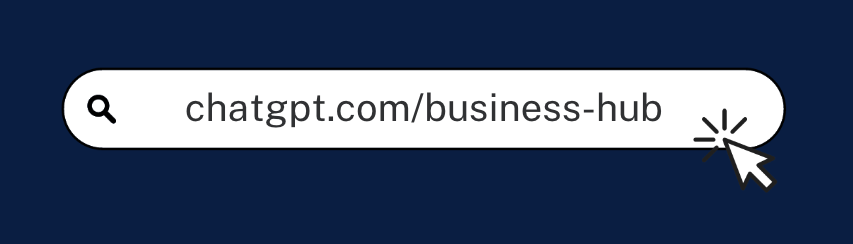
Step 2: Search for your business name
If your business appears, select it to claim it. If it doesn't, select the plus sign to create your profile.
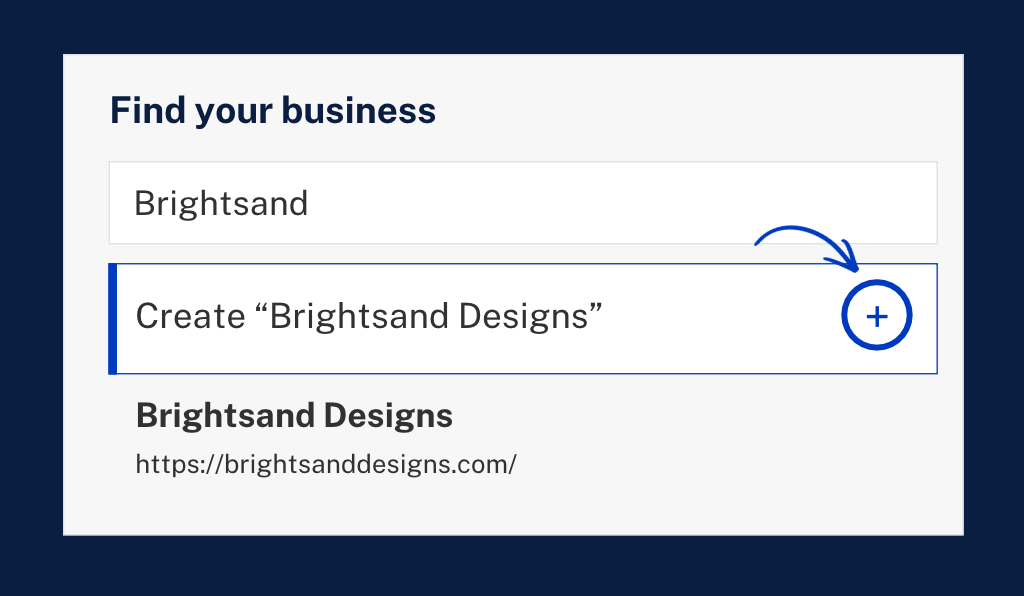
Step 3: Choose your business type
Business Hub asks how customers reach you. Choose the website option if you’re an online business or customers buy from your website.
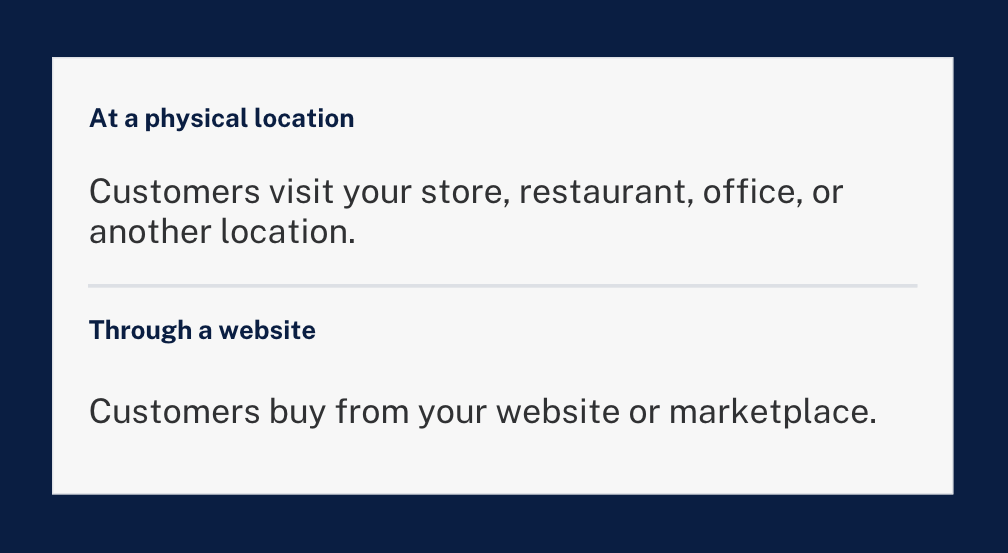
Step 4: Add your website
Enter the web address customers use to find you.
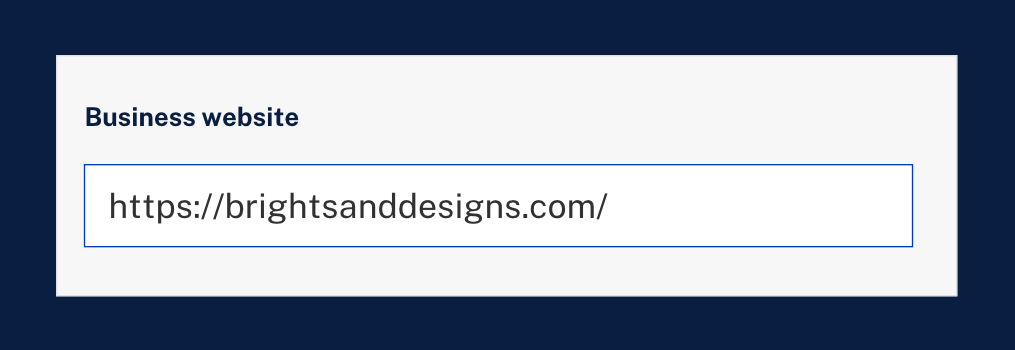
Step 5: Verify that you own your website
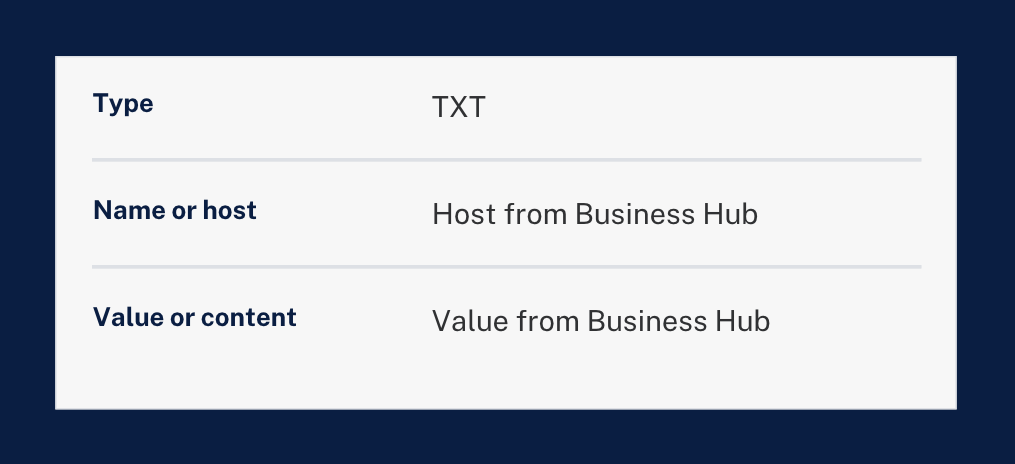
Business Hub gave us a TXT record to add to our domain's DNS settings. It has three parts: a type, a name or host, and a value. Copy them exactly as Business Hub shows them.
Not sure where to enter the record? Hide the values in a screenshot and ask ChatGPT to walk you through it.
Want the exact clicks? Follow our step-by-step guide: How to verify your business on ChatGPT in cPanel, GoDaddy and more.
Step 6: Add your phone and email
Both are optional. Add the contact details you want customers to use.
Step 7: Verify your identity
Your profile starts as a draft. Business Hub then asks you to verify with a government-issued ID. It told us this is required before editing business information or publishing a Business Agent.
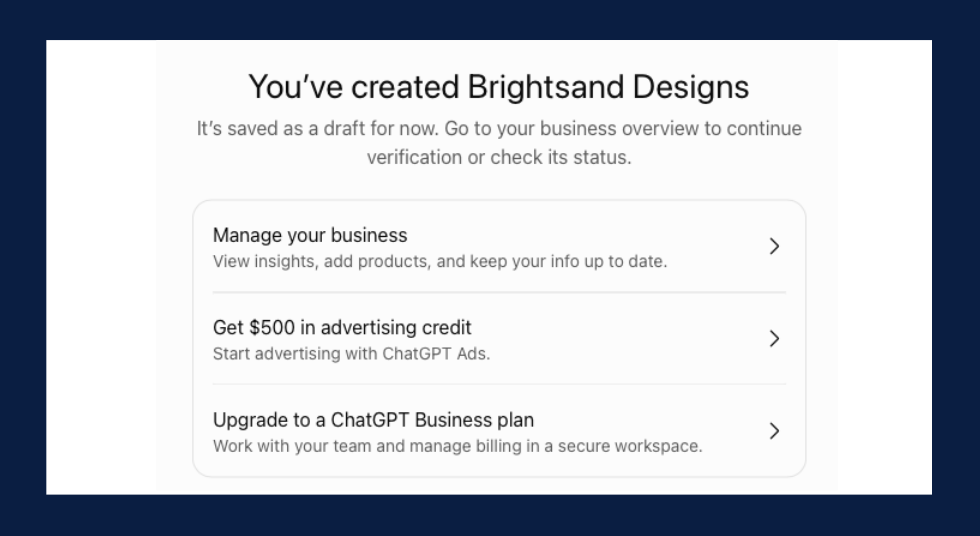
That is where we are now. Brightsand's profile is created, and we are waiting to be approved.
Step 8: Complete your profile
Once you are approved, update your business information. If you sell products, add them.
Step 9: Track mentions and website clicks
Check back after a few days to see whether data has started coming in.
What did it look like when we registered Brightsand?
This is what we saw on our own screens.
- Our profile started as a draft. “Brightsand Designs” appeared with a Draft label right after setup.
- Identity verification comes next. The overview prompted us to verify with a government-issued ID.
- The data started empty. Mentions and website clicks both showed a dash.
- Ads appeared immediately. ChatGPT offered advertising credit and a suggested campaign. We skipped it.
[PUT IMAGE HERE: Image 7. Alt text: ChatGPT Business Hub overview for Brightsand Designs showing draft status, identity verification and brand insights]
Does this mean ChatGPT has ads now?
Yes. ChatGPT has an advertising product called ChatGPT Ads, and it was offered to us during setup.
After creating our profile, we were offered advertising credit and a suggested campaign through Ads Manager.
So registering and advertising sit side by side. Registering is the free part. Ads are the paid part, and they are optional.
What do ChatGPT ads look like?
We can only show you the recommended campaign automated by ChatGPT upon sign-up.
The ad preview in Ads Manager showed our business name, an "Ad" label, a headline, a short line of text, and an image. The recommended campaign had an objective (clicks), a location, a destination URL, and a suggested budget of $100 a day, which we could edit.
We have not run a campaign yet. So we can't tell you yet where an ad appears for the person using ChatGPT, or what a click costs.
[PUT IMAGE HERE: Image 8. Alt text: ChatGPT Ads Manager recommending an optional ad campaign after registering a business]
Do I have to pay for ads to show up in ChatGPT?
No. We registered without buying a single ad.
Our advice: register first, wait for your own numbers, then decide whether ads are worth testing.
Do ads change what ChatGPT recommends?
This is the question we most want answered, and we can't verify it from the outside. We won't guess.
What we can say is that nothing in OpenAI's announcement promises that a registered business, or an advertiser, gets recommended more. We are watching this closely and will update this article as we learn more.
Is ChatGPT turning into Google?
It is starting to build a familiar toolkit. Google has business profiles, analytics, and ads. ChatGPT now has versions of all three.
| ChatGPT | ||
|---|---|---|
| Business profile | Google Business Profile | Business Hub |
| Your numbers | Google Search Console | Mentions and website clicks in Business Hub |
| Advertising | Google Ads | ChatGPT Ads |
| What people get | A page of results to choose from | An answer in a conversation |
The last row is the biggest difference. On Google, people scan results and choose. In ChatGPT, they ask a question and get an answer. That makes showing up in the answer especially valuable.
Business Hub does not replace your Google Business Profile. We highly recommend you keep both with the same details.
Will registering make ChatGPT recommend my business?
Registering is not a ranking button. It gives you a say in your own information and a view of how people engage with you.
What ChatGPT says about you still starts with what it can find. That means clear, consistent information about your business, and a website that answers what your buyers ask. The fundamentals of SEO still apply.
What should I do now?
- Ask ChatGPT about your business. Note anything wrong or outdated.
- Register your business on ChatGPT. Use the steps above.
- Keep your business details consistent everywhere. Name, description, locations, and services should match on your website, Google Business Profile, LinkedIn, and every directory.
- Write one clear sentence about what you do. [Company] is a [category] that [does what] for [whom]. Use it everywhere.
- Bring your website up to date. Update the pages your buyers land on first.
- Check back on your numbers. Look at mentions and website clicks after a few days.
What don't we know yet?
Since it’s just launched, this new feature is still new. There are still some important questions that do not have clear answers yet.
- How long approval takes. We are still waiting on ours.
- How much business it will send. Our numbers are still blank. We will share them when they come in.
- Whether registration stays free.
- When Business Agents open beyond the United States.
- Whether ads affect what ChatGPT recommends.
We are looking forward to learning more, and we will update this article as we do.
My take
My first thought was the same as everyone's: so ChatGPT has a business hub and ads now, and it is starting to look like Google.
I think that is partly right. ChatGPT is building what Google built: a business profile, numbers and ads. But people use it differently. They don't scroll a page of links. They ask a question and get a direct answer. That makes being one of the businesses ChatGPT names potentially very valuable.
So I'm not treating this as one more listing to fill in. I'm treating it as the start of a new channel. I would rather learn it now, while it is early, than catch up later.
Quick answers
Is registering the same as claiming your business in ChatGPT?
Yes. OpenAI calls it claiming your business. If ChatGPT already lists you, you claim the listing. If not, you create a profile.
Can a service business or B2B company register?
We registered Brightsand Designs, a marketing agency, as a website business. We are waiting to be approved.
Is Businesses in ChatGPT the same as ChatGPT Business?
No. ChatGPT Business is a paid plan for your team. Businesses in ChatGPT is about how your business shows up to the public.
Does this replace Google Business Profile?
No. Keep both, with the same details.
The bottom line
Register your business on ChatGPT this week. Then strengthen the website, information and content behind it.
Want it done for you? Our team will register your business on ChatGPT, check what ChatGPT says about you today, and align your facts across every platform.

5 Practical Methods of Increasing Website Traffic
5 Practical Methods of Increasing Website Traffic
More website traffic can create more chances for people to discover your business, learn what you offer, and take the next step.
But traffic on its own is not the goal. The better goal is to attract people who are genuinely interested in your content, products, or services.
If you are still learning how organic search works, start with What Is SEO? A Beginner's Guide to Search Engine Optimization. It explains the SEO basics behind search visibility, keywords, content, technical setup, and links.
Once that foundation is clear, these five methods can help you turn it into steady website growth.
1. Improve Pages That Already Have Search Potential
One of the fastest ways to grow organic traffic is to improve pages that already appear in search. Instead of always starting from zero, look for existing pages that earn impressions or visits but could perform better.
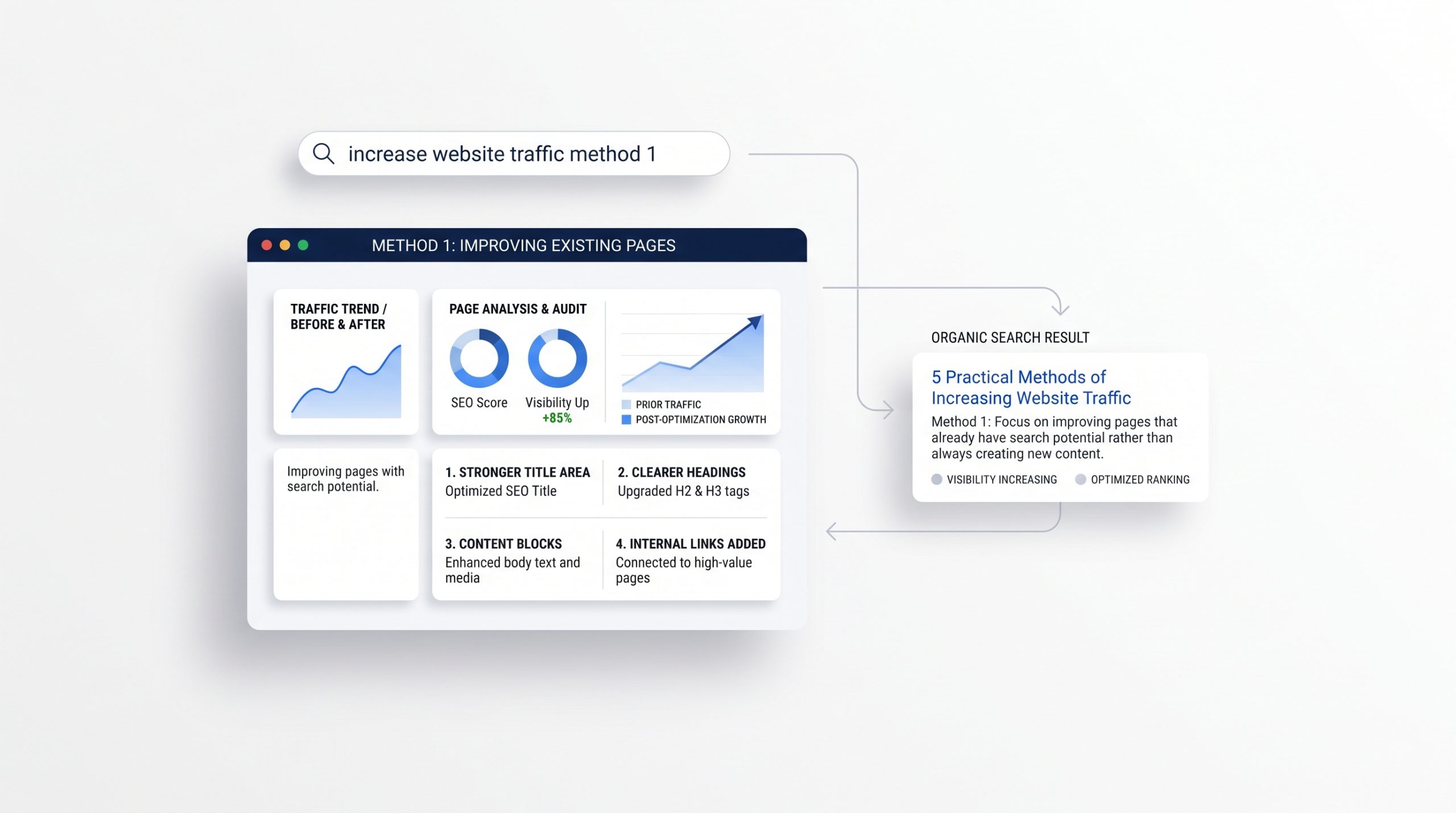 Review your most important pages in Google Search Console. Look for pages that are already being shown for useful searches.
Then check whether the page fully answers what people are looking for. A stronger title, clearer headings, better examples, updated information, or a more useful introduction can make the page easier to understand.
Internal links can help too. Link related pages together so visitors can keep exploring the topic.
A clear website structure also makes it easier for both visitors and search engines to move through your content.
Small improvements to pages that already have visibility can often be more useful than publishing another page with no clear purpose.
2. Create Content Around Real Search Questions
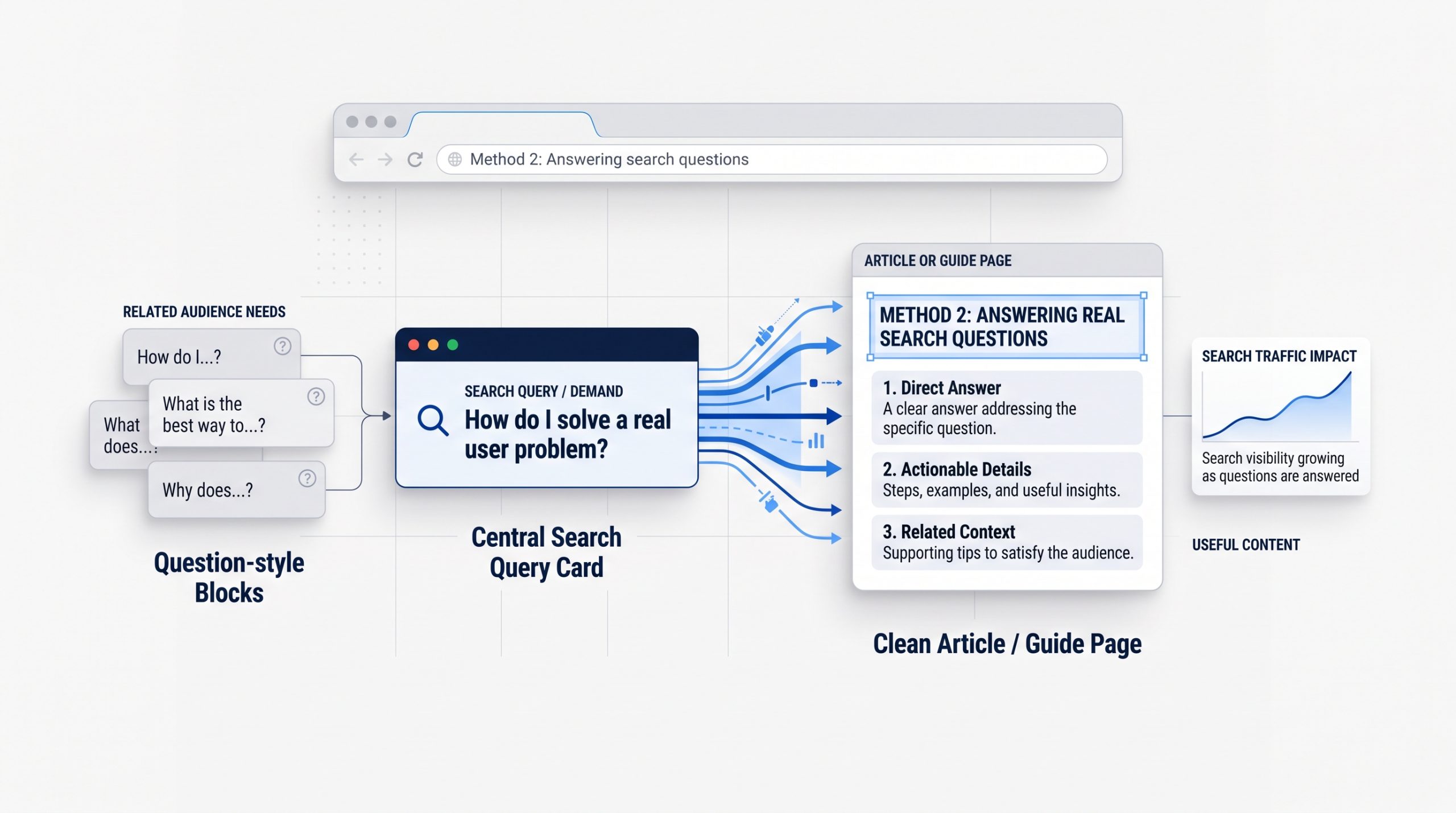
Useful content can bring new visitors to your site when it answers questions people are already searching for. Focus on problems, comparisons, how-to questions, and topics that connect naturally to what your business knows or offers.
Start with the questions customers ask before they buy.
Those questions can become blog posts, FAQs, guides, checklists, or comparison pages.
For example, a service business may answer questions about cost, process, timelines, common mistakes, or how to choose the right provider.
The goal is not to publish as much as possible. It is to create content with a clear reason to exist.
Your SEO foundation matters here. The beginner's guide to SEO explains how search intent and keyword research can help you choose topics that match what people actually need.
3. Promote Useful Content Through Social Media and Email
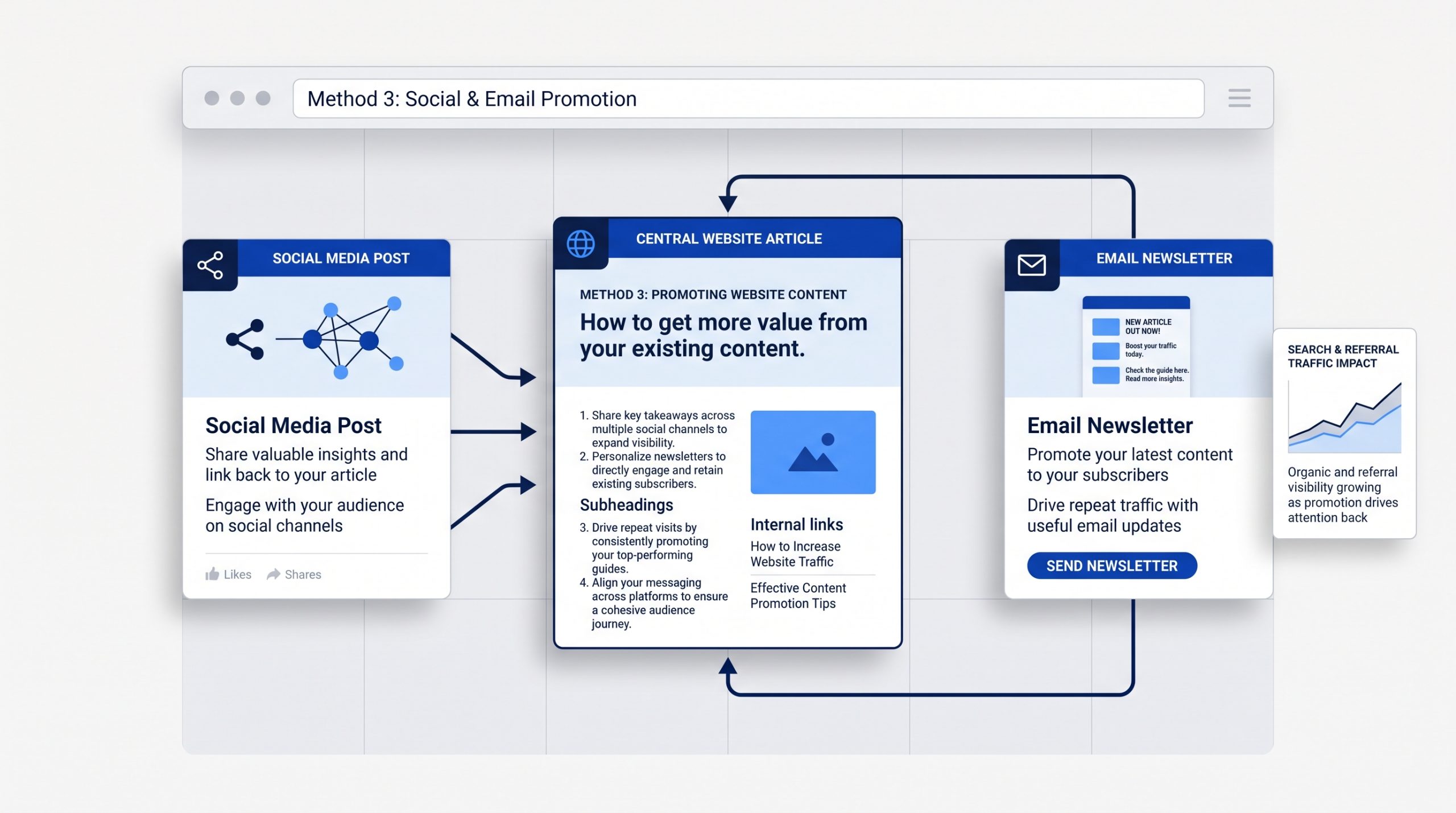
Publishing a useful page does not mean people will automatically find it. Social media and email can give new content an early push while also bringing existing followers, subscribers, and customers back to your website.
 Do not copy the whole article into a social post.
Pull out one useful point, question, example, or takeaway. Then give people a reason to visit the full page.
The same approach works with email. A short introduction can highlight why the article matters and direct readers to the website for the full answer.
A focused social media strategy helps connect each post to a wider business goal instead of treating social content as a separate activity.
The key is to promote pages that are genuinely worth the click.
4. Build Referral Traffic Through Relevant Mentions and Links
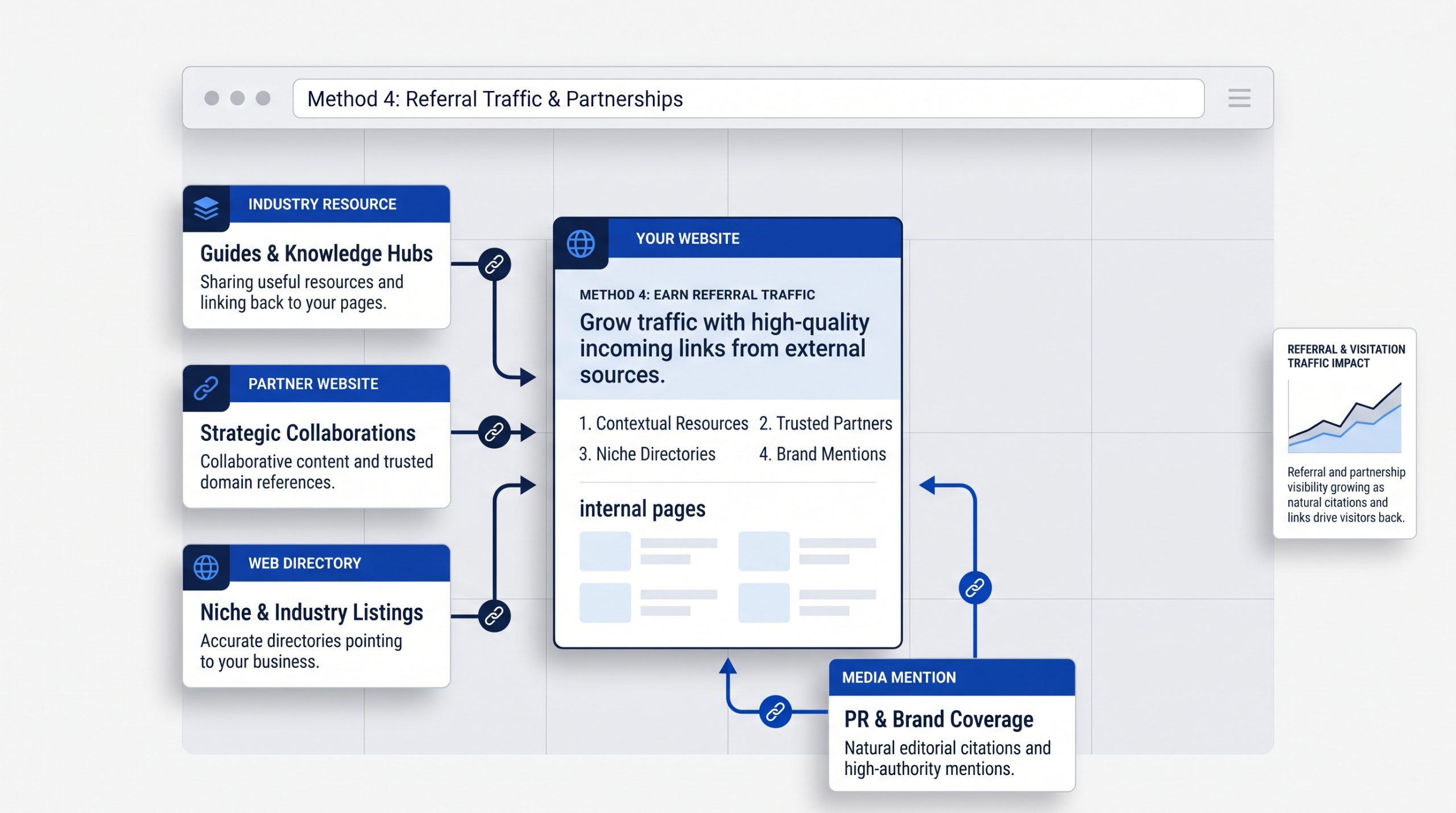
Referral traffic comes from people clicking to your website from another site. Relevant links, partnerships, directories, media mentions, and industry resources can introduce your business to audiences that may not find you through search or social media first.
 Look for places where your website genuinely belongs.
That may include industry associations, partner websites, supplier pages, local directories, guest features, podcasts, or useful resource lists.
Avoid chasing links only for the number.
A relevant mention on a trusted site can be more useful than many low-quality listings.
For local businesses in the Philippines, a carefully chosen business directory listing can also make the business easier to discover.
5. Measure What Brings the Right Visitors
Traffic growth becomes easier to improve when you know where visitors come from and what they do after they arrive. Measure the channels, pages, and topics that bring useful visitors instead of focusing only on the total traffic number.
 Google Search Console can show how your pages perform in organic search. Analytics can help you understand what visitors do once they reach the site.
Look at questions such as:
Which pages bring the most relevant traffic?
Which search topics are growing?
Which social or referral sources send engaged visitors?
Which pages lead to inquiries, sign-ups, sales, or another useful action?
Use those answers to decide what to improve next.
If one topic consistently brings the right visitors, build on it. If a page receives traffic but leads nowhere, improve the page or the next step.
A Simple Website Traffic Plan
You do not need to use every traffic tactic at once. Start with a strong SEO foundation, improve the pages you already have, publish useful content, promote it through the channels you use, and measure which efforts bring the right people back.
A simple monthly routine can be enough:
Review search performance.
Improve one existing page.
Publish one useful new piece of content.
Promote it through social media or email.
Look for one relevant referral or partnership opportunity.
Then use the results to decide what deserves more attention next month.
BSD Perspective
At BSD, we see website traffic as part of a wider digital system. SEO, content, social media, email, website design, and referrals work better when they support the same audience and business goal.
More traffic is useful only when the website gives those visitors a clear reason to stay.
That means the page needs a clear message, useful information, an easy experience, and a logical next step.
Instead of chasing traffic from every channel, focus on building a smaller number of reliable paths that bring the right people to the right pages.
Build Traffic Around What Your Audience Actually Needs
Increasing website traffic is not about finding one perfect channel. It comes from making your website easier to discover, creating content worth visiting, promoting that content in the right places, earning relevant mentions, and learning from the results.
Start with the method that fits your biggest gap.
If search visibility is weak, improve SEO.
If useful pages exist but few people see them, improve promotion.
If visitors arrive but do not take action, improve the website experience.
The strongest traffic strategy is the one you can keep improving over time.

What Is SEO? A Beginner's Guide to Search Engine Optimization
What Is SEO? A Beginner's Guide to Search Engine Optimization
What is SEO, and why does it matter?
Search engine optimization helps people find useful pages when they search online. It also helps search engines discover, understand, and present those pages in the right context.
That sounds simple. The confusing part is everything that sits underneath it.
SEO can involve keywords, content, site structure, page speed, links, local listings, analytics, and technical settings. Search results have also changed. A results page can now include standard links, maps, images, videos, shopping results, and AI-assisted answers.
You do not need to master all of that at once.
The best place to start is with the basic system. Learn how search works. Understand what people are trying to find. Build useful pages for those needs. Make those pages easy to crawl and use. Then measure what happens and improve over time.
This guide is the starting point. As you go deeper, BSD’s SEO strategies, tools, and analytics can help you explore specific topics in more detail.
What This SEO Guide Covers
This guide explains the main parts of SEO in plain language. You will learn how search engines find pages, what keywords and search intent mean, how to optimize a page, how technical SEO works, why links matter, how local SEO differs, and how to measure results.
- What SEO means and how it differs from paid search
- How crawling, indexing, and search results work
- The main types of SEO
- Search intent and keyword research
- On-page SEO and content optimization
- Internal links and website structure
- Technical SEO basics
- Backlinks and off-page SEO
- Local SEO
- SEO measurement and Google Search Console
- SEO for AI-assisted search
- Common mistakes and a beginner checklist
What Is SEO?
SEO stands for Search Engine Optimization. It is the process of improving a website so search engines can find and understand its pages, while making those pages useful for the people searching. The goal is relevant organic visibility, not simply getting the highest possible ranking for any keyword.
 Organic visibility means appearing in unpaid search results.
SEO does not mean paying Google to place a page at the top. Paid search ads are a separate channel. They can appear above or around organic results, but the advertiser pays for those placements or clicks.
SEO focuses on earning visibility by creating pages that match a real search need and making the website easy for search systems to access and understand.
A strong SEO strategy usually connects three things:
- Search demand: what people actually look for.
- Page value: whether your page gives them a useful answer, product, service, or next step.
- Technical access: whether search engines can reach, process, and understand the page.
If one part is missing, the result becomes weaker. Great content that cannot be crawled may never get a fair chance. A fast site with thin content may be easy to access but not useful. A page that targets a popular keyword but answers the wrong need can also struggle.
Why SEO Matters
SEO helps connect existing demand with useful pages. People already use search to research problems, compare options, find local businesses, learn new skills, and make buying decisions. SEO gives your website a better chance to appear during those moments without relying only on paid advertising.
One of the biggest advantages of SEO is that a useful page can keep being discovered after it is published.
An ad usually stops producing traffic when the budget stops. A useful search page can continue earning impressions and clicks as long as it remains relevant, accessible, and competitive.
That does not mean SEO is free. It takes time, writing, design, development, research, maintenance, and analysis. The difference is that you are investing in assets on your own website.
SEO can also support other marketing work. A well-structured article can answer questions before a sales call. A service page can explain an offer clearly. A local page can help nearby customers find a business. A strong resource can earn links and referrals from other websites.
The best SEO work is not separate from the customer experience. It improves how people find, understand, and use the site.
How Do Search Engines Work?
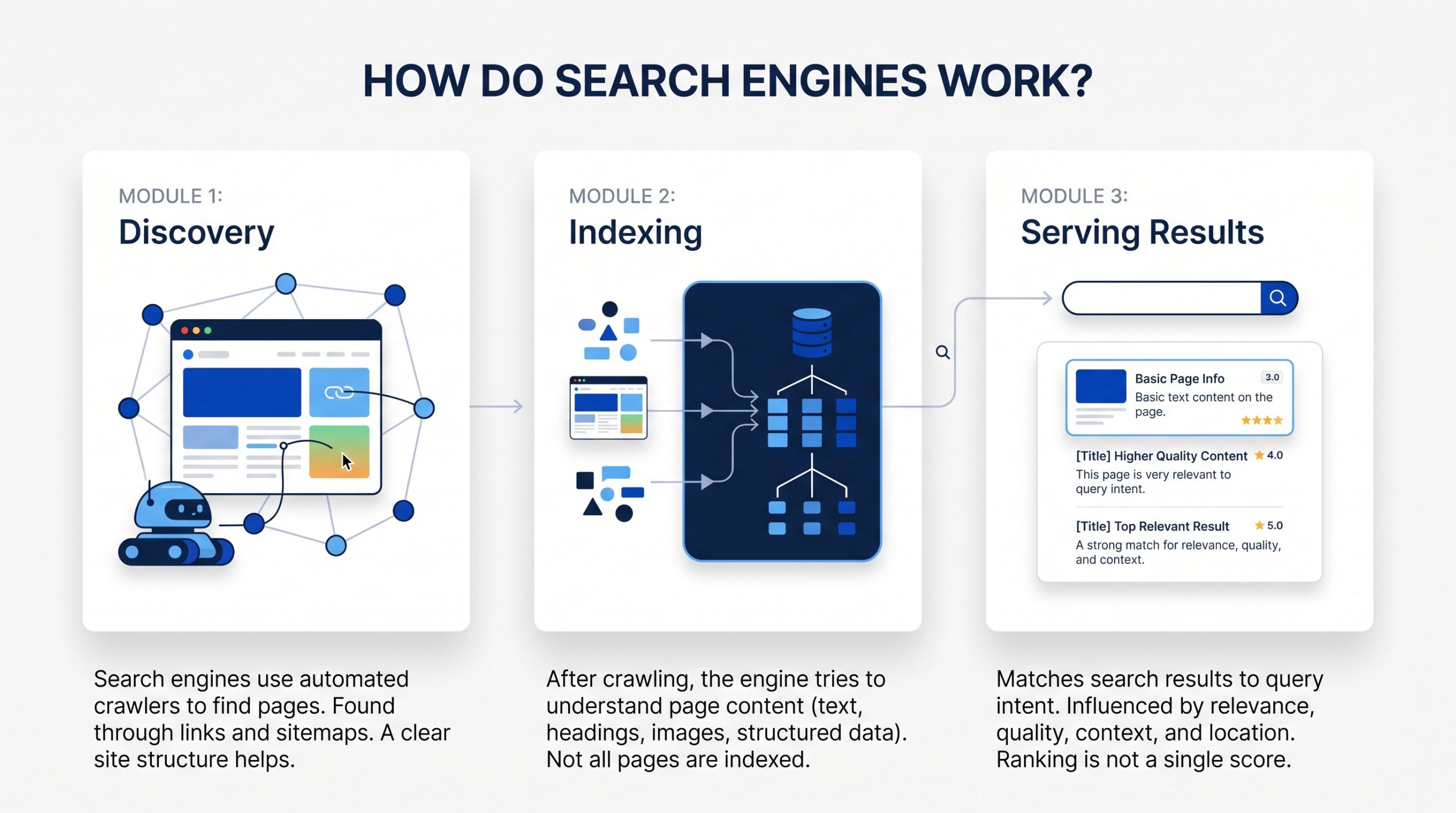
Search engines generally need to discover a page, understand and store information about it, then decide when it may be useful for a search. For beginners, it helps to think about three broad stages: crawling, indexing, and serving results. Each stage can affect whether a page becomes visible.
 1. Crawling: Finding Pages
Search engines use automated programs often called crawlers or bots to discover pages across the web.
They can find a page through links from other pages, through a sitemap, or because the URL is already known to the search engine.
Crawling does not mean a page will rank. It only means the search engine was able to reach and fetch it.
A clear website structure helps. Important pages should not be hidden behind broken links or isolated from the rest of the site.
2. Indexing: Understanding Pages
After a page is crawled, the search engine tries to understand what it contains.
It looks at the main text, headings, links, images, structured data, and other page signals. It also tries to understand which URL should represent the content when duplicate or very similar versions exist.
A page can be crawled without being indexed. Search engines do not have to keep every page they find.
3. Serving Results: Matching a Search
When someone searches, the search engine looks for results that fit the query and its likely intent.
Many systems and signals can influence which results appear. Relevance, quality, usability, context, location, and the type of search can all matter.
The important lesson for beginners is that ranking is not one score. There is no single switch that makes a page rank.
SEO improves the full set of signals that help a page become a strong match for the right search.
What Is a Search Engine Results Page?
A search engine results page, often called a SERP, is the page you see after entering a search. Modern SERPs can contain much more than traditional blue links. Depending on the query, you may see ads, local results, images, videos, rich results, shopping features, and AI-assisted answers.
This matters because SEO is no longer only about one list of ten links.
Different searches can produce very different layouts.
A local search may show a map and nearby businesses. A product search may show shopping features. A how-to search may include video or image results. An informational query may trigger an AI-generated overview with links to supporting sources.
Your SEO strategy should match the type of result people expect for the topic.
The Four Main Types of SEO
SEO is easier to understand when you divide it into four connected areas: on-page SEO, technical SEO, off-page SEO, and local SEO. Most websites use the first three. Local SEO becomes especially important when a business serves people in a specific area or has a physical location.
| SEO Area | What It Focuses On | Simple Example |
| On-page SEO | The content and elements on a page | Clear title, useful copy, headings, images, internal links |
| Technical SEO | How the website can be crawled, indexed, and used | Site speed, mobile experience, sitemaps, redirects, canonicals |
| Off-page SEO | Signals and references from outside the website | Relevant backlinks, mentions, digital PR |
| Local SEO | Visibility for location-based searches | Google Business Profile, reviews, location information, local citations |
These areas overlap. A strong article is still limited if the site has serious technical problems. A technically healthy site can still underperform if the content does not meet search intent. Good SEO brings the pieces together.
Search Intent Comes Before Keywords
Search intent is the reason behind a query. Before you choose a keyword, ask what the person is trying to accomplish. A page can mention the right phrase many times and still miss the search if it gives the wrong type of answer, format, or next step.
Imagine these searches:
- “what is SEO” suggests someone wants a beginner explanation.
- “SEO audit checklist” suggests someone wants a practical process or template.
- “SEO agency near me” suggests someone is comparing service providers.
- “Google Search Console login” suggests someone wants to reach a specific tool.
The topic is related in each case, but the intent is different.
That means the best page format may also be different. One query may need a guide. Another may need a service page, product page, comparison, local landing page, or quick answer.
Before writing, search the topic yourself. Look at the types of pages that appear. You are not copying them. You are learning what kind of result search systems currently see as useful for that query.
Keyword Research: Finding What People Search For
Keyword research is the process of learning the words and questions people use when they search. Good keyword research is not about collecting the biggest list. It is about understanding demand, intent, topic relationships, and which page on your site should answer each important search.
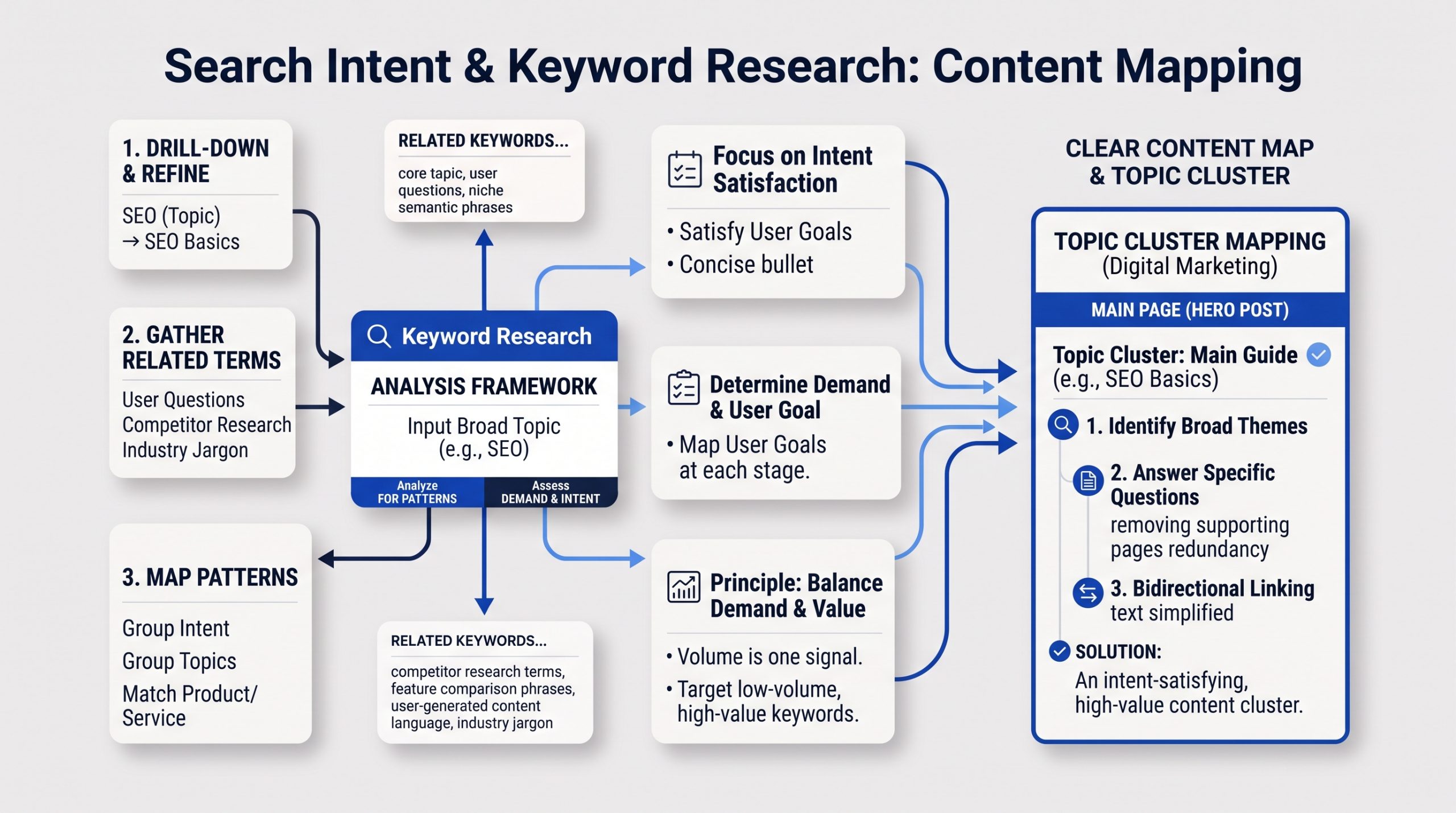 Start with a broad topic that matters to your audience.
For example, a website about digital marketing may start with “SEO.” That topic can lead to more specific searches such as “SEO basics,” “keyword research,” “technical SEO,” “local SEO,” or “how long does SEO take.”
Then look for patterns.
Which terms describe the same intent? Which questions need their own page? Which searches are too different to combine? Which terms connect naturally to a product or service?
Search volume can help you estimate demand, but it should not be your only filter.
A low-volume term can still be valuable if it closely matches what your audience needs. A high-volume term can be useless if your page cannot satisfy the intent or the audience is wrong.
Keyword research works best when it leads to a clear content map. One main page can cover the broad topic. Supporting pages can answer narrower questions and link back to the main guide.
That is one reason hero posts matter. They create a strong starting point for a topic cluster instead of leaving related articles isolated.
On-Page SEO: Making Each Page Clear
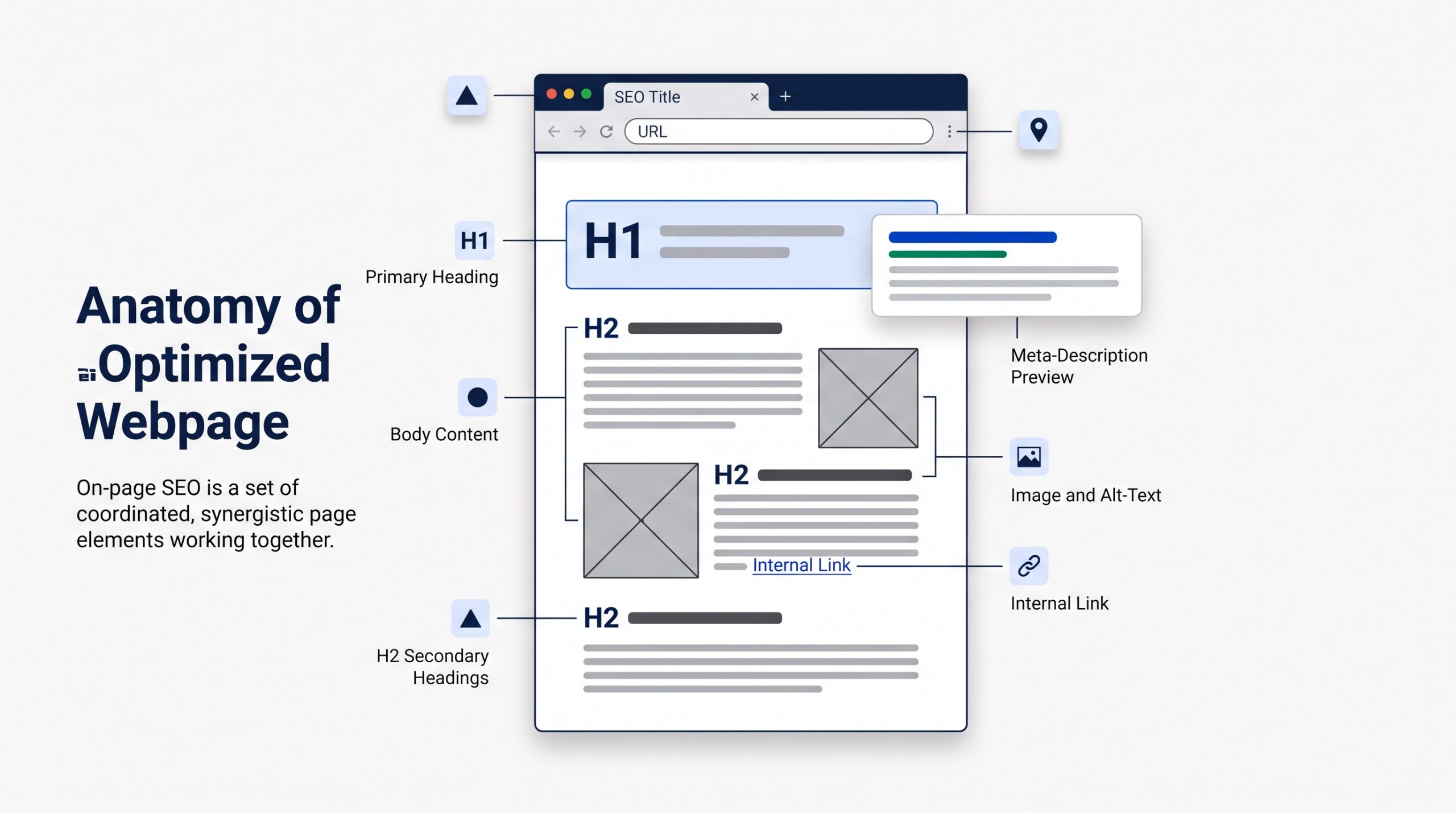
On-page SEO improves the content and visible structure of a page so people and search engines can understand it quickly. The goal is not to place a keyword everywhere. The goal is to make the topic, purpose, hierarchy, and next step clear from the title through the final paragraph.
 Page Title and SEO Title
The page title should explain what the page is about.
For a blog post, it should also give the reader a reason to click. Place the main topic early when it sounds natural.
The SEO title shown in search may be adjusted by the search engine, but writing a clear title still gives it strong source material.
Headings
Use one main H1 for the page title. Then use H2 and H3 headings to organize the content into clear sections.
Headings help readers scan. They also show how ideas relate to one another.
URLs
Keep URLs readable and focused.
A short slug such as /what-is-seo is easier to understand than a long URL filled with dates, filler words, or tracking terms.
Meta Descriptions
A meta description is a summary that search engines may use in the search snippet.
It is not a place to stuff keywords. Write a useful description that tells the searcher what they will get from the page.
Images and Alt Text
Images can help explain a topic and improve the page experience.
Use descriptive file names. Add alt text when the image communicates useful information. Alt text should describe the image in context, not repeat a keyword for SEO.
Internal Links
Internal links connect one page on your site to another.
They help people discover related information. They also help search engines understand how pages connect and which pages are important within a topic.
Use descriptive anchor text. Link to the next useful resource instead of adding links only to increase a count.
Content SEO: Create the Best Useful Answer You Can
Content SEO is the work of creating and improving pages so they fully answer a real search need. Useful content is accurate, focused, easy to understand, and supported by genuine knowledge or experience. Word count alone does not make a page helpful, and keyword repetition does not create expertise.
A short page can be excellent if the question is simple.
A detailed guide may need several thousand words because the topic has many parts.
The right length is the length required to do the job well.
Strong content usually does a few things clearly:
- Answers the main question early.
- Explains the details a beginner may not know.
- Uses examples where they make the idea easier to understand.
- Shows first-hand knowledge, original insight, or a clear point of view when relevant.
- Keeps information accurate and up to date.
- Makes the next step easy to understand.
Google continues to emphasize helpful, reliable, people-first content. That means SEO should support the reader, not turn the article into a collection of repeated phrases.
For a topic like SEO, freshness also matters. Search tools, interfaces, and search features change. Evergreen explanations should be reviewed when the platforms around them change.
Internal Linking and Website Structure
A clear website structure helps both visitors and search engines understand where information belongs. Important pages should be reachable through normal navigation and useful internal links. Related pages should support one another instead of competing, duplicating the same topic, or sitting alone without context.
Think of your website like a library.
The homepage is not the only useful page. Categories, service pages, guides, and supporting articles should be organized so a person can move from a broad topic to a more specific one.
For SEO, that often means creating a topic hub.
A hero article can explain the broad subject. Supporting posts can cover keyword research, technical SEO, local SEO, analytics, backlinks, or AI search in more depth. Those supporting posts should link back to the hero article, and the hero article should link out when a deeper explanation is useful.
The technical side of that structure is closely tied to website design and development. Navigation, mobile usability, content structure, and performance all shape how easy a site is to use and maintain.
Technical SEO: Making Sure the Site Can Be Found and Used
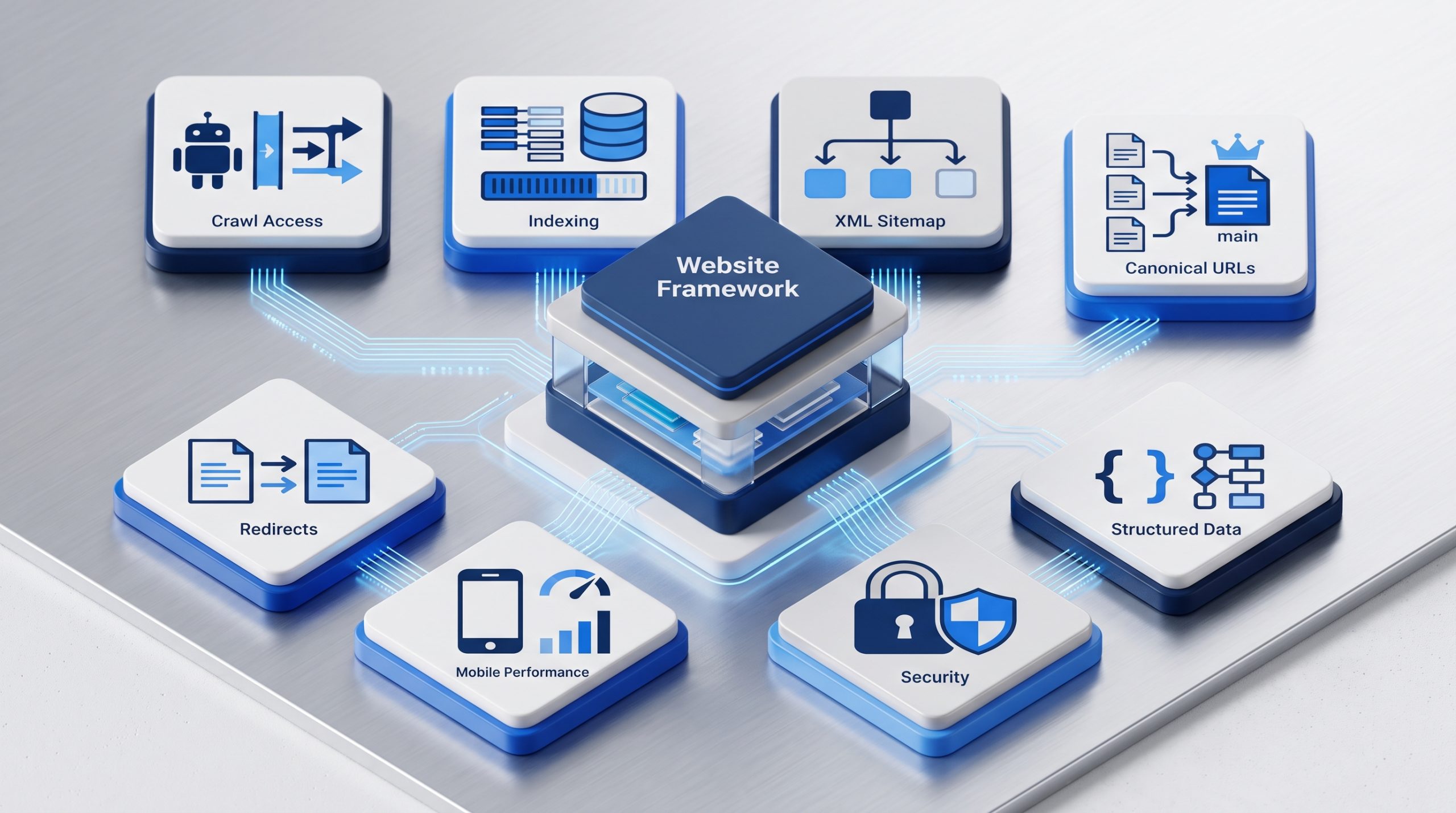
Technical SEO focuses on the systems behind the page. It helps search engines crawl and index important URLs and helps users access the site without unnecessary friction. You do not need to be a developer to understand the basics, but technical problems can block otherwise strong content.
 Crawlability and Indexing
Important pages need to be reachable by search engines.
Site navigation, internal links, robots settings, and server responses all affect access. If a page is blocked, broken, or returns the wrong status code, it may be difficult to process correctly.
Indexing is a separate step. A page can be crawled but not added to the index.
XML Sitemaps
An XML sitemap gives search engines a list of URLs you want them to know about.
It can help discovery, especially on larger or newer sites. A sitemap does not guarantee that every listed page will be indexed.
Canonical URLs
Sometimes several URLs contain the same or very similar content.
Canonical signals help search engines understand which version you prefer as the main URL.
Redirects and Broken Pages
When a page moves, use the right redirect so users and search engines reach the new location.
Broken links and long redirect chains create friction. They also make site maintenance harder.
Mobile Experience and Page Performance
Your pages should work well on phones, tablets, and desktops.
Google recommends looking at page experience as a whole. Core Web Vitals are useful measures, but they are not the only thing that matters. Security, mobile usability, intrusive interruptions, and the clarity of the main content also affect the experience.
Structured Data
Structured data is code that describes specific information on a page in a machine-readable format.
When it matches supported search features and accurately reflects the visible content, it can help search engines understand the page and may make it eligible for richer search appearances.
Structured data is not a guarantee of a rich result, and it does not replace useful content.
Off-Page SEO and Backlinks
Off-page SEO covers signals that happen outside your own website. Backlinks are one important part. A backlink is a link from another site to yours. Relevant links can help search engines discover pages and can support the wider signals that show a site or resource is known and referenced online.
Not all backlinks have the same value.
A useful link usually makes sense for the reader. It may come from an industry publication, a trusted partner, a useful directory, a news story, a research citation, or another site that genuinely wants to reference your resource.
Buying large batches of low-quality links is not a shortcut worth building a strategy around.
A better long-term approach is to create things that deserve references. That can include original research, strong guides, useful tools, templates, case studies, or expert commentary.
It is also important to separate Google’s own search systems from third-party SEO scores. For example, Domain Authority is not a Google ranking score, even though it can be a useful comparison metric inside some SEO tools.
Use third-party metrics as indicators, not as the final goal.
Local SEO: Getting Found in a Specific Area
Local SEO focuses on searches connected to a place. It matters most for businesses with physical locations or defined service areas. The goal is to make the business easy to understand and verify across its website, Google Business Profile, reviews, local mentions, and trusted business listings.
Google says local results are mainly influenced by relevance, distance, and prominence.
Relevance is how well the business matches the search. Distance considers how far the business is from the searcher or location used in the query. Prominence reflects how well-known the business is, including information from links and reviews.
For local SEO, start with accurate basics.
- Use complete and current business information.
- Keep the business name, address, phone number, hours, and categories accurate.
- Create useful location or service-area pages when they serve a real need.
- Ask for genuine customer reviews and respond to them professionally.
- Keep important listings consistent across trusted platforms.
For Philippine businesses, accurate listings in relevant business directories can support a clearer local footprint when the directories are reputable and the information stays consistent.
Do not create dozens of thin location pages that say the same thing with only the city name changed. Each location page should have a real reason to exist.
How to Measure SEO Results
SEO measurement should show whether the right people are finding and using your pages. Rankings can be useful, but they are only one signal. Search Console, analytics data, conversions, and business outcomes give a more complete view of whether SEO is creating useful visibility.
Google Search Console is one of the best places to start.
Its Performance reports can show clicks, impressions, click-through rate, and average position. You can also view performance by query, page, country, device, date, and search appearance.
Each metric answers a different question.
- Impressions show how often your site was seen in eligible search results.
- Clicks show how often someone clicked through to your site.
- CTR shows the share of impressions that became clicks.
- Average position gives a broad view of where your highest result appeared, but read it as a trend rather than a perfect rank tracker.
Then connect search data to what happens on the site.
Did visitors read the article? Did they explore another page? Did they submit a form, call, sign up, or buy?
The best metric depends on the page.
A beginner guide may be successful because it earns discovery and assists future visits. A service page may be more directly tied to enquiries. An ecommerce category page may be measured against sales and revenue.
Traffic matters. Relevant traffic matters more.
SEO and AI Search in 2026
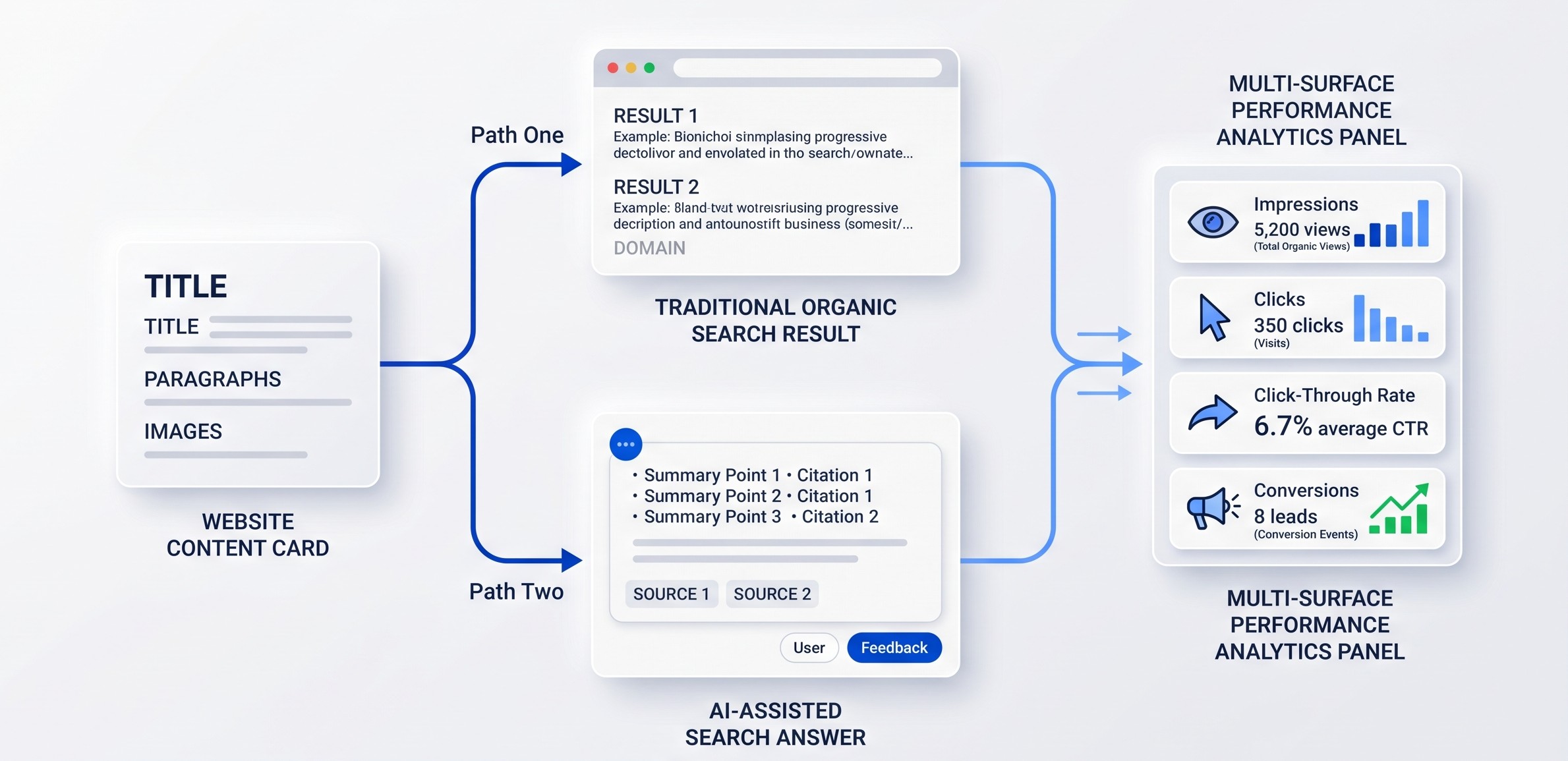
AI-assisted search changes how information can be presented, but it does not replace the foundations of SEO. Search systems still need accessible pages, clear information, useful content, and reliable signals. Google’s current guidance says established SEO practices continue to apply to its generative AI features.
 For site owners, that means you do not need a separate version of your website for AI search.
Keep your important pages crawlable. Answer questions clearly. Use headings that make the structure obvious. Add original details that make the page more useful than a generic summary. Use structured data when it accurately describes visible content.
Google also clarified in June 2026 that llms.txt files are not needed for Google Search and do not improve or hurt visibility or rankings there.
Search measurement is evolving too. AI Mode traffic now contributes to Search Console totals, and Google added reporting for web multimodal search in September 2026. That gives site owners more ways to understand discovery beyond traditional typed searches.
This wider shift toward AI search visibility is another reason to build strong web fundamentals instead of chasing one new optimization trick.
The search interface will keep changing. Clear, useful, well-structured information is still the safest foundation.
How Long Does SEO Take?
SEO is usually a long-term process, not an instant result. Search engines need time to discover changes, process pages, compare them with other results, and respond to new signals. The timeline depends on the website, competition, topic, technical condition, content quality, and strength of the existing brand.
Some changes can be noticed quickly.
Fixing a broken page, improving a title, or submitting a sitemap can have a visible effect sooner than building authority in a highly competitive market.
New websites often need more time because they have less history, fewer links, and less content.
Established sites may see faster movement on pages that already receive impressions.
Do not judge SEO only by whether one keyword moved this week.
Watch broader trends. Are relevant impressions growing? Are more useful pages earning clicks? Are conversions from organic search improving? Are technical problems decreasing?
SEO is easier to manage when you treat it as ongoing improvement instead of a one-time launch task.
Common SEO Mistakes Beginners Should Avoid
Most beginner SEO mistakes come from focusing on a tactic instead of the user and the full system. Keyword stuffing, thin pages, duplicated content, low-quality links, poor site structure, and chasing tool scores can all waste time. The basics work better when they are applied consistently and in context.
Keyword Stuffing
Repeating the same phrase again and again can make the page hard to read. Use the main keyphrase naturally, then use related language where it helps explain the topic.
Creating a Page for Every Tiny Keyword Variation
Several searches may share the same intent. One strong page can often cover them better than many thin pages that compete with each other.
Ignoring Search Intent
A keyword is not enough. Make sure the page format and answer match what the searcher is trying to do.
Publishing Without Internal Links
New content should connect to relevant pages on the site. Do not leave useful articles isolated.
Chasing One SEO Score
Tool scores can help diagnose issues, but no single score tells you whether a page will rank or convert.
Buying Low-Quality Links
Links created only to manipulate rankings can create risk. Build useful resources and earn relevant references instead.
Treating SEO as a One-Time Project
Search behavior, competitors, content, websites, and search features change. Review important pages and data regularly.
A Beginner SEO Checklist
You do not need to fix everything at once. Start with the pages that matter most, make sure search engines can access them, improve how well they answer real searches, connect them through internal links, and track performance. Then expand into deeper technical, content, local, and authority work.
- Set up Google Search Console and confirm the correct website property.
- Check that important pages can be crawled and indexed.
- Create or submit an XML sitemap.
- Choose one clear purpose and main topic for each important page.
- Research the search intent before choosing the target keyphrase.
- Write clear page titles, headings, URLs, and meta descriptions.
- Create useful content that answers the topic fully without keyword stuffing.
- Add descriptive internal links between related pages.
- Check mobile usability, loading performance, HTTPS, redirects, and broken pages.
- Use relevant structured data only when it matches visible content.
- Build real references, mentions, and backlinks over time.
- If location matters, keep your Google Business Profile and local listings accurate.
- Review Search Console data for impressions, clicks, CTR, queries, and page trends.
- Update important content when facts, tools, or search features change.
SEO Terms Beginners Should Know
SEO has a lot of vocabulary, but you only need a small group of terms to follow most beginner conversations. Learning these definitions makes technical guides, reports, and SEO tools much easier to understand.
| Term | Definition |
| SERP | The search engine results page shown after someone searches. |
| Keyword | A word or phrase connected to what people search for. |
| Search intent | The goal behind the search. |
| Crawl | When a search engine fetches a page to discover or process it. |
| Index | The collection of pages and information a search engine may use for results. |
| Organic result | An unpaid search result. |
| Backlink | A link from another website to your site. |
| Internal link | A link from one page on your site to another page on the same site. |
| Canonical | A signal that identifies the preferred version of similar or duplicate URLs. |
| XML sitemap | A machine-readable list of URLs that helps search engines discover site pages. |
| Structured data | Machine-readable markup that describes specific information on a page. |
| CTR | Click-through rate, or the percentage of impressions that result in clicks. |
BSD Perspective
At BSD, we see SEO as part of the whole digital experience. A page can be technically optimized and still fail if the message is unclear, the content is weak, or the website is difficult to use. Good SEO connects search intent, content, design, development, and measurement.
The most useful question is not “How do we make Google like this page?”
A better question is “How do we make this page easier to find, understand, trust, and use?”
That changes the work.
Keyword research becomes audience research. On-page SEO becomes clearer communication. Technical SEO becomes better access and performance. Internal linking becomes useful navigation. Analytics becomes a way to learn what people actually do.
Search engines will continue to change. The specific features may look different next year.
A useful website with clear information, strong structure, and a real reason to exist is a much more durable investment.
Start With the SEO Basics, Then Build From There
What is SEO? At its core, SEO is the practice of helping the right people discover the right page through search. It combines useful content, clear structure, technical access, internal and external signals, and ongoing measurement. The advanced tactics make more sense once this foundation is clear.
You do not need to become an SEO specialist before improving your website.
Start with the basics.
Understand what your audience searches for. Build the right page for that need. Make the page easy to read and easy to reach. Connect it to the rest of your site. Keep the technical foundation healthy. Measure what happens.
Then improve one layer at a time.
If your website needs stronger structure, content, performance, or search visibility, explore how BSD approaches website and digital marketing work as part of one connected system.
Frequently Asked Questions About SEO
Is SEO the same as Google Ads?
No. SEO focuses on unpaid organic visibility. Google Ads is paid advertising. Both can appear on search results pages, but they use different systems and budgets.
Do I need to use my exact keyword many times?
No. Use the main phrase naturally in important places, then explain the topic in normal language. Related terms and clear context are more useful than forced repetition.
Can I do SEO without technical skills?
Yes, you can handle many basics such as keyword research, titles, content, headings, internal links, and Search Console. More complex indexing, performance, migration, or server issues may need developer support.
Do backlinks still matter?
Relevant links still matter as part of how pages are discovered and how the web connects information. Focus on useful, earned references rather than buying large volumes of low-quality links.
Does structured data improve rankings?
Structured data can help search engines understand specific page information and can make a page eligible for certain rich search features. It does not guarantee a rich result or a ranking increase.
Is SEO still important with AI search?
Yes. AI-assisted search still depends on strong web content and search systems. Accessible pages, clear answers, useful information, and reliable signals remain important even as the search interface changes.

Enhancing User Experience and SEO with Infinite Scroll: A Comprehensive Guide
Understanding Infinite Scroll: A Seamless Journey
In today's fast-paced digital landscape, website design, and functionality are vital factors that can determine the success of your online presence. One intriguing feature gaining popularity is infinite scrolling, allowing users to seamlessly navigate content without needing multiple page loads. But what exactly is endless scroll, and how can you ensure it doesn't compromise your website's search engine optimization (SEO) efforts? In this article, we dive into infinite scrolling and explore three practical ways to create an SEO-friendly endless-scrolling page that captivates users and appeases search engine algorithms.
Understanding Infinite Scroll: A Seamless Journey
Infinite scrolling pages create a user experience akin to exploring an ever-unfolding content landscape. As visitors scroll down a webpage, new content continuously loads, eliminating the need for pagination or manual clicks to access additional information. This fluid interaction keeps users engaged, encouraging them to explore and discover more of what your website offers.
Crafting an SEO-Friendly Infinite Scrolling Page
Including a Comprehensive Sitemap: Guiding the Crawlers
A sitemap is like a roadmap for search engine crawlers, guiding them through the intricate pathways of your website. It's essential when dealing with infinite scroll pages that continuously load new content. Providing a sitemap in XML format, you help search engines locate and index the ever-expanding content efficiently. Ensure that each piece of loaded content has its dedicated URL and is linked appropriately within indexed pages. Regularly test and refine your sitemap to fine-tune it for SEO excellence.
Crafting a Thoughtful URL Structure: Navigating the Infinite
The URL structure is pivotal in maintaining an SEO-friendly infinite scroll page. Adopt a sequential approach to your URLs, reflecting the natural flow of content as users scroll down. It's imperative to avoid using relative-time-based URL parameters, as they introduce chronological complexity that can hinder SEO performance. Regularly perform web tests to identify opportunities for backend optimization, ensuring your URL structure remains clean, concise, and conducive to search engine algorithms.
Harnessing the Power of pushState: Enhancing Functionality and SEO
pushState, an HTML5 method, emerges as a critical player in the infinite scrolling narrative. By leveraging pushState, you dictate how content loading unfolds, integrating the state object and URL to align with your pagination format. This method ensures a smooth browsing experience while maintaining SEO integrity. Should you need to modify your browsing history, consider using replaceState. This invaluable feature enables users to scroll backward, revisiting pages within the pagination history.
Embrace Infinite Scroll: Elevate User Experience, Elevate SEO
Infinite scroll offers a dynamic and captivating user experience that can set your website apart from the competition. Implementing the above strategies ensures that this engaging feature doesn't compromise your SEO efforts. Remember, the essence of a successful online presence lies in striking a harmonious balance between captivating your audience and complying with search engine algorithms.
Explore the Possibilities with Brightsand Designs
At Brightsand Designs, we're not just designing visually stunning websites; we're about crafting holistic digital experiences that harmonize aesthetics, functionality, and SEO prowess. Discover how our expertise can help you navigate the exciting realm of infinite scrolling while optimizing your website for search engine success. Dive into our comprehensive process to uncover the possibilities that await your digital journey.
Conclusion: A Seamless Blend of User Engagement and SEO Excellence
Infinite scroll presents an exciting opportunity to revolutionize your website's user experience. By embracing this feature with careful consideration for SEO strategies, you can create a digital space that not only captivates your audience but also garners favor with search engines. With Brightsand Designs by your side, the dynamic harmony between user engagement and SEO excellence is well within your grasp.

How to Design a Website
The internet and its uses have come a long way. Websites are now prerequisites for businesses in the same way that every private individual has a Facebook page. Having a website for your business gives your company an air of legitimacy and authenticity. The worst part is that many believe they must be some tech genius to build a website. In today's highly competitive market, that's very understandable, which is why there are tools and websites that you can utilize that teach you How to Design a Website.
The fact is that 47% of people expect a web page to load in 2 seconds or less. Once it's up, it takes 0.05 seconds for people to form an opinion about your site. Studies have shown that 94% of first impressions are design-related.
Hosting /Domain
First things first, you'll need a domain. If you already have one, skip this step. As the internet has become more competitive with websites and their design, some hosting sites want to help everyone find a place online. You can find a more detailed list of hosting facts.
There are websites like Wix, Squarespace, and WordPress; you only need to pay a monthly fee, purchase a domain name (www.), and use their templates and platform. It comes down to your website's needs which will determine what kind of hosting you choose.
Define Purpose
Some people think it's all about the look of a website; others, it's usability. But the truth is, a unique balance of looks, clear copy, and usability is the key to having excellent web design.
Now that you have a host and a domain, it's time to define what kind of website you're designing. If it's selling a product, you'll want to focus more on the page's functionality. The main focus should be on the product more than the entire page aesthetic.
Whatever theme you choose, remember a website is your digital business card. Potential prospects will get an impression of your company, good or bad, depending on your site's impact on them.

Plan Out Your Web Design
It helps to look around other websites for inspiration, especially ones similar to your niche. You can get an idea of what you'd like to implement in your website design and what you don't. Just remember its views only. Full-on copying is not a good idea.
Your site should be yours, and the impact you want on your audience should be because of your design, content, and value, not because you copied what seems to work for someone else. A great place for ideas or a "vision board" would be Pinterest.
When you have a well-formulated plan about how you want to structure your page, this will help you with things like content management and user experience. Physically draw it out if you have to, or look up templates by Webflow that go best with your aim.
Your range of options is endless; this isn't a process that has to be rushed. Hubspot highlights the importance of specific areas on your website that can improve your UX that isn't covered here.
User Experience (UX)
The user experience should focus on the user. This part of your page design comes in many aspects but contributes to the whole thing. You want your visitors to locate what they want on your page quickly. Nothing will make them click off faster than not getting the information they need right away from you.
This feature is all about accessibility for users interacting on your site. Webdesignerdepot makes a case for the importance of UX to impact visitors positively. Anything from the font, typeface, or color can significantly impact the UX. Things to focus on:
-
- Clarity – The content and messaging of your website should be straightforward.
- Usability – The standard layouts for things like CTA (call to action) or logins should be easy to find.
- Mobile-Friendly – More people are on their phones and are more likely to look up sites on their mobile devices.
Layout
In our previous blog post here, we set an example of what kind of structure would be ideal for a page. The idea behind this is to clarify to first-time visitors where everything on your site is, like services and content. You don't want to have someone click off because they couldn't understand how to use your website.

We immediately put our services and related information above the fold so prospects can browse and see our services.
Two layout patterns are used for websites: the F Pattern and the Z Pattern.
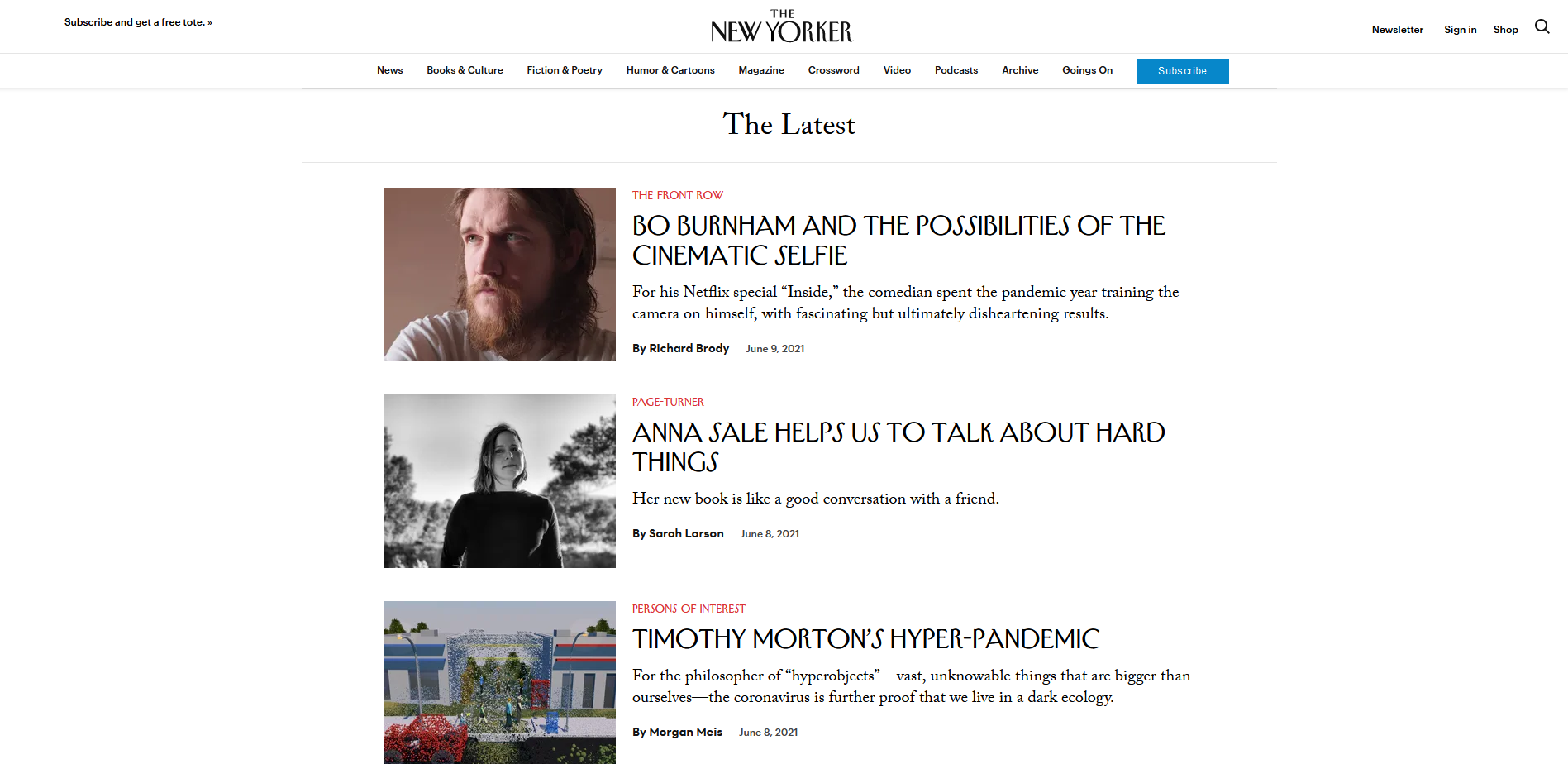
The New Yorker makes an excellent example of the F Pattern for layout. This layout is similar to Google search pages where you read in a horizontal movement, that's the top bar of the F. Then, you read the second line in the same direction, which forms the lower F bar until you eventually scan the rest. The Instagpage blog has a detailed explanation of this pattern.

The Z Pattern is often used in web design and is a more familiar layout. Instapage explains this pattern by showing how people will scan horizontally from left to right and then down to the left side, creating a diagonal line. Lastly, they go back across to the right side. This pattern is excellent for layouts with minimal text, making scanning through the page more accessible.
Content Management System (CMS)
A content management system (CMS) allows you to build a website without much technical knowledge. A user-friendly interface makes writing, publishing, and editing your content more accessible, like CTAs (call to action) buttons and other hyperlinks.
If you're familiar with WordPress.Org.,they, they use the CMS, making it much easier for their clients to create websites and add content. It's like opening up MS Word right there, online. You can add photos, links, and videos to one post. The best part is that multiple people can work on the same piece at the same time before publishing.
Other sites that offer CMS:
SEO (Seach Engine Optimization)
You probably hear a lot about this and wonder what it is. SEO is like having a restaurant with excellent food, but nobody knows about it. Now, you enhance the ambiance and add more options for different diners to the menu. The changes aren't that apparent, but they make a big difference.
SEO is a way to improve being seen on the first page of Google searches. For example, the content you put out, like the title and the meta description, allows people to see the post before clicking.
Search engines cannot read images, so having text and the idea will help Google see what you're describing. Also, if you have too many photos on your site, it may slow down. A quick fix for this is to compress the images.
Internal linking is another great tool when making posts. The process of you writing in-depth about a specific topic and how you link to another post about the same topic from a different site. Search engines will think you know much about this topic and rank you higher.
How You Can Apply These Tools
There's a lot that goes into making a website. It's widely shared for one to get too focused on the aesthetics of your website design. Still, it's essential that you also consider the functionality of your website – your user experience (UI). It is your audience that you need to reel in. Brightsand designs can help you apply all the tools mentioned above and more! We help you create a website that represents your vision with a seamless experience for your audience.
BRIGHTSAND Designs is a full-service digital marketing agency that prioritizes and transforms your ideas and potential into actuality. Our strength in design and professional branding is what we stand on to create the realities that our partners deserve.