

ChatGPT now lets you register your business
Right now, someone is asking ChatGPT who to hire in your industry. It is giving them an answer. Until this week, you had no say in what it said about you.
That just changed, and it raises real questions. Does ChatGPT have ads now? Is it turning into Google? Do you have to pay to show up? We registered Brightsand Designs on launch day to find out. Here is what we learned so far, including the parts nobody knows yet.
The short version: OpenAI has launched Businesses in ChatGPT, in beta. You can now register your business on ChatGPT through Business Hub, keep your information up to date, and see how people engage with you. We paid nothing to register. It is not a ranking button, but it gives you direct control over information you could not manage before.
What exactly did ChatGPT launch?
OpenAI calls it Businesses in ChatGPT, and it is in beta. It is a way for businesses to claim and manage their presence inside ChatGPT. There are two parts:
- ChatGPT Business Hub. Claim your business, update your information, and see how people engage with you.
- Business Agents. Let eligible businesses chat directly with customers through ChatGPT. OpenAI is starting with e-commerce and online service businesses in the United States.
What does this mean for my business?
ChatGPT is becoming another place where people discover, compare, and choose businesses. Now businesses have a way to manage how they show up on ChatGPT.
OpenAI claims 1.2 billion people use ChatGPT every week. Many has already been using it to ask it who to hire, what to buy, and which company to trust. Until now, you could not tell ChatGPT anything about your own business.
Now you can claim your business, keep your details current, and see how people engage with you. This becomes a game changer.
But one thing has not changed – ChatGPT still decides who to recommend.
How does registering your business in ChatGPT benefit my business?
- You manage your own information. Verified businesses can update key business details.
- You can add your products. Product feeds can include current pricing and availability.
- You get insights. Our Business Hub currently shows mentions and website clicks.
- You get an early look at the channel. This is still in beta, so businesses registering now can learn how it works while the platform is still developing.
Is it free to register your business on ChatGPT?
Upon registering our company, we paid nothing. We were not asked for a card, a top-up on an existing ChatGPT plan, nor has it asked us for an ad budget. Although ChatGPT did offer us optional extras, including ads. We skipped them and still successfully got our business registered.
Can my business register on ChatGPT?
OpenAI's rule is one sentence: any eligible business located where ChatGPT is available can claim their business through Business Hub.
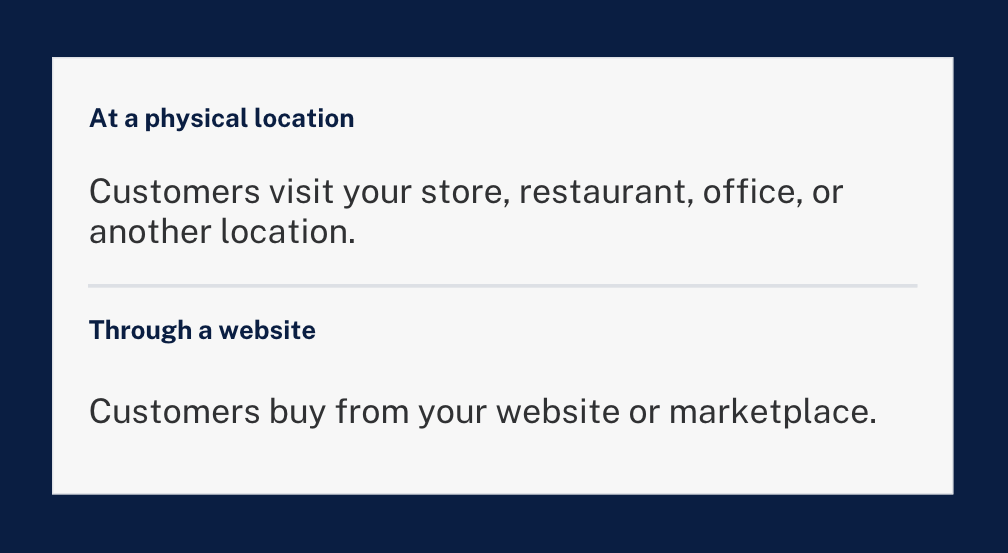
Business Hub asked us whether customers reach us at a physical location or through a website. We registered Brightsand Designs, a marketing agency, as an online business through our website.
OpenAI has not released the full list of who counts as eligible. The fastest test is to search for your business in Business Hub and see what it offers you.
How do I register my business on ChatGPT?
These are the steps we followed. Have these ready: access to your domain's DNS settings and a government-issued ID.
Step 1: Open ChatGPT Business Hub
Sign in to ChatGPT and go to chatgpt.com/business-hub. Use an account your business owns, not a personal login that leaves with an employee.

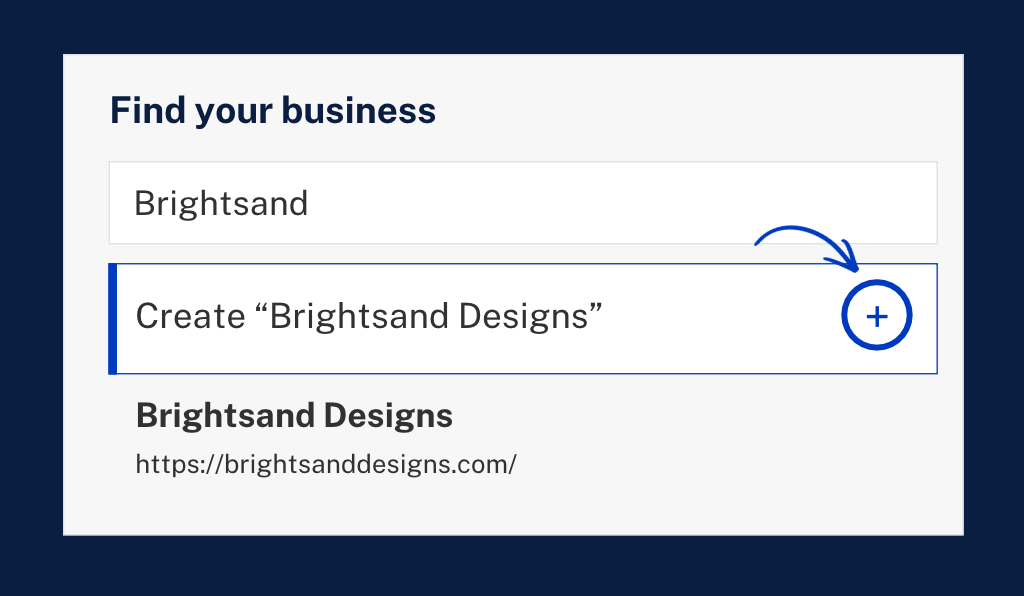
Step 2: Search for your business name
If your business appears, select it to claim it. If it doesn't, select the plus sign to create your profile.
Step 3: Choose your business type
Business Hub asks how customers reach you. Choose the website option if you’re an online business or customers buy from your website.
Step 4: Add your website
Enter the web address customers use to find you.

Step 5: Verify that you own your website
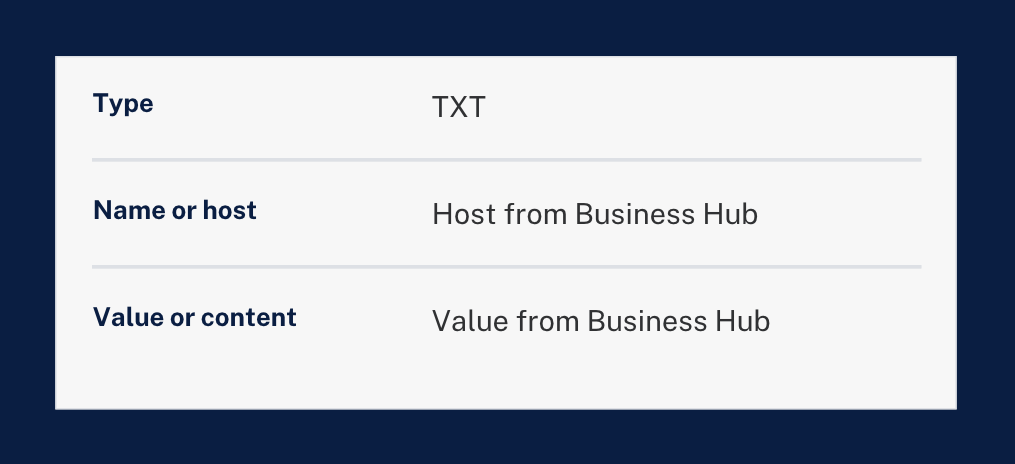
Business Hub gave us a TXT record to add to our domain's DNS settings. It has three parts: a type, a name or host, and a value. Copy them exactly as Business Hub shows them.
Not sure where to enter the record? Hide the values in a screenshot and ask ChatGPT to walk you through it.
Want the exact clicks? Follow our step-by-step guide: How to verify your business on ChatGPT in cPanel, GoDaddy and more.
Step 6: Add your phone and email
Both are optional. Add the contact details you want customers to use.
Step 7: Verify your identity
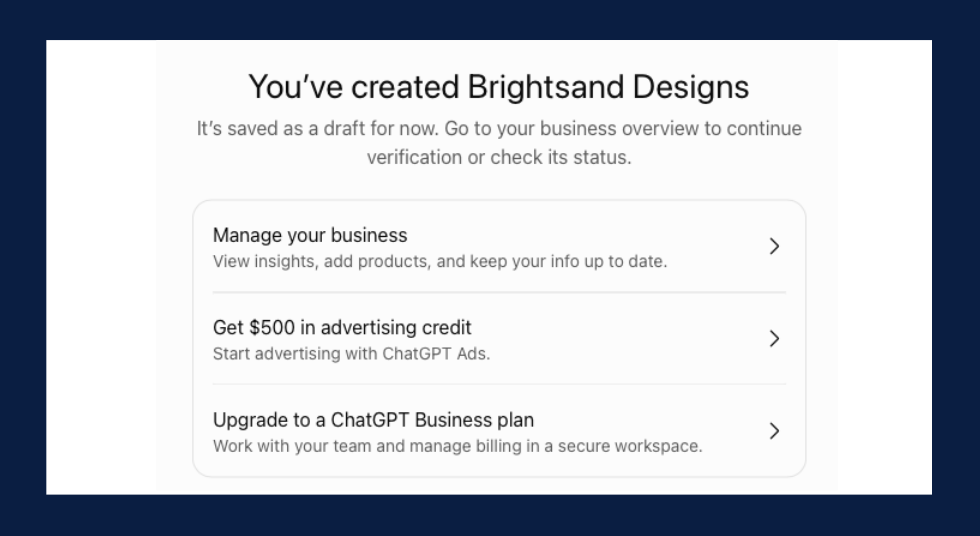
Your profile starts as a draft. Business Hub then asks you to verify with a government-issued ID. It told us this is required before editing business information or publishing a Business Agent.
That is where we are now. Brightsand's profile is created, and we are waiting to be approved.
Step 8: Complete your profile
Once you are approved, update your business information. If you sell products, add them.
Step 9: Track mentions and website clicks
Check back after a few days to see whether data has started coming in.
What did it look like when we registered Brightsand?
This is what we saw on our own screens.
- Our profile started as a draft. “Brightsand Designs” appeared with a Draft label right after setup.
- Identity verification comes next. The overview prompted us to verify with a government-issued ID.
- The data started empty. Mentions and website clicks both showed a dash.
- Ads appeared immediately. ChatGPT offered advertising credit and a suggested campaign. We skipped it.
[PUT IMAGE HERE: Image 7. Alt text: ChatGPT Business Hub overview for Brightsand Designs showing draft status, identity verification and brand insights]
Does this mean ChatGPT has ads now?
Yes. ChatGPT has an advertising product called ChatGPT Ads, and it was offered to us during setup.
After creating our profile, we were offered advertising credit and a suggested campaign through Ads Manager.
So registering and advertising sit side by side. Registering is the free part. Ads are the paid part, and they are optional.
What do ChatGPT ads look like?
We can only show you the recommended campaign automated by ChatGPT upon sign-up.
The ad preview in Ads Manager showed our business name, an "Ad" label, a headline, a short line of text, and an image. The recommended campaign had an objective (clicks), a location, a destination URL, and a suggested budget of $100 a day, which we could edit.
We have not run a campaign yet. So we can't tell you yet where an ad appears for the person using ChatGPT, or what a click costs.
[PUT IMAGE HERE: Image 8. Alt text: ChatGPT Ads Manager recommending an optional ad campaign after registering a business]
Do I have to pay for ads to show up in ChatGPT?
No. We registered without buying a single ad.
Our advice: register first, wait for your own numbers, then decide whether ads are worth testing.
Do ads change what ChatGPT recommends?
This is the question we most want answered, and we can't verify it from the outside. We won't guess.
What we can say is that nothing in OpenAI's announcement promises that a registered business, or an advertiser, gets recommended more. We are watching this closely and will update this article as we learn more.
Is ChatGPT turning into Google?
It is starting to build a familiar toolkit. Google has business profiles, analytics, and ads. ChatGPT now has versions of all three.
| ChatGPT | ||
|---|---|---|
| Business profile | Google Business Profile | Business Hub |
| Your numbers | Google Search Console | Mentions and website clicks in Business Hub |
| Advertising | Google Ads | ChatGPT Ads |
| What people get | A page of results to choose from | An answer in a conversation |
The last row is the biggest difference. On Google, people scan results and choose. In ChatGPT, they ask a question and get an answer. That makes showing up in the answer especially valuable.
Business Hub does not replace your Google Business Profile. We highly recommend you keep both with the same details.
Will registering make ChatGPT recommend my business?
Registering is not a ranking button. It gives you a say in your own information and a view of how people engage with you.
What ChatGPT says about you still starts with what it can find. That means clear, consistent information about your business, and a website that answers what your buyers ask. The fundamentals of SEO still apply.
What should I do now?
- Ask ChatGPT about your business. Note anything wrong or outdated.
- Register your business on ChatGPT. Use the steps above.
- Keep your business details consistent everywhere. Name, description, locations, and services should match on your website, Google Business Profile, LinkedIn, and every directory.
- Write one clear sentence about what you do. [Company] is a [category] that [does what] for [whom]. Use it everywhere.
- Bring your website up to date. Update the pages your buyers land on first.
- Check back on your numbers. Look at mentions and website clicks after a few days.
What don't we know yet?
Since it’s just launched, this new feature is still new. There are still some important questions that do not have clear answers yet.
- How long approval takes. We are still waiting on ours.
- How much business it will send. Our numbers are still blank. We will share them when they come in.
- Whether registration stays free.
- When Business Agents open beyond the United States.
- Whether ads affect what ChatGPT recommends.
We are looking forward to learning more, and we will update this article as we do.
My take
My first thought was the same as everyone's: so ChatGPT has a business hub and ads now, and it is starting to look like Google.
I think that is partly right. ChatGPT is building what Google built: a business profile, numbers and ads. But people use it differently. They don't scroll a page of links. They ask a question and get a direct answer. That makes being one of the businesses ChatGPT names potentially very valuable.
So I'm not treating this as one more listing to fill in. I'm treating it as the start of a new channel. I would rather learn it now, while it is early, than catch up later.
Quick answers
Is registering the same as claiming your business in ChatGPT?
Yes. OpenAI calls it claiming your business. If ChatGPT already lists you, you claim the listing. If not, you create a profile.
Can a service business or B2B company register?
We registered Brightsand Designs, a marketing agency, as a website business. We are waiting to be approved.
Is Businesses in ChatGPT the same as ChatGPT Business?
No. ChatGPT Business is a paid plan for your team. Businesses in ChatGPT is about how your business shows up to the public.
Does this replace Google Business Profile?
No. Keep both, with the same details.
The bottom line
Register your business on ChatGPT this week. Then strengthen the website, information and content behind it.
Want it done for you? Our team will register your business on ChatGPT, check what ChatGPT says about you today, and align your facts across every platform.

Evergreen Content: Why It Matters for SEO and Traffic
Evergreen Content: Why It Matters
 Some content gets attention for a few days. Other content can stay useful for months or even years.
That second type is evergreen content.
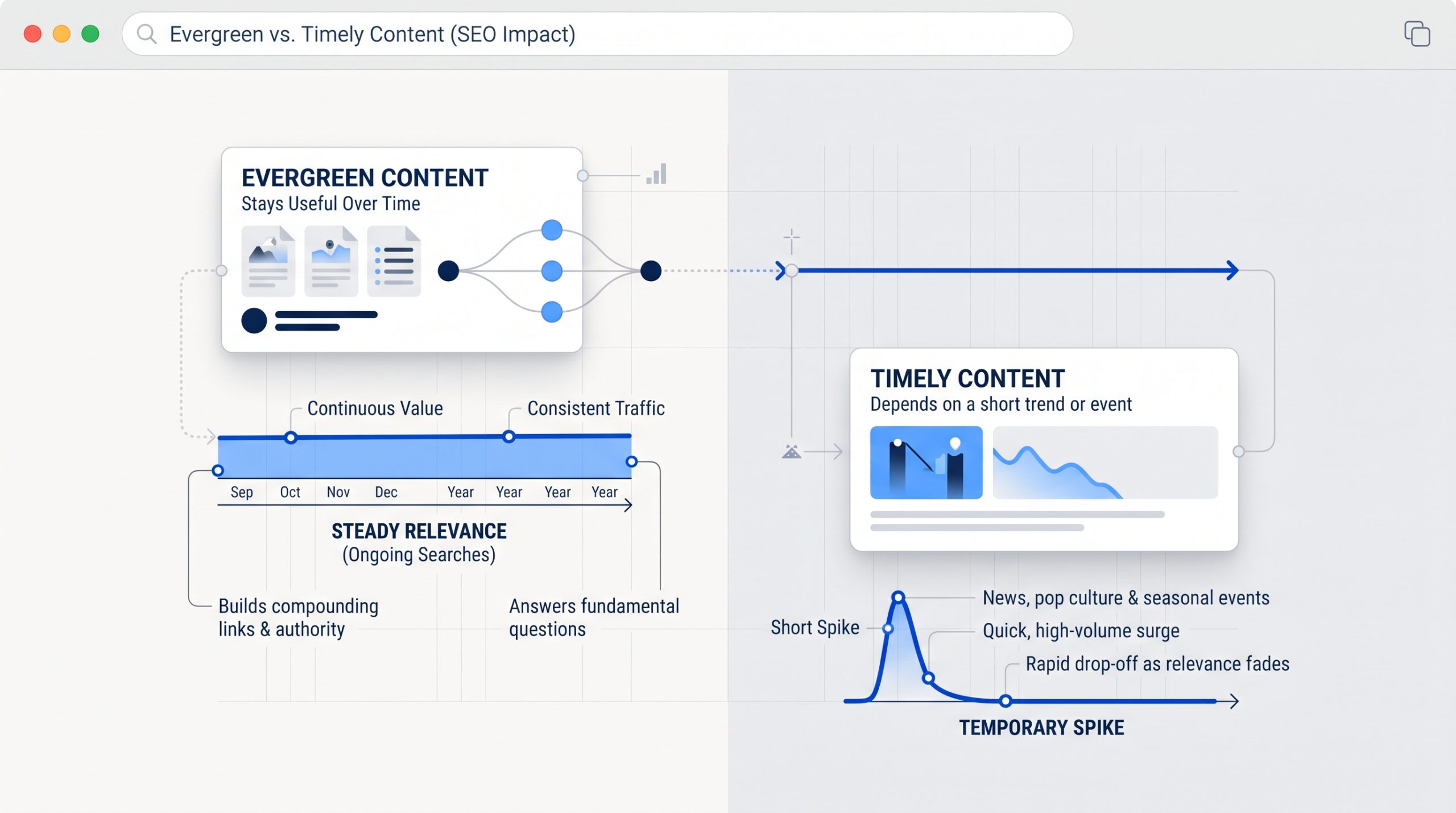
Evergreen content focuses on questions and topics that people continue to search for over time. It does not depend on one short trend, event, or news cycle.
If you are still building your SEO foundation, What Is SEO? A Beginner's Guide to Search Engine Optimization explains how useful content, search intent, keywords, links, and technical setup work together to improve search visibility.
Evergreen content supports that foundation by giving your website useful pages that can keep answering the same important questions over time.
What Is Evergreen Content?
Evergreen content is useful information that stays relevant after the publish date. It usually answers recurring questions, explains a lasting topic, or helps people solve a problem that does not disappear when a trend ends.
Examples can include how-to guides, beginner explainers, checklists, definitions, tutorials, FAQs, and resource pages.
A guide to understanding SEO basics can stay useful for a long time. A post about a one-day platform update probably will not.
Evergreen does not mean the page should never change. Good evergreen content still needs reviews and updates when facts, tools, examples, or best practices change.
 Why Evergreen Content Matters for SEO
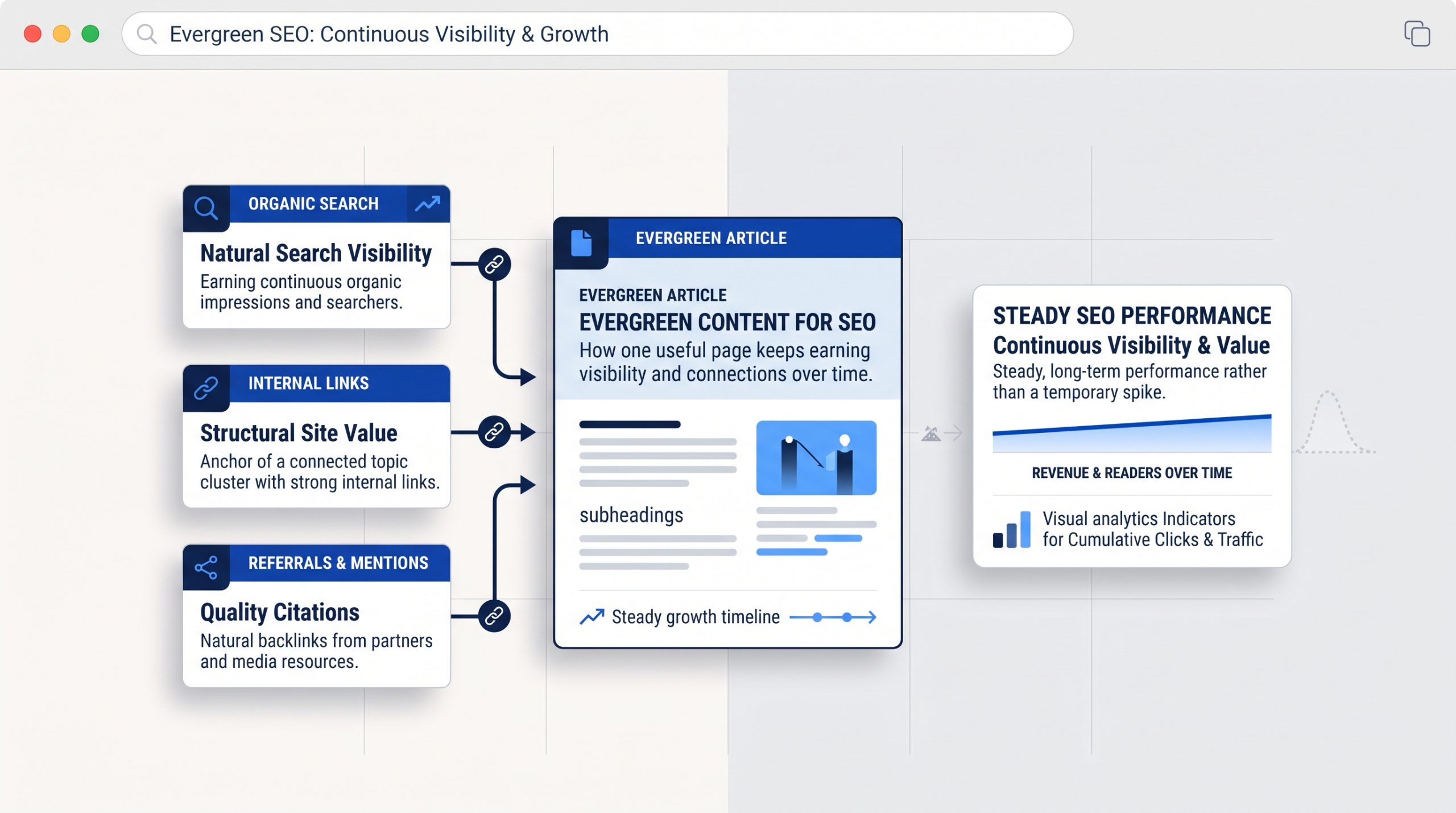
Evergreen content gives a website more chances to earn search visibility over time because the topic continues to matter. When a useful page stays relevant, it can keep attracting searches, internal links, referrals, and returning readers long after the first promotion ends.
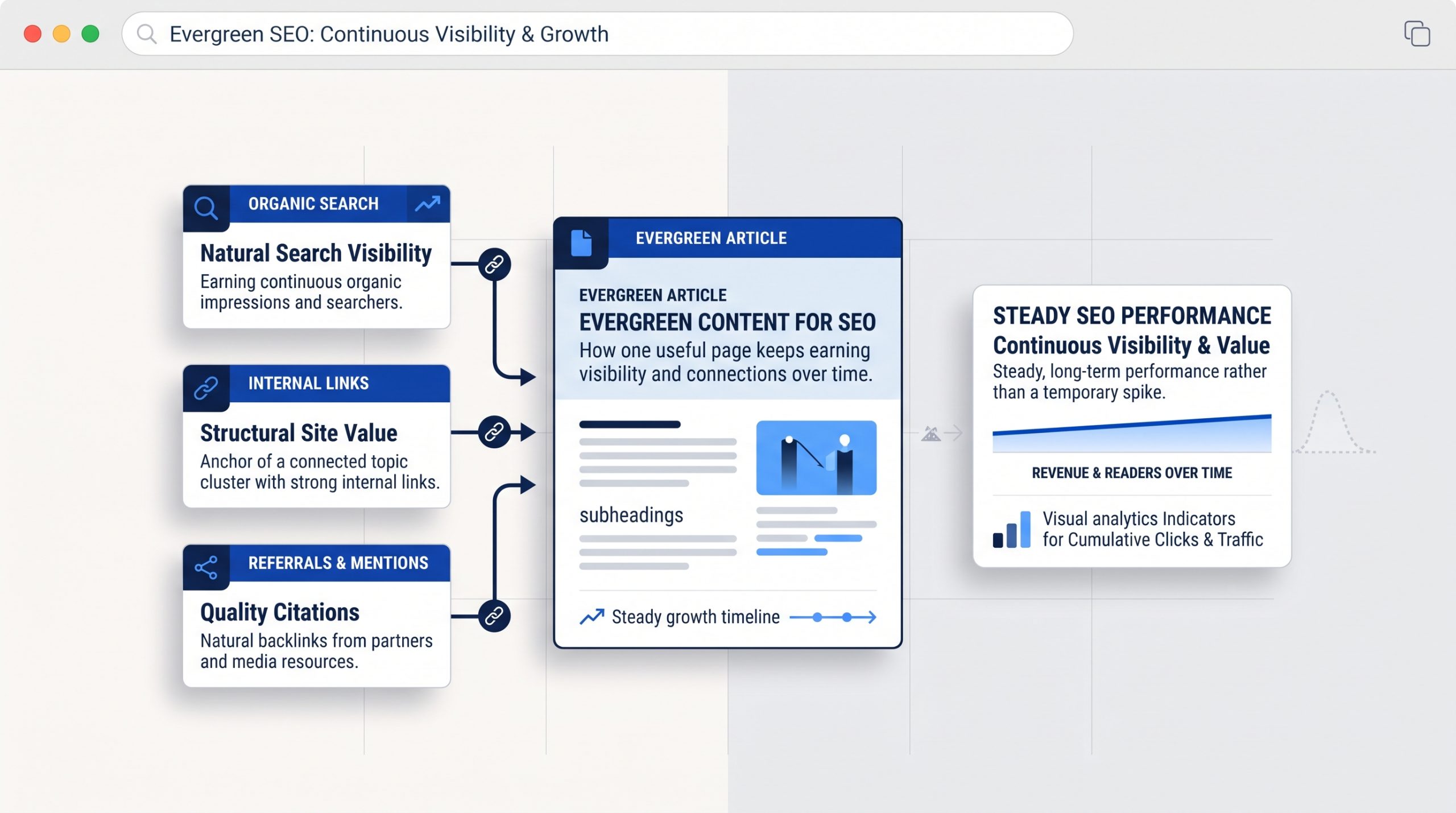 That makes evergreen content different from short-lived content.
A trend post may create a quick spike. An evergreen guide can keep working in the background.
It can also support other pages on your site. A strong evergreen article can become a useful place to link from newer posts, service pages, and related guides.
This works especially well when the website has a clear content and page structure, so readers can move naturally from one useful topic to the next.
Google also advises site owners to focus on helpful, reliable, people-first content rather than publishing pages mainly to chase rankings. That is a useful rule for evergreen content too.
Evergreen Content Can Support Steady Website Traffic
One useful evergreen page can keep bringing in visitors from search, internal links, social shares, email, and referrals. The traffic may grow slowly, but the page can continue contributing after the launch period has ended.
This is why evergreen content is valuable for a long-term content strategy.
You are building an asset, not only filling a content calendar.
For example, a business may publish a guide answering a common customer question. That guide can appear in search, be shared by the sales team, be linked from future blogs, and be reused in social or email content.
The same page supports several channels without needing to be recreated every week.
What Makes a Good Evergreen Topic?
A good evergreen topic solves a recurring problem. It should still be useful after the current month, campaign, or trend has passed. The best topics often come from questions customers ask again and again.
Start with your audience rather than a list of popular keywords.
What do people need to understand before they buy?
What mistakes do they keep making?
What process needs a simple explanation?
What question does your team answer every week?
Those are often stronger evergreen ideas than topics chosen only because they are trending.
Your broader SEO content planning can then help you connect those lasting questions to search intent and related topics.
Evergreen Does Not Mean Publish It and Forget It
Evergreen content still needs maintenance. Review important pages from time to time and update anything that has become inaccurate, incomplete, or less useful. The goal is to keep the information reliable, not to change the publish date just to make the page look newer.
Check links, examples, screenshots, statistics, product names, tools, and steps.
You may also discover new questions that deserve a short section.
If the page still answers the search well, do not rewrite it just because it is old.
Google specifically warns against changing dates or adding content only to make a site appear fresh. Update the page when the update improves the information.
 How to Create Evergreen Content That Stays Useful
Strong evergreen content begins with a lasting question, gives a complete answer, uses a clear structure, and leaves room for future updates. Keep the topic focused enough to be useful but broad enough to stay relevant beyond one short campaign.
Choose one clear search need.
Answer the main question early.
Use headings that make the page easy to scan.
Add examples that clarify the idea without tying the entire article to one short-lived trend.
Link to deeper pages where readers may need more detail.
Then review the page periodically and improve it when the topic changes.
BSD Perspective
At BSD, we see evergreen content as the foundation of a useful content library. Trend-based posts can add timely interest, but evergreen pages give a website stable topics that customers can return to and that future content can build around.
A strong content plan usually needs both.
Timely content can respond to what is happening now.
Evergreen content explains what people will still need to know later.
When the two work together, a website can stay current without rebuilding its content strategy every month.
Build Content That Keeps Doing a Job
Evergreen content matters because it gives useful information a longer life. A strong page can support SEO, website traffic, internal linking, customer education, and future marketing long after the first day it is published.
Start with one question your audience asks often.
Create the best clear answer you can.
Keep it easy to find.
Then update it when the information truly needs to change.
That is how content becomes more than a post. It becomes part of the website's long-term value.

5 Practical Methods of Increasing Website Traffic
5 Practical Methods of Increasing Website Traffic
More website traffic can create more chances for people to discover your business, learn what you offer, and take the next step.
But traffic on its own is not the goal. The better goal is to attract people who are genuinely interested in your content, products, or services.
If you are still learning how organic search works, start with What Is SEO? A Beginner's Guide to Search Engine Optimization. It explains the SEO basics behind search visibility, keywords, content, technical setup, and links.
Once that foundation is clear, these five methods can help you turn it into steady website growth.
1. Improve Pages That Already Have Search Potential
One of the fastest ways to grow organic traffic is to improve pages that already appear in search. Instead of always starting from zero, look for existing pages that earn impressions or visits but could perform better.
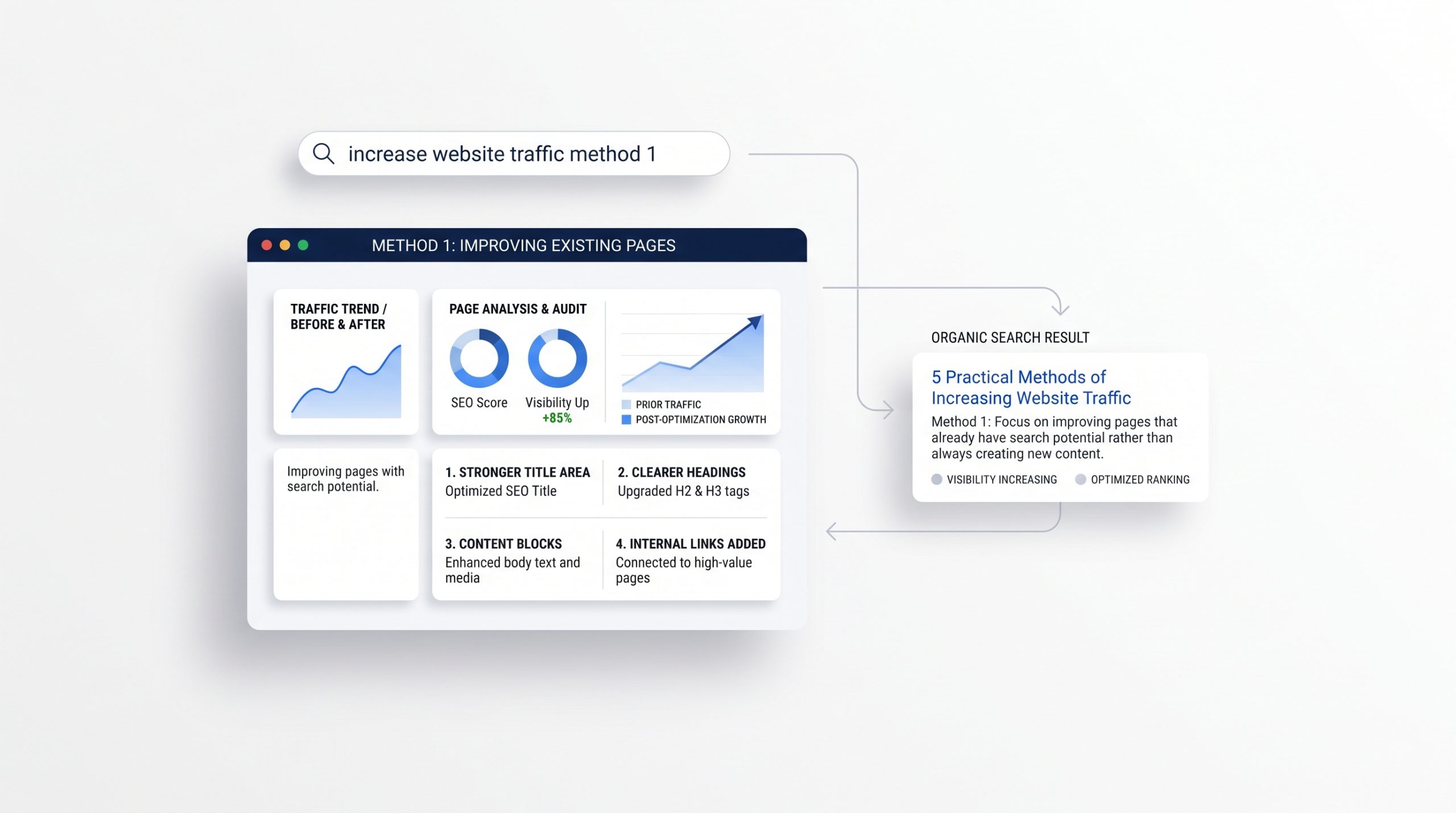 Review your most important pages in Google Search Console. Look for pages that are already being shown for useful searches.
Then check whether the page fully answers what people are looking for. A stronger title, clearer headings, better examples, updated information, or a more useful introduction can make the page easier to understand.
Internal links can help too. Link related pages together so visitors can keep exploring the topic.
A clear website structure also makes it easier for both visitors and search engines to move through your content.
Small improvements to pages that already have visibility can often be more useful than publishing another page with no clear purpose.
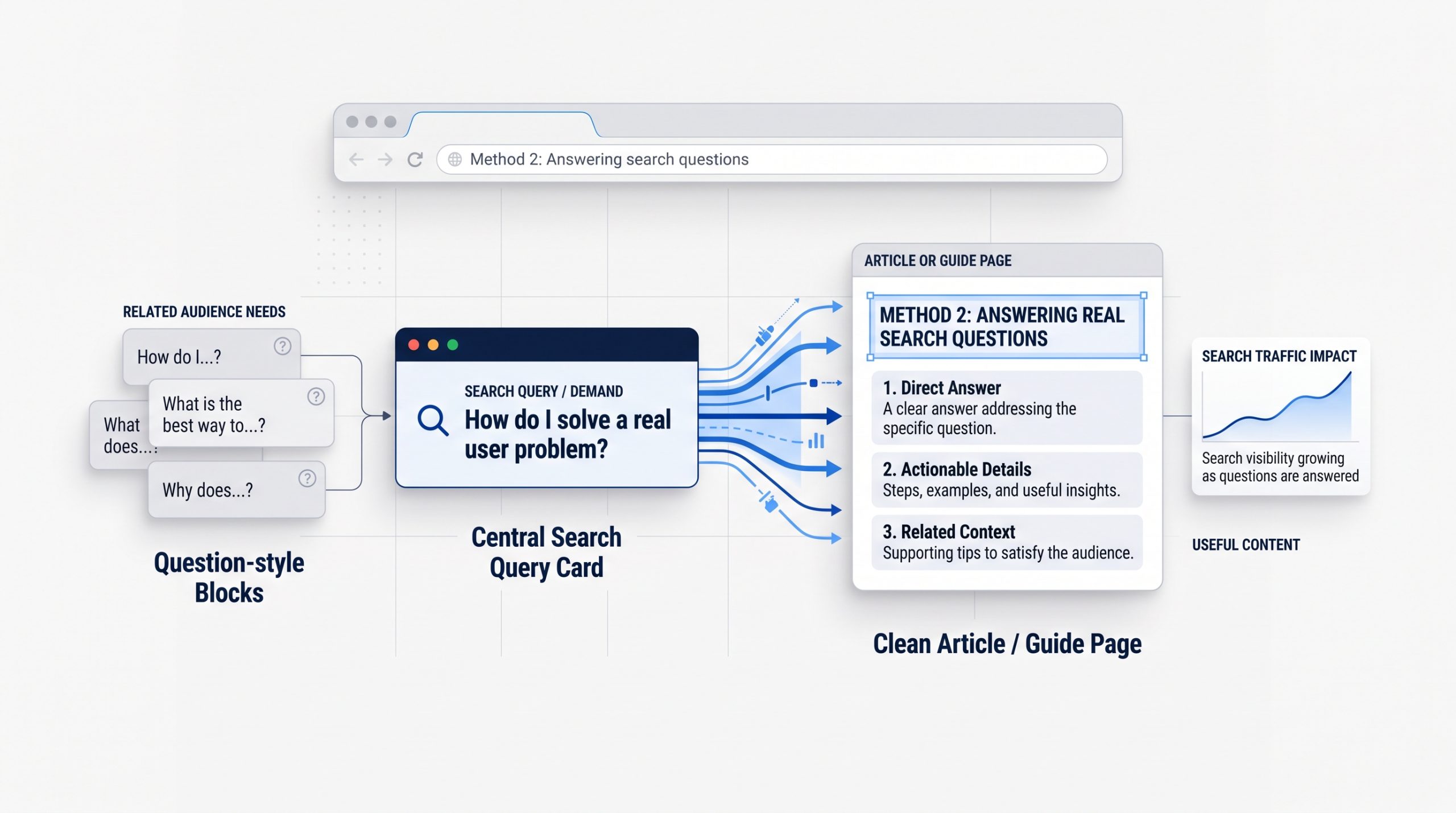
2. Create Content Around Real Search Questions
Useful content can bring new visitors to your site when it answers questions people are already searching for. Focus on problems, comparisons, how-to questions, and topics that connect naturally to what your business knows or offers.
Start with the questions customers ask before they buy.
Those questions can become blog posts, FAQs, guides, checklists, or comparison pages.
For example, a service business may answer questions about cost, process, timelines, common mistakes, or how to choose the right provider.
The goal is not to publish as much as possible. It is to create content with a clear reason to exist.
Your SEO foundation matters here. The beginner's guide to SEO explains how search intent and keyword research can help you choose topics that match what people actually need.
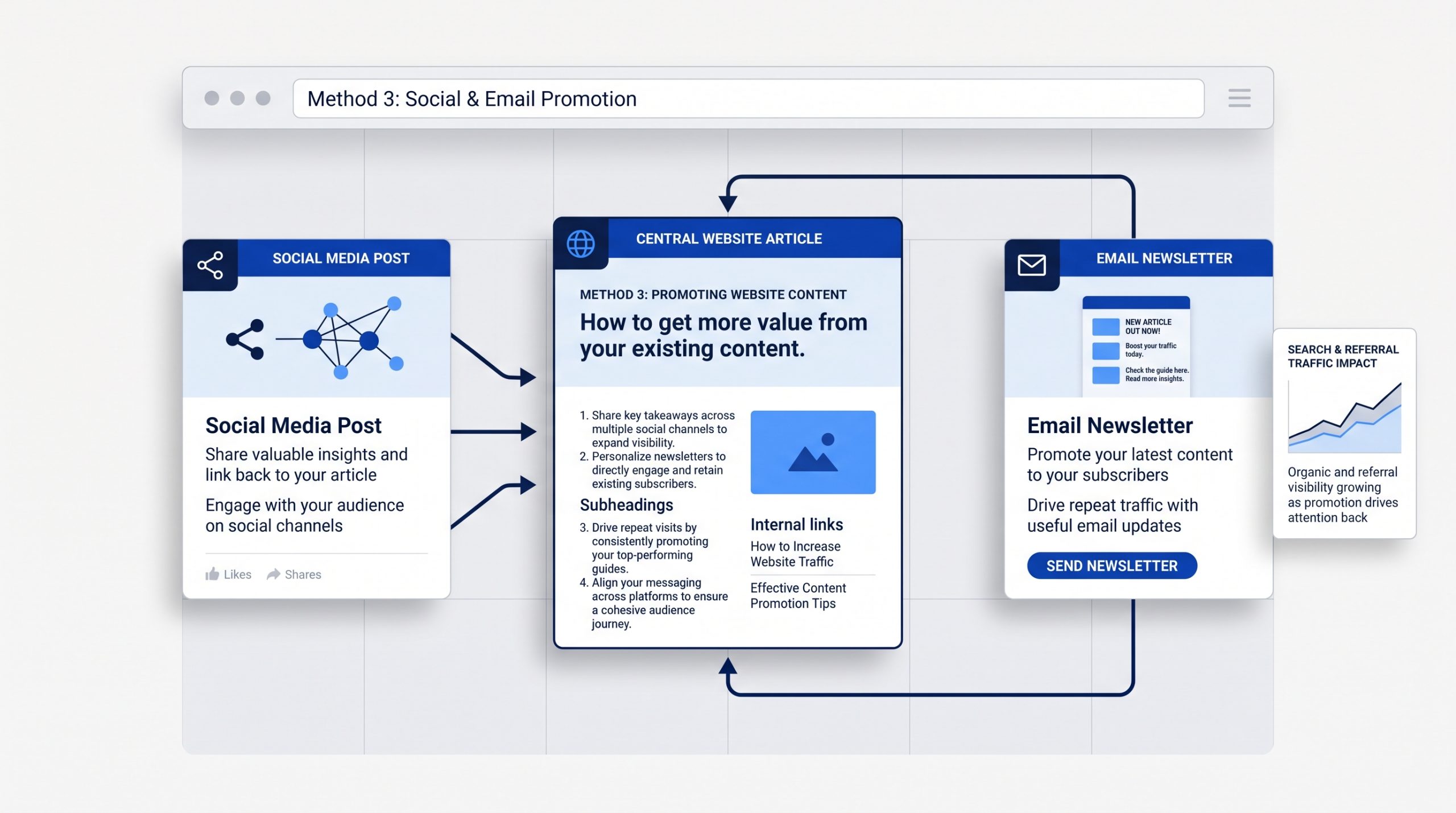
3. Promote Useful Content Through Social Media and Email
Publishing a useful page does not mean people will automatically find it. Social media and email can give new content an early push while also bringing existing followers, subscribers, and customers back to your website.
 Do not copy the whole article into a social post.
Pull out one useful point, question, example, or takeaway. Then give people a reason to visit the full page.
The same approach works with email. A short introduction can highlight why the article matters and direct readers to the website for the full answer.
A focused social media strategy helps connect each post to a wider business goal instead of treating social content as a separate activity.
The key is to promote pages that are genuinely worth the click.
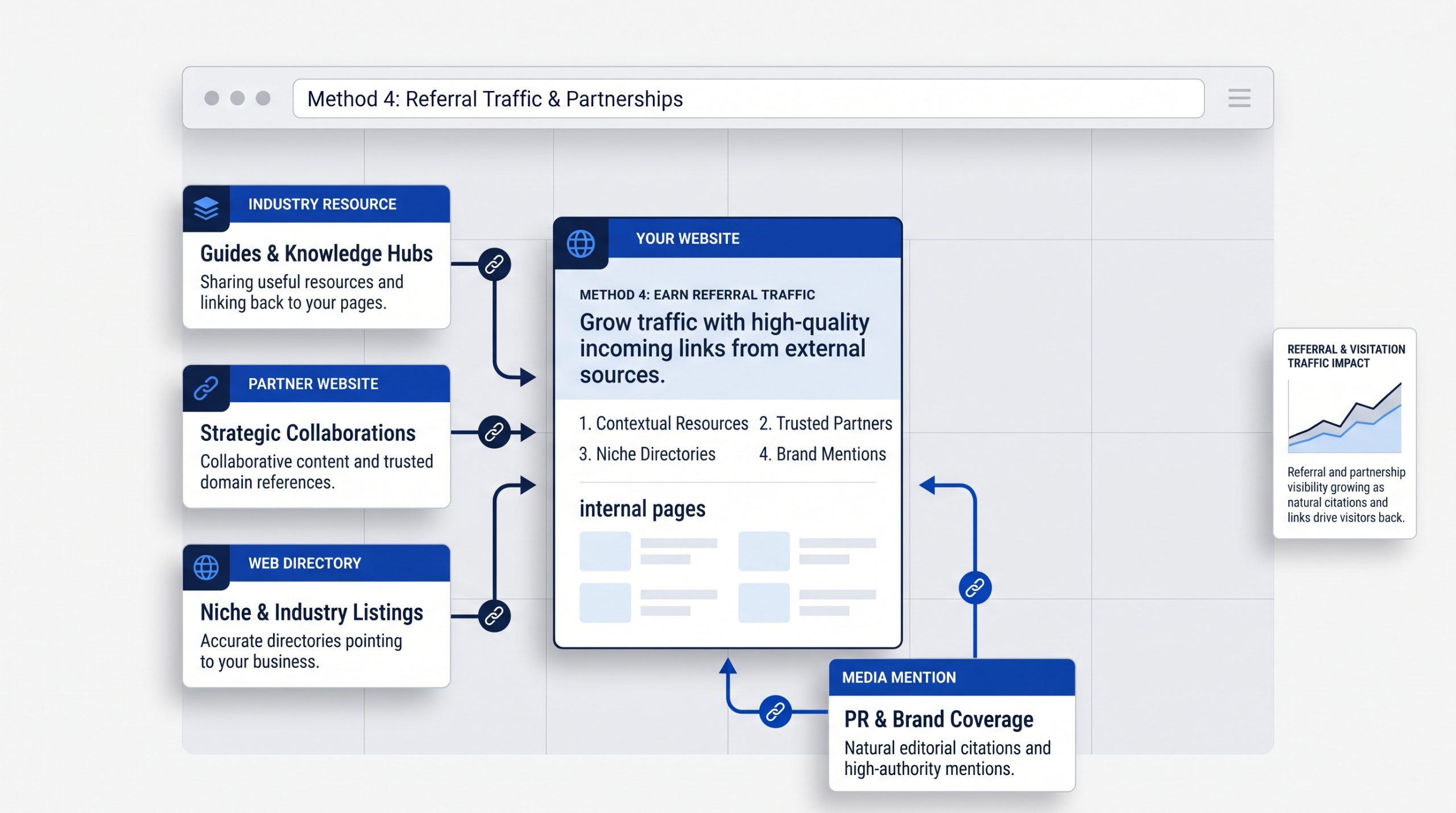
4. Build Referral Traffic Through Relevant Mentions and Links
Referral traffic comes from people clicking to your website from another site. Relevant links, partnerships, directories, media mentions, and industry resources can introduce your business to audiences that may not find you through search or social media first.
 Look for places where your website genuinely belongs.
That may include industry associations, partner websites, supplier pages, local directories, guest features, podcasts, or useful resource lists.
Avoid chasing links only for the number.
A relevant mention on a trusted site can be more useful than many low-quality listings.
For local businesses in the Philippines, a carefully chosen business directory listing can also make the business easier to discover.
5. Measure What Brings the Right Visitors
Traffic growth becomes easier to improve when you know where visitors come from and what they do after they arrive. Measure the channels, pages, and topics that bring useful visitors instead of focusing only on the total traffic number.
 Google Search Console can show how your pages perform in organic search. Analytics can help you understand what visitors do once they reach the site.
Look at questions such as:
Which pages bring the most relevant traffic?
Which search topics are growing?
Which social or referral sources send engaged visitors?
Which pages lead to inquiries, sign-ups, sales, or another useful action?
Use those answers to decide what to improve next.
If one topic consistently brings the right visitors, build on it. If a page receives traffic but leads nowhere, improve the page or the next step.
A Simple Website Traffic Plan
You do not need to use every traffic tactic at once. Start with a strong SEO foundation, improve the pages you already have, publish useful content, promote it through the channels you use, and measure which efforts bring the right people back.
A simple monthly routine can be enough:
Review search performance.
Improve one existing page.
Publish one useful new piece of content.
Promote it through social media or email.
Look for one relevant referral or partnership opportunity.
Then use the results to decide what deserves more attention next month.
BSD Perspective
At BSD, we see website traffic as part of a wider digital system. SEO, content, social media, email, website design, and referrals work better when they support the same audience and business goal.
More traffic is useful only when the website gives those visitors a clear reason to stay.
That means the page needs a clear message, useful information, an easy experience, and a logical next step.
Instead of chasing traffic from every channel, focus on building a smaller number of reliable paths that bring the right people to the right pages.
Build Traffic Around What Your Audience Actually Needs
Increasing website traffic is not about finding one perfect channel. It comes from making your website easier to discover, creating content worth visiting, promoting that content in the right places, earning relevant mentions, and learning from the results.
Start with the method that fits your biggest gap.
If search visibility is weak, improve SEO.
If useful pages exist but few people see them, improve promotion.
If visitors arrive but do not take action, improve the website experience.
The strongest traffic strategy is the one you can keep improving over time.
Holiday Marketing for Small Businesses: How to Prepare for the 2026 Season
Holiday Marketing for Small Businesses: How to Prepare for the 2026 Season
Holiday marketing has changed. Black Friday is no longer the true start of the season.
Many people plan gifts weeks before the big sale days. They compare prices. They watch creator posts. They send DMs. Some also use AI tools before they choose what to buy.
For a small business, that can sound like a lot to manage. It does not have to be.
The best advantage is simple: prepare early. Get your offer, product details, content, replies, and tracking ready before the rush. Then your team can spend less time fixing problems during the busiest weeks.
Meta’s 2026 Holiday Insights Center shows how social media, DMs, creators, AI, and shopping now connect. Many of its figures refer to people who use Meta platforms. Keep that in mind when reading the numbers.
Start Early and Build an Offer Worth Noticing
Holiday marketing for small businesses should start before the busiest sales days. Early planning gives you time to shape the offer and prepare your content. You can also test the buying process before feeds, inboxes, and ad space get crowded.
Attentive’s 2026 Consumer Pulse research found that 83% of consumers start planning holiday purchases before Black Friday. It also found that 71% expect to shop before Black Friday.
Basis found a similar pattern. Its 2026 Holiday Shopping and Advertising Trends report says 68% of consumers shop early to avoid delays. It also found that 57% look for deals throughout the year.
This does not mean you need Christmas posts in August. It means the plan should be ready early.
Start with one clear offer. What do customers get? Why does it matter? How long does it last? What should they do next?
You also do not need a huge discount. Small businesses can compete through ease and value. Try gift bundles, free local delivery, gift wrapping, seasonal packages, early booking perks, or simple pickup options.
Then test the message. Could a new customer understand the offer in a few seconds? If not, make it simpler.
Turn Social Media and DMs Into Your Holiday Storefront

Facebook, Instagram, and DMs can shape what customers do next. The final sale may still happen somewhere else. Keep your profiles current, make products easy to find, and plan for fast replies so shoppers can move forward with less effort.
Meta reports that 85% of shoppers who use its platforms have bought something in a physical store after seeing it on social media.
That means your profile is part of the shopping trip. It is not just a place to post.
Before the rush, check the basics. Are your holiday hours right? Does the bio link work? Can people find your address, products, booking page, or current offer quickly?
Your posts also need different jobs. A clear social media strategy can help you mix tips, product details, proof, reminders, and sales posts. This keeps the feed useful without making every post feel like an ad.
DMs matter too. Meta says 59% of shoppers who use its platforms message businesses during the holidays. It also says 33% use messages to find products. Another 26% use them to make payments.
A DM may come from someone who is already close to buying.
Prepare simple answers for common questions. Cover stock, sizing, shipping, pickup, hours, booking slots, payment methods, and return rules.
Meta Business Agent can answer some business questions and suggest products from a catalog. It may help with the first reply. Still, give customers a clear way to reach a person when they need more help.
Use Creators and AI to Help Shoppers Decide
Holiday shopping does not follow one straight path. A shopper may see a creator post, ask AI for ideas, compare options on social media, and visit your site before buying. Clear product details help your business stay useful at each step.
Meta says 94% of shoppers who use its platforms look to creators for holiday shopping ideas. For a small business, that does not mean hiring a famous influencer.
A smaller creator may be a better fit. A local food creator can suit a nearby restaurant. A fitness creator may fit a wellness brand. A loyal customer with a trusted voice can also be useful.
AI is now part of gift research too. Meta says almost one in four global shoppers used AI during the last holiday season.
Google’s 2026 holiday shopping research adds more context. It found that shoppers who use AI notice more steps and sources during the buying process than shoppers who do not use AI.
The lesson is simple. Your product details need to be clear wherever people find them.
Use exact product names. Keep prices and stock up to date. Write plain descriptions. Add strong photos. Make shipping, booking, and return details easy to see.
AI may help a shopper find your business. Clear details can help them trust it.
Make Every Click Easier to Convert
Holiday marketing does not end when someone clicks a post or ad. Your website, mobile pages, checkout, booking flow, and tracking still need to work. Fixing small problems can be more useful than paying for more traffic.
Salesforce’s 2026 holiday retail outlook shows why. In Q2 2026, mobile made up about three-quarters of global online traffic. Social also sent more visits to online stores. Yet many shoppers still left without buying.
More traffic does not always mean more sales.
Test the full path on your own phone. Start with a social post. Open the link. Find the item. Add it to the cart or try to book. Check if delivery, pickup, fees, and deadlines are easy to understand.
Each unclear step gives the shopper one more reason to leave.
Paid ads need the same care. Meta’s holiday materials cite an average return of more than $4 for every $1 spent by advertisers. That is a broad platform average. It is not a promise for every business.
If your budget is small, good tracking matters even more. Check Meta Pixel and Conversions API before you raise spend. Decide which actions matter. Then make sure those actions can be tracked.
Once the campaign is live, use social media analytics to connect attention with results. Look at site visits, enquiries, bookings, and sales. The goal is not to spend more because it is the holidays. The goal is to see what is worth more budget.
Connect the Campaign, Measure What Matters, and Stay Flexible
Your holiday campaign should feel connected across social media, email, your website, ads, DMs, and the store. Keep the offer and key dates the same. Then use customer actions to adjust the plan while there is still time.
Each channel has a different job. Social media can introduce the offer. Creator content can build trust. DMs can answer questions. Your website can give full details. Email can bring people back before a deadline.
This is why social media and email marketing can work well together. One helps people find you. The other helps you stay in touch after they show interest.
September: Set the main goal. Choose the offer, key products, dates, stock limits, and what your team can handle.
October: Prepare the main creative, landing pages, emails, product details, auto replies, creator briefs, and tracking. Test them before demand rises.
November: Increase visibility. Watch the data. See which posts, products, emails, and ads lead to useful actions.
December: Make key details easy to find. Show shipping cutoffs, pickup options, stock, booking deadlines, and last-minute choices.
January: Review the campaign while it is still fresh. Save the best creative, common questions, sales patterns, and channel results for next year.
Do not track every number just because it is there. Focus on the numbers that help you make a choice.
If reach is high but profile visits are low, the content may not give people a reason to learn more. If product views are high but sales are weak, check price, shipping, trust, and checkout. If the same question keeps coming through DMs, add that answer to your public content.
The goal is not to be everywhere at once. It is to make the places where customers already find you work better together.
If you need help linking content, messages, ads, and tracking, BSD’s social media marketing can help turn those parts into one clear plan.
Start before the rush. Keep the message simple. Watch what customers do. Then improve the campaign while there is still time.
Social Media Content Planning: What Should Your Business Post?
Social Media Content Planning: What Should Your Business Post?
You know you need to post on social media. The harder question is: what should you actually post?
Without a plan, content can quickly become a mix of last-minute graphics, random trends, and promotional posts. You stay active, but the feed does not always move the business forward.
Good social media content planning starts before the calendar. It connects what you post to your audience, your brand, and the goals in your social media strategy.
Start With the Job Your Content Needs to Do
Every post should have a purpose. Your content may need to attract new people, answer a question, build trust, show proof, start a conversation, or encourage a next step. Knowing that purpose first makes social media content planning much easier and keeps your calendar from becoming random.
Before brainstorming topics, ask what the business needs from social media right now.
If the goal is awareness, you may need useful or shareable content. If the goal is trust, show your expertise, process, or results. If the goal is leads, create content that helps the right people understand their problem and what to do next.
Build a Few Content Pillars
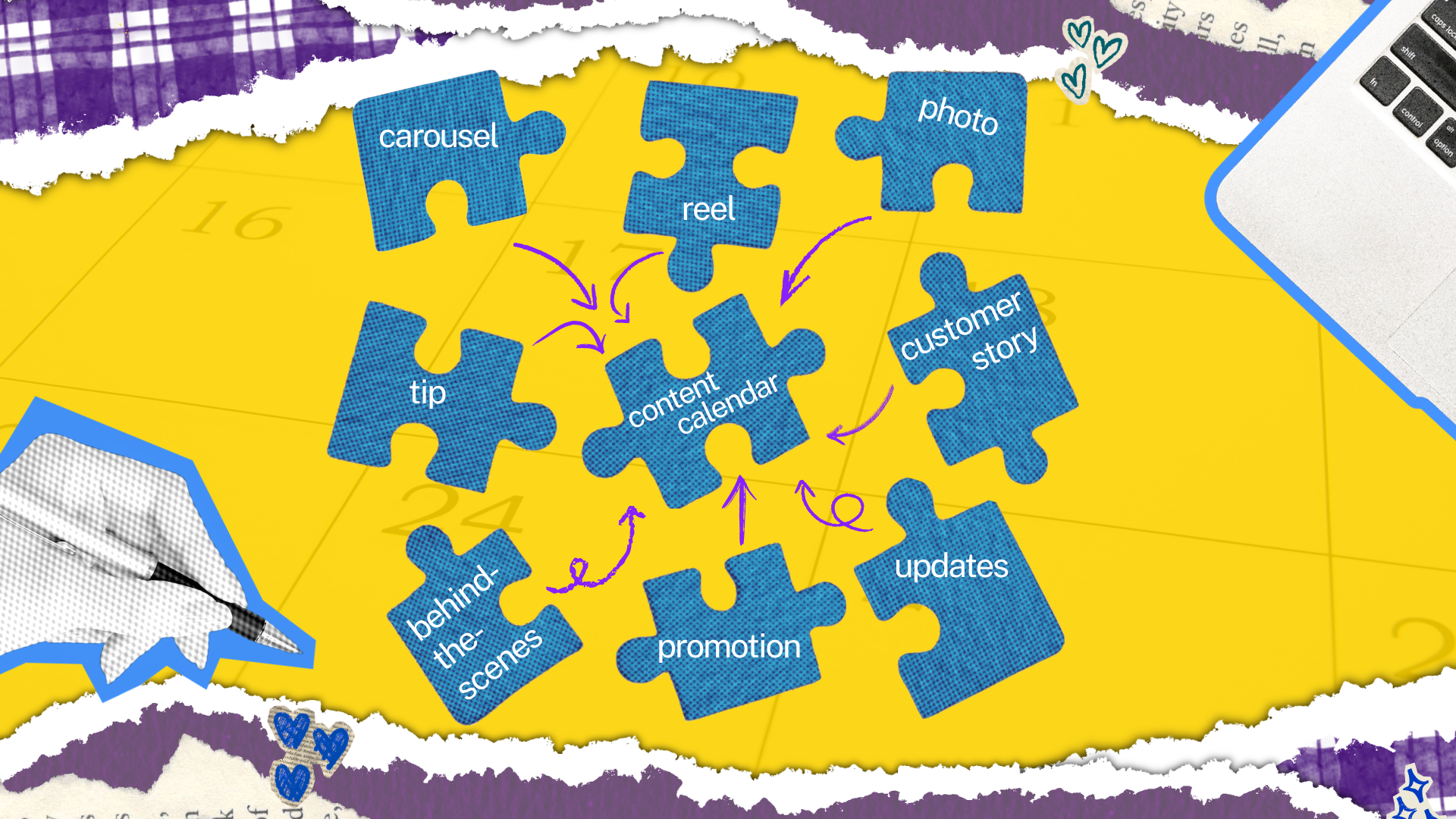
Content pillars are the main themes your brand returns to again and again. They give your team enough structure to plan faster without making every post feel the same. For most businesses, three to five clear pillars are enough to keep the feed focused, useful, and recognizable.
A service-based business might use five simple pillars:
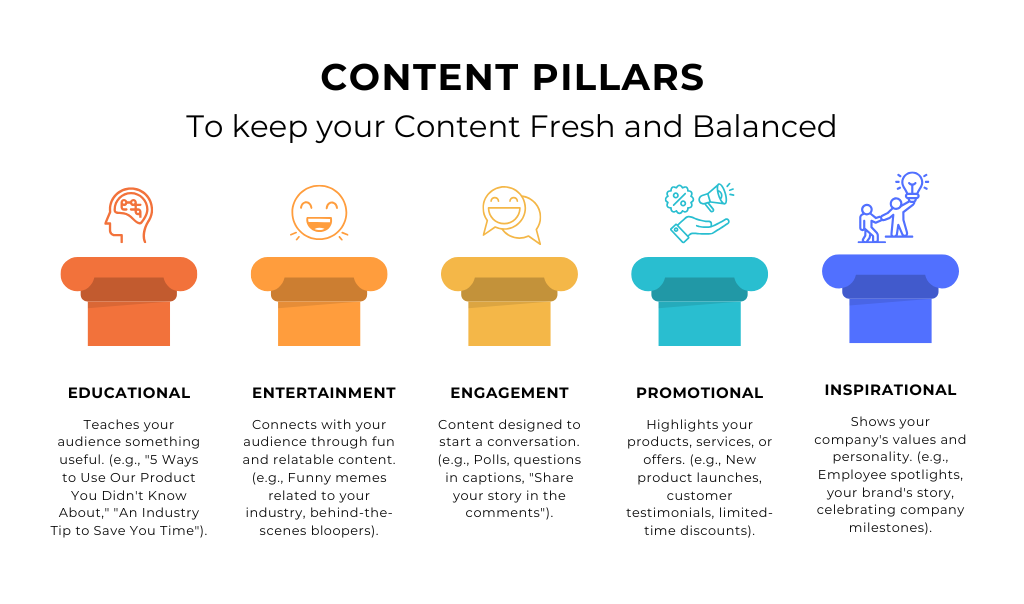
- Educate: Share tips, answer common questions, explain a topic, or help your audience solve a problem.
- Promote: Talk about your products, services, offers, events, or other ways people can work with your business.
- Inspire: Share customer stories, results, ideas, milestones, or messages that encourage your audience.
- Entertain: Create lighter content that catches attention and shows personality. This could include relatable posts, trends, short videos, or humor that fits your brand.
- Behind the Scenes: Show the people and process behind the business. Introduce your team, share how work gets done, or give your audience a look at what happens outside the polished final product.
You do not need to give every pillar the same amount of space.
The right mix depends on your audience and goals. The point is to create enough variety that your feed stays useful and interesting without feeling random.
These pillars can then become the starting point for your social media content calendar. Instead of asking, “What should we post today?” you can ask, “Which pillar have we not covered lately?”
Turn Real Questions Into Post Ideas
You do not need to invent every social media idea from scratch. Some of your best topics already exist in customer questions, sales calls, emails, search queries, reviews, and conversations with your team. These sources reveal what people actually want to understand before they choose a business.
If customers keep asking the same question, that is a post idea. If your sales team explains the same misconception every week, that is another one.
One strong question can also become several formats. A detailed blog can become a carousel, a short video, a quick tip, a poll, or a follow-up email. The idea stays the same, even as the format changes.
Plan a Mix, Not a Feed Full of Sales Posts
A useful content plan balances education, engagement, proof, brand building, and promotion. Not every post needs to sell. Giving people useful reasons to follow and trust your business makes promotional content feel more natural when it appears and creates a stronger journey from discovery to action.
If every post says “buy now” or “book a call,” people have little reason to stay unless they are already ready to buy.
Think about the relationship instead. Social content can help people discover you, learn from you, and decide whether they trust you. From there, channels such as social media and email marketing can keep that relationship moving.
Use a Content Calendar to Make the Plan Real
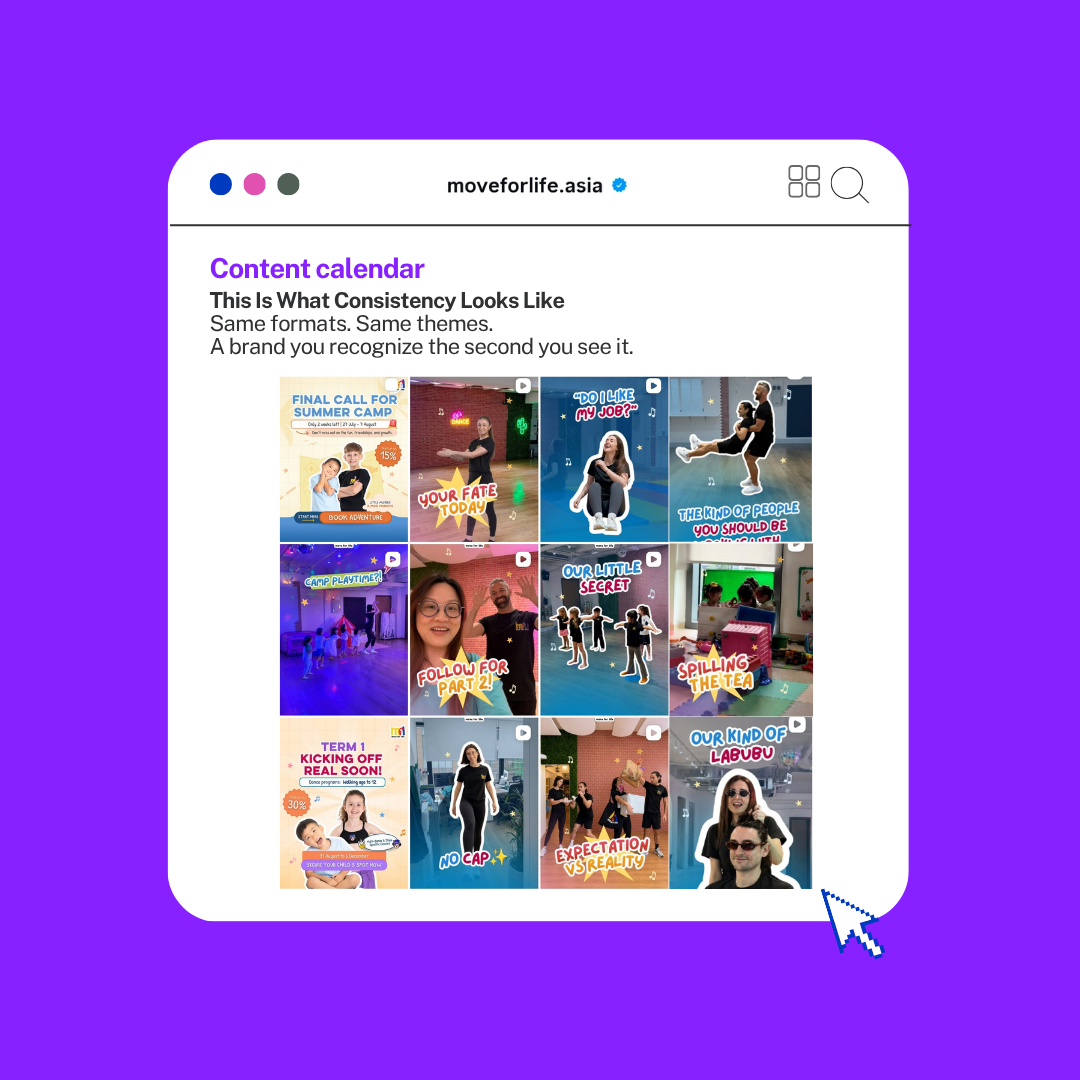
A content calendar turns your ideas into a repeatable publishing plan. It should show more than dates. Add the content pillar, goal, format, platform, CTA, and key metric for each post. This makes it easier to see whether your monthly content has enough variety and a clear purpose.
You do not need a complicated system. A spreadsheet can work.
For each post, record the topic, content pillar, format, platform, goal, CTA, and publish date. Planning these details also makes it easier to batch similar tasks and avoid rushing when posting day arrives.
Let Your Analytics Shape What You Post Next
Your content plan should change as you learn. Review which topics, formats, and calls to action get useful responses from your audience. Reach and views can show visibility, while interactions, profile visits, clicks, enquiries, and conversions can tell you more about what people do after seeing the content.
Do not judge the plan by likes alone. Use your social media analytics to find patterns and decide what deserves another test.
A post that reaches fewer people may still be valuable if it brings qualified website visits. A high-view video may be useful for awareness even if it does not generate leads right away. The goal determines which result matters.
What Should Your Business Post This Week?

When you are stuck, return to four simple sources: what your audience asks, what your business knows, what proof you can show, and what you need people to understand next. That gives you a practical mix of useful content without relying on trends or posting simply to fill the calendar.
For example, your week could include one educational post, one proof-based post, and one brand or service post. The exact mix depends on your goals, team capacity, and platform.
Consistency matters, but that does not mean posting every day. A realistic plan you can maintain is more useful than an ambitious calendar your team cannot sustain.
Plan With Purpose, Then Create
Social media content planning should make posting easier, not add another layer of work. Start with your goals, choose a few repeatable content pillars, build ideas from real audience needs, and use performance data to improve the plan. You will spend less time guessing and more time creating with direction.
If your team needs support turning strategy into a practical content calendar, BSD's social media marketing service connects planning, content creation, publishing, and reporting around the same goals.
Social Media and Email Marketing: Why You Need Both
Social Media and Email Marketing: Why Your Brand Needs Both
Social media is one of the best tools for getting discovered.
A useful post can introduce your brand to new people. A Reel can increase your reach. A strong carousel can turn a casual viewer into a follower.
But social media was never meant to be your only database.
Your followers still live on a platform you do not control. An algorithm change can affect your reach overnight.
That is why social media and email marketing work better together.
Social media gets attention. Email gives you a direct way to continue the relationship.
Social Media Is for Discovery
 Think of social media as a busy storefront.
People pass by, discover your business, explore your content, and learn what you offer.
That makes social media valuable for:
- brand awareness
- audience growth
- engagement
- community building
- driving traffic
But you are still operating on rented land.
You do not control the algorithm. You cannot guarantee that every follower will see your next post. Your audience may grow while your organic reach changes.
This does not make social media less useful.
It simply means your social media strategy should give people somewhere to go after they discover you.
Instead of treating follower growth as the finish line, use social media to start the relationship.
Followers Are Not Customers
A large follower count can look impressive, but followers alone do not build a business.
Someone can follow your account today and rarely see your content again.
Email creates a different kind of connection.
When someone joins your email list, they are giving your brand permission to communicate with them more directly.
That is why we like to think of the two channels differently:
Social media is the storefront. Email is the asset.
Social introduces your business.
Email gives interested people a way to stay connected beyond the feed.
Your social content can encourage people to visit your website, download a resource, subscribe for useful insights, or take another relevant step.
That creates a stronger path than simply asking people to follow you and hoping the algorithm keeps showing them your content.
Use Actions to Make Email More Relevant
Building an email list is only part of the strategy.
What you send matters too.
Traditional email marketing often treats every subscriber the same. One newsletter goes to everyone, regardless of their interests.
A better email marketing strategy pays attention to behaviour.
Imagine two subscribers.
One joined your list today after reading a beginner's guide.
The other has visited your service or pricing page three times.
They probably do not need the same message.
The new subscriber may need helpful content that introduces your brand.
The second person may benefit from service details, case studies, or answers to common questions.
Pay attention to what people do, not just who they are.
Clicks, downloads, page visits, and other actions can help you send more useful messages.
Build Emails People Actually Want to Open

Email marketing does not have to mean sending crowded newsletters filled with promotions.
Keep it simple.
One email can answer one question, share one idea, or direct someone to one useful resource.
Clear copy often does more work than an overdesigned email.
The same goes for your brand experience.
Your emails should feel connected to the social content that brought someone to you in the first place. Your voice, message, and visual identity should feel familiar across both channels.
That consistency helps people recognize and trust your brand as they move from one platform to another.
Give People One Clear Next Step
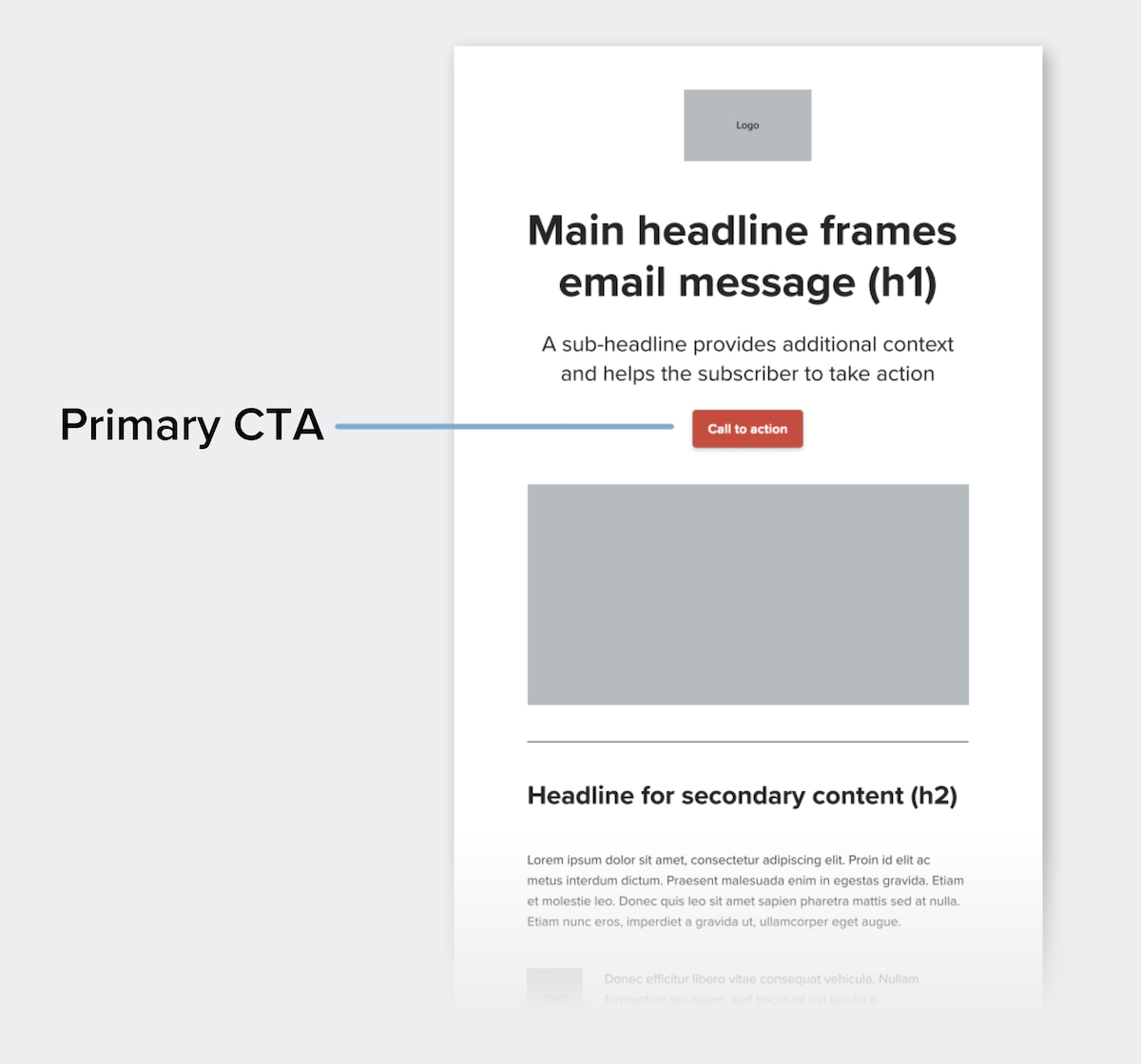
Every email should answer a simple question:
What should the reader do next?
Maybe you want them to:
- read an article
- view a case study
- explore a service
- download a resource
- book a conversation
Choose one main action.
Too many options can make the next step unclear.
The right CTA also depends on where someone is in their relationship with your brand.
A new subscriber may be ready to read another article. Someone who keeps returning to your service page may be ready to talk.
Your marketing should help both people move forward without forcing them into the same journey.
Social Media and Email Work Better Together
You do not need to choose between social media and email.
Give each one a clear job.
Social media creates discovery. Email builds a direct connection.
A person might discover your brand through Instagram, visit your website, join your email list, receive useful content, and eventually explore your services.
Each channel supports the next.
At Brightsand Designs, this is how we think about digital marketing. Social media, email, content, and your website should not feel like separate projects. They should support the same business goals and create a clear journey for your audience.
So, use social media for what it does best: getting noticed.
Then invite interested people into a channel where you can continue the conversation.
Because followers are valuable.
But the real opportunity is turning attention into a relationship — and giving that relationship somewhere to grow.

Marketing vs. Sales: Separate in Traditional Business, Unified in E-Commerce?
For decades, businesses have operated under the clear assumption that marketing and sales are two distinct functions—each with its own role in the customer journey. Marketing focuses on building awareness and generating leads, while sales converts that interest into paying customers. This separation has worked well for traditional businesses where human interaction is a key part of closing deals. But is this same distinction as relevant in the world of e-commerce?
The rapid rise of online stores and digital sales channels has changed the way businesses operate. The line between marketing and sales has become increasingly blurred. In e-commerce, many tasks traditionally handled by salespeople are now managed by marketing teams through digital tools and automation. But does this mean marketing has effectively become sales in e-commerce?
Let’s explore the differences and why the traditional separation may no longer apply in the world of e-commerce.
Traditional Business: The Clear Divide Between Marketing and Sales
In a traditional business model, such as brick-and-mortar retail stores, professional services like real estate, law firms or consultancies, and B2B companies in manufacturing or distribution, marketing and sales have always been seen as separate but complementary functions, each responsible for different stages of the customer journey.
-
Marketing's Role is focused on the top of the funnel creating awareness, generating interest, and nurturing leads. It uses channels like advertising, social media, content marketing, and events to attract potential customers.
-
Sales' Role works the bottom of the funnel converting interested leads into actual customers. Sales teams use direct interaction whether it's face-to-face, phone calls, or emails to address customer concerns, negotiate deals, and close sales.
In this model, the handoff from marketing to sales is clearly defined. Marketing warms up the leads, and when a prospect is ready to make a decision, they are handed over to the sales team to close the deal. Both functions play critical but distinct roles and rely on smooth collaboration to convert interest into revenue.

E-Commerce: Where Marketing and Sales Blur Together
In the world of e-commerce, the situation is different. Many businesses operate without a traditional sales team, relying on automated processes, data, and digital experiences to drive purchases. This shifts a significant portion of the customer journey into the hands of the marketing team. So, is marketing effectively taking over the sales role in e-commerce? In many ways, the answer is yes.
Here’s why:
1. Digital Customer Journey
In e-commerce, customers don’t need a salesperson to guide them through the buying process. Instead, they interact with your website, product descriptions, and automated tools like chatbots and email follow-ups. The entire buying journey can happen without any human sales interaction, and marketing handles most of this journey.
2. Conversion Optimization
Marketing is no longer just about creating awareness and driving traffic to a site. In e-commerce, marketing teams are also responsible for optimizing the user experience ensuring that visitors move seamlessly from browsing to buying. This includes everything from website design to checkout flow and even abandoned cart reminders. These are traditionally sales-oriented tasks that have now shifted into marketing’s domain.
3. Customer Support and Objection Handling
In traditional businesses, a salesperson would handle customer objections, answer questions, and build trust. In e-commerce, live chat, FAQs, return policies, and customer reviews—all managed by marketing—serve the same purpose. Marketing ensures customers have all the information they need to feel confident about making a purchase.
4. Automated Sales Processes
Many e-commerce businesses use email marketing automation and retargeting ads to re-engage potential buyers who didn’t complete a purchase. These tools effectively take on the role of a salesperson by following up with a lead. The goal is to remind customers of their interest, address concerns, and incentivize them to complete their purchase.
Has Marketing Become Sales in E-Commerce?
In e-commerce, the line between marketing and sales is indeed blurred, if not entirely erased. In traditional business, the handoff between marketing and sales is essential to move a lead from interest to purchase. But in e-commerce, marketing often handles the entire journey, from attracting visitors to converting them into buyers.
-
- Does this mean sales no longer exists in e-commerce? Not exactly. Instead of a traditional salesperson, conversion-focused strategies and data-driven insights take on the role of sales. This includes:
- Personalized product recommendations ("You might also like…")
- Upselling and cross-selling at checkout
- Time-limited offers or discounts to incentivize immediate purchase
- Cart abandonment strategies to encourage customers to return and finish their purchase
In essence, e-commerce sales is still happening but it’s carried out by marketing efforts through automation, UX, and data analysis rather than human interaction. Marketing is performing a dual function generating interest and ensuring conversion.
Why the Blurring of Lines Matters for E-Commerce Success
For e-commerce businesses, understanding that marketing is also driving sales is crucial. Treating marketing and sales as separate functions might work in traditional settings, but in e-commerce, an integrated approach is key to success.
1. Faster Customer Journeys
In e-commerce, customers move quickly from discovering a brand to making a purchase. By managing both marketing and sales efforts, the customer journey is more streamlined resulting in fewer barriers to purchase.
2. Data-Driven Decisions
Marketing teams in e-commerce have access to detailed customer data, from browsing behavior to purchasing habits. This data allows marketing to act like sales by personalizing offers and driving conversions at the right moment.
3. Consistent Messaging
When marketing controls the entire journey, from awareness to sale, customers experience a consistent, personalized message throughout. This helps build trust and leads to higher conversion rates.
Conclusion: Marketing and Sales—Separate for Traditional Businesses, Unified in E-Commerce
If you have a traditional business—such as a retail store, a service company, or a B2B operation—marketing and sales remain distinct functions. Marketing focuses on generating awareness and leads, while sales takes over when it’s time to close the deal. Each team plays a separate but vital role in moving customers through the buying process.
However, in e-commerce, these roles blend together. Marketing teams handle the entire customer journey, from attracting visitors to converting them into buyers, without a traditional sales team. Marketing becomes responsible for both generating interest and driving conversions, using automation, data, and digital tools.
Do you agree that marketing and sales have become one in the world of e-commerce? Let’s discuss how your e-commerce business can optimize this integration to boost conversions!

I tried TikTok productivity hacks and they actually work
As a business owner, I’m always on the lookout for ways to improve productivity and efficiency—not just for my team but for myself as well. Running a business means juggling countless responsibilities, from managing clients to overseeing projects and strategizing for growth. In the fast-paced digital marketing landscape, staying productive is key to maintaining a competitive edge. Surprisingly, one of the most unexpected sources of productivity inspiration came from TikTok. While initially a platform I used for entertainment and staying up-to-date with the latest drama, I soon discovered a treasure trove of productivity hacks that are not only practical but also incredibly effective for business owners like me.
TikTok is an unexpected phenomenon. In 2020, a music app that evolved into a cornerstone of pop culture content? I would not have believed it. Especially if you told me that I would end up scrolling for hours on end, but here we are.
While TikTok has served its purpose for entertainment, you can find all types of intel and information about topics you can learn from.
With TikTok's unique (and creepily accurate) algorithm, the more you engage with a particular type of content, the more of that type of content will appear on your For You Page (this is the equivalent of the Instagram Explorer page).
So, just before I shut off for the evening, I revisited the app to look for more memes, and lo and behold, I came across a genre that I never realized TikTok could be utilized for—productivity hacks. There are actual productivity gurus who share tips and tricks on how to work smarter, and the tips are actually good.
So here are my top 5 productivity hacks I tested that are actually worth trying:
Energy Management
Unlike traditional productivity tips and tricks, which typically focus on time management, this strategy aims to improve our efficiency management through our Body's energy. It does so by tracking your energy levels throughout the day (and week) and using that data to create a schedule that works for you. When I first saw this TikTok, I have to say I was a skeptic, but as I practiced it more throughout my day, it actually made so much sense!
https://www.tiktok.com/@myycah/video/6985998876167687430
After a few days of trying this method and actively tracking my energy, I realized that I peak between 9 a.m. and 2 p.m., then pick up again at 9 p.m. to 2 a.m., and I began structuring my workday accordingly. I also discovered that early mornings boost my energy and enthusiasm for the day, so I began prioritizing waking up earlier to allow myself an hour or two before work to prepare breakfast and drink coffee.
This is my favorite out of all the other productivity management hacks I've tried because it allows me to be mindful and proactive. However, as everything goes potential issues frequently arise in my schedule. For example, if I didn't get enough sleep the night before, I push the draining tasks off to the next day.
The Pomodoro Technique
You might've already heard of the Pomodoro Technique, but let me refresh your memory (just in case you thought it had to do with pasta, just like I did). The Pomodoro Technique is a time-management method that involves breaking your workday into 25-minute chunks separated by five-minute breaks. Once four 'pomodoros' have been completed, you are encouraged to take a more extended 20-minute break.
https://www.tiktok.com/@tamerxi/video/6897036642016578818?is_from_webapp=1&sender_device=pc&web_id7056657971837928961
Although many people I know and TikTok users swear by this, it's not my favorite productivity method. It does get me started on work, but when I'm on a roll with a task, I hate being interrupted by the timer. By the time I got to my breaks, I could already feel my momentum fade. I eventually ended up cutting my breaks shorter and went back to work.
The 5-Minute Rule
If you are one to procrastinate or avoid a task, this is a must-try! I usually struggled with getting started with tasks in the past, and I never realized I had been doing this all along until I found it on TikTok.
The 5-Minute Rule is simple. Instead of forcing yourself to do something you don't really want to work on, the 5-Minute Rule allows you to do the task for—you guessed it—five minutes. If after 5 minutes you still don't feel engaged with the work you do, you can stop. But more often than not, I find myself completing the task...I just really need to start.
https://www.tiktok.com/@gabriel.nussbaum/video/6997046616142122246
This tip will make starting on a task you're trying to avoid incredibly effortless.
Body Doubling
Body Doubling is another favorite of mine, especially since most of our employees are working remotely. This method is simple: just have another person be present via Zoom or work remotely with you to help you get more things done.
The idea of this method is that it provides extra accountability on tasks you need to go over. By having another person present, you become more aware of the job you need to work on and, at the same time, minimize any stress that might come with it because you're not alone.
https://www.tiktok.com/@dustychipura/video/6880301017024433409
This is one of those methods I didn't realize I was doing. I've tried Body Doubling both in-person and virtually, and every time I've done so, my productivity improves almost immediately.
The Eisenhower's Box
As a digital marketer, our buckets either get filled very fast or it's filled to the brim. A lot of urgent tasks in one day? Not to worry!
This method was developed by Dwight Eisenhower in the 1900s and is an incredible hack for people with several urgent tasks on their plates. The idea is to plan your tasks by dividing them into four sections. The upper left section is for "Urgent and Important," the upper right area is labeled "I," which stands for "Important," and the lower-left corner is marked "U," for urgent things. At the same time, the lower right corner is reserved for "None," which means that it is neither urgent nor important and is an area where activities such as watching TV or, ironically, watching TikTok would go.
Once you’ve created your four quadrants, brainstorm all of the tasks you need to do. I would suggest starting in the top left box first, then delegating the important but not urgent tasks to teammates, and deciding when would be the best time to tackle those tasks in the future.
And there you have it! Our top productivity hacks you never knew you needed—thanks to TikTok.
With a growing landscape and consumer base on the app, who's to know when we find more innovative and creative ways to stay productive and efficient?
As TikTok continues to grow and evolve, it’s clear that the platform offers more than just entertainment—it’s a surprising resource for finding innovative ways to boost productivity and efficiency, especially in digital marketing. For business owners and entrepreneurs, these hacks provide practical tools to help manage time, energy, and tasks more effectively. Who knows what other creative solutions we’ll discover as the app’s landscape expands?
If you’ve come across a TikTok productivity hack that’s made a difference for you, feel free to share it in the comments below—we’re always looking for new ways to improve and stay ahead in digital marketing and business!


How To Understand Your Customers
It’s 2021: Navigating New Consumer Realities in Digital Marketing
In the wake of 2020, the world underwent a seismic transformation, pushing companies and systems to adapt at an unprecedented pace. Digital marketing, the ever-evolving frontier, faced its own tectonic shifts to accommodate pandemic-induced changes. This transformation birthed a new lexicon of online interactions between companies and consumers, changing the way we communicate and engage.
Is Your Company a Cause Worth Supporting?
The era of the “conscious consumer” is upon us, prompting brands to reconsider their core values and operations. Advocacy against the status quo has prompted consumers to scrutinize brands' alignment with their beliefs. Companies that fail to resonate with their audience's values find themselves at risk of losing customer loyalty.
However, authenticity is key in this new landscape. Attempting to ride trendy waves for superficial gains is transparent to savvy consumers, potentially causing more harm than good. The emphasis now rests on a deeper truth rather than fleeting trends.
Quality of Life Over Mere Transactions
Does your product offer lasting value beyond the fleeting joy of a purchase? In an era of tightened purse strings and widening economic disparities, consumers meticulously research products before buying. They consider whether a purchase truly enhances their lives and if comparable options exist for less.
Your brand's success hinges on its capacity to enrich lives authentically. Consumers seek a genuine connection, believing that your brand genuinely cares for their well-being, not just their wallets.
Speak to the Right Crowd, Not Everyone
At inception, businesses often construct a target audience or buyer persona to focus their marketing efforts. Trying to appeal to everyone dilutes your message and appeal. Remember, not everyone will resonate with your brand, and that's okay.
Creating a well-defined buyer persona provides your company with a clear trajectory. While demographic shifts may occur, nurturing your target audience fosters loyalty and creates brand advocates. Personal connections wield formidable influence.
In a Forbes interview, Mayur Gupta – Chief Marketing & Strategy Officer of Gannett, encapsulates this ethos:
“It’s your Purpose that defines your Why, your soul as a business. And then the Promise you make with your customers, your community which should ladder up to your Purpose. And lastly, the Product you deliver that ladders up to your Promise.” – Mayur Gupta, Forbes 2021 Interview.

Does My Small Business Need a Marketing Team?
…and how we can help you succeed
DO SMALL BUSINESSES NEED MARKETING TEAMS?
The simple answer to that is ABSOLUTELY. But don't just take our word for it. Let us explain why investing in a marketing team is a smart move for your business.
Welcome to the Information Age, where the online world is a vast realm of opportunities. Whether people are searching for new restaurants, travel destinations, or solutions to their problems, they turn to the internet for answers. Your potential customers are out there seeking information, and your company needs to be readily available to provide the solutions they're looking for. After all, a staggering 97% of people search online for local businesses.
Having an impactful online presence isn't just a luxury; it's a necessity. In a world where digital interactions are becoming the norm, businesses that fail to establish themselves online risk falling behind. But you might be wondering, "Does my small business really need a marketing team?" The answer is a resounding yes. Small businesses must leverage the power of the digital space to connect with customers and prospects. It might seem tempting to wait until your business has grown, but consider this: can your company afford to remain invisible in today's competitive landscape?
By establishing an online presence early on, you're not just participating; you're taking control of your narrative. In a digital era where competition is fierce, social media platforms like Facebook and Instagram play a crucial role in your marketing strategy. Studies by Hubspot have shown a surge in local searches, highlighting how consumers now rely on online information to make informed decisions about businesses.
Benefits of Marketing
✅ Forge personal customer relationships
✅ Level the playing field against larger companies
✅ Target your desired audience effectively
✅ Gain insights into your customer base
✅ Customize prices and operating hours to fit your customers' lives
✅ Offer convenient communication channels for customers
✅ Expand your reach even on a tight budget
One of the most significant benefits of digital marketing for small businesses is the availability of free platforms like Facebook and Instagram. However, investing in a dedicated website remains a superior investment. As we discussed in our previous blog, there's a distinct difference between having a social media page and establishing a full-fledged website.
In the current times, where the digital sphere has become essential for businesses of all sizes, partnering with a team of experts can help you not just survive but thrive. A digital marketing team can align your business with your long-term goals and help you connect with your target audience effectively.
Investing in digital marketing doesn't have to break the bank. Small businesses can benefit from scalable plans offered by agencies like BRIGHTSAND Designs. By collaborating with professionals who understand your budget and goals, you'll receive tailored strategies and creative solutions to reach your audience.
In an insightful article by Entrepreneur, the value of a well-executed marketing strategy for guiding businesses toward long-term success is emphasized. While some expenses may be incurred, remember that the cost of digital marketing is often far less than traditional advertising methods.
An Outsider's Perspective
Digital marketing isn't just about utilizing platforms; it's about achieving significant results online. To effectively engage your audience, you must meet them where they are, and today, that's online. Partnering with a marketing team offers a fresh perspective—an outsider's view—that can be incredibly valuable. As a business owner, your energy should be directed toward running your company, not juggling complex marketing strategies.
According to Neil Patel, a renowned marketing expert, hiring a dedicated team can transform your marketing efforts. At BRIGHTSAND Designs, we offer tailored solutions for small and new businesses. We understand that every business is unique, and our dedicated team can provide insights, guidance, and solutions across various areas, including social media, project management, and SEO optimization. Our goal is to enhance your online visibility and market presence.
But How Can Start-Ups Afford This?
The journey to establishing a strong online presence doesn't require an all-in approach. Just as you build a house, you start with a strong foundation, reliable materials, a plan, and a team. Similarly, there are four essential pillars you need to start your digital journey:
✅ Logo and Branding
✅ Brand Guide
✅ Website
✅ Editable Templates
These pillars form the basis of your digital marketing strategy. They represent your identity, voice, and platform for engaging with your audience. Your logo, branding, brand guide, website, and templates collectively contribute to your brand's recognition and success.
Logo and Branding
A logo is the visual representation of your company, and branding is the story that accompanies it. Think of brands like Coca-Cola—its logo and branding go hand in hand, forming an iconic identity.
Brand Guide
Your brand guide is your playbook, defining everything from your mission and vision to your photography style and color palette. It ensures consistency in your messaging across all channels.
Website
A website is your online storefront, providing visitors with insights into your offerings, values, and solutions. It's the place where visitors can become customers, making it an indispensable tool for businesses.
Editable Templates
Editable templates provide consistency to your messaging and branding. They help maintain a cohesive look across different communications, contributing to a professional image.
While having all four pillars is ideal, you can start by focusing on two and gradually build up your digital presence. As your business grows, you can then partner with a digital marketing team to optimize your foundation. Marketing is an investment that yields returns, and with the right strategies in place, you can kick-start your business's journey toward success.
Ready to take your small business to the next level? BRIGHTSAND Designs specializes in helping businesses like yours establish a powerful online presence. Explore our services and discover how we can work together to achieve your business goals. What are you waiting for? Let's embark on this exciting digital journey together!